Need help?
Do you have a question about the Dyegoo GT02 and is the answer not in the manual?
Check package contents and consult distributor for any missing accessories before proceeding with installation.
Follow the installation order, do not reverse, and do not power up the terminal during installation. Suggest hidden placement.
Details on connecting the ignition coil, vehicle power source, and oil pump wires to the relay for engine control.
Instructions for connecting the external SOS switch button for emergency assistance.
Connect external speaker and microphone for two-way calls, voice alarms, or voice monitoring.
Procedure for starting up and shutting down the terminal by managing SIM card and power.
Configure terminal operations via SMS commands, including SIM binding, password, alarms, and engine control.
Troubleshoot initial connection failures and terminal offline status by checking power, SIM, and GSM signals.
Address GPS positioning failures and GSM signal abnormalities, considering installation and environmental factors.
Resolve issues related to power cut-off alarms and ensure proper fuse box functionality.
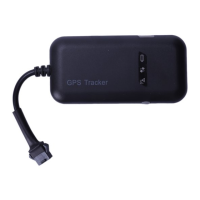
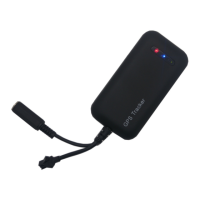
The GT02 is a GPS anti-theft alert system designed for real-time tracking and vehicle security. It integrates GPS, GSM, SMS, and GPRS technologies to provide comprehensive monitoring and alarm functionalities. The device is offered in several models, each with varying features to suit different user needs, ranging from basic tracking and vibration alarms to more advanced options including voice monitoring, engine control, and SOS emergency functions.
At its core, the GT02 provides real-time tracking, allowing users to monitor the location of their vehicle continuously. This is achieved through its GPS capabilities, which pinpoint the vehicle's geographical position. The GSM quad-band frequency ensures global use, making the device versatile across different regions.
A key aspect of the GT02 is its anti-theft capabilities, primarily driven by a built-in vibration sensor. This sensor enables smart anti-theft features, triggering alarms upon detecting unauthorized movement or tampering. The system also supports ACC ignition detection, which provides notifications about the vehicle's status, indicating whether the engine is on or off.
For enhanced security and control, certain GT02 models incorporate additional features. The "Enhanced Version" and "Multi-function Version" include the ability to remotely cut off engine power or oil supply. This function is particularly useful in theft scenarios, allowing the administrator to send a command via the live tracking monitoring system to disable the engine, preventing the vehicle from being restarted without authorization. To ensure safety, this engine cut-off command is only triggered when the vehicle is in a valid GPS signal status and its speed is under 20km/h or it is stationary. Once the theft alarm is dismissed, a restore engine command can be sent to reactivate the oil pump, allowing the vehicle to start again.
Voice monitoring is another advanced feature available in some models, such as the GT02-U and GT02-M. This allows an external microphone to be connected, enabling the administrator to listen in on the vehicle's surroundings. This can be particularly useful for verifying alarm events or for general surveillance. The GT02-M model further expands on this by including an SOS button, which, when pressed for three seconds in an emergency, triggers an SOS emergency help alarm. The terminal will then repeatedly call the bound cellphone number (up to three times if unanswered) and upload SOS alarm information to the live tracking monitoring system.
The device also supports various alarm methods, which can be configured via SMS commands. These include SMS alarms, phone call alarms, or a combination of both. Users can set up vibration alarms to be active when the vehicle is parked and still, or to be off when driving. Movement alarms are triggered when the vehicle is in a vibration alarm-on status and detects movement exceeding a specified speed threshold for a certain number of times.
Furthermore, some GT02 models feature a built-in back-up battery, which supports illegal main power cut-off alarms. If the terminal's main power supply is disconnected, it will automatically trigger a power cut-off alarm, sending an SMS to the bound cellphone and uploading the alarm information to the monitoring system.
The GT02 is designed for ease of use, with a focus on remote control and monitoring. Users interact with the device primarily through SMS commands for configuration and status inquiries, and through a live tracking monitoring platform for real-time visualization and control.
Installation: The installation process emphasizes hidden placement to prevent theft and damage. It is recommended to use ribbons or strong double-faced adhesive tape to fasten the terminal. Crucially, the GSM and GPS antennas' signal receiving side should face the sky, free from metal or other shielding materials that could block signals. The manual suggests installation locations such as within the front decorated board under the windshield, under the dashboard (avoiding metal covers), or within the back decorated board under the windshield. It warns against metal heat shield layers or heating layers, as these can reduce GPS signal strength and potentially cause function failure.
SIM Card Management: A correct SIM card is essential for the terminal's operation. Users must ensure the SIM card has sufficient credit and that GPRS services are enabled. The SIM card is inserted into a dedicated slot on the terminal's back, with a cover for protection. It is critical to power off the device before performing any SIM card operations.
Start-up/Shut-down: To start the device, the SIM card is inserted, and the back-up power supply is turned on. Shutting down involves disconnecting the power plug and removing the SIM card.
Parameter Settings via SMS: Many of the device's parameters can be configured by sending specific SMS commands from a bound cellphone number. These commands use upper-case letters and English punctuation.
Live Tracking Monitoring Platform: The GT02 system includes a web-based live tracking monitoring platform (e.g., http://www.gps588.com/). This platform provides a visual interface for real-time tracking, displaying vehicle locations on a map. It supports multiple languages, including English, Chinese, Spanish, French, Portuguese, German, Arabic, Vietnamese, Thai, and Russian. Users can log in with an account and password provided by their distributor to access the service platform and its advanced features.
The GT02's maintenance aspects primarily revolve around ensuring proper installation, signal reception, and power supply, along with basic troubleshooting steps.
Troubleshooting: The user manual provides a comprehensive troubleshooting guide to address common issues:
Warranty and Support: The device comes with a warranty card, which is essential for repair services. The warranty typically covers one year from the purchase date for product crashes due to manufacturing reasons. However, certain situations are not covered under warranty but may qualify for paid repair services, such as expired warranty periods, damages from unauthorized tampering, water damage, burnt PCBs due to improper acts, physical damage to the terminal's outer cover, screen, or antennas, unreadable IMEI numbers, discrepancies between warranty card content and the terminal, or damages caused by force majeure. Users are advised to keep the warranty card and original purchase receipt safe. Any future upgrades or changes to the product will be communicated to distributors. For detailed platform usage, users should request the "Service Platform User Manual" from their distributor.
 General
| Model | GT02 |
|---|---|
| Category | GPS Tracker |
| Network | GSM/GPRS |
| GSM Frequency | 850/900/1800/1900Mhz |
| GPS Sensitivity | -159dBm |
| GPS Accuracy | 5m |
| Geo-Fence | Yes |
| Display | No |
| Time To First Fix | Hot start: 1s |
| Battery | Li-ion battery |
| Charging Time | 3 hours |
| Compatibility | Android, iOS |
| Standby Time | 3 days |

 To Next Page