BlueWave 75 bulbs will typically vary less than 1% over eight hours of normal use and so daily or weekly
adjustments are adequate to maintain a tightly controlled process. A Change Bulb Indicator LED is provided
to alert the operator to check bulb operation or to change the bulb if required.
Setting the Cycle Duration
The Shutter Timer located on the front panel of the BlueWave 75 is factory set to the most common operating
mode and recommended operation of the Shutter Timer with the BlueWave 75. Some modes available on this
Shutter Timer may not operate correctly with the BlueWave 75 unit and have been disabled.
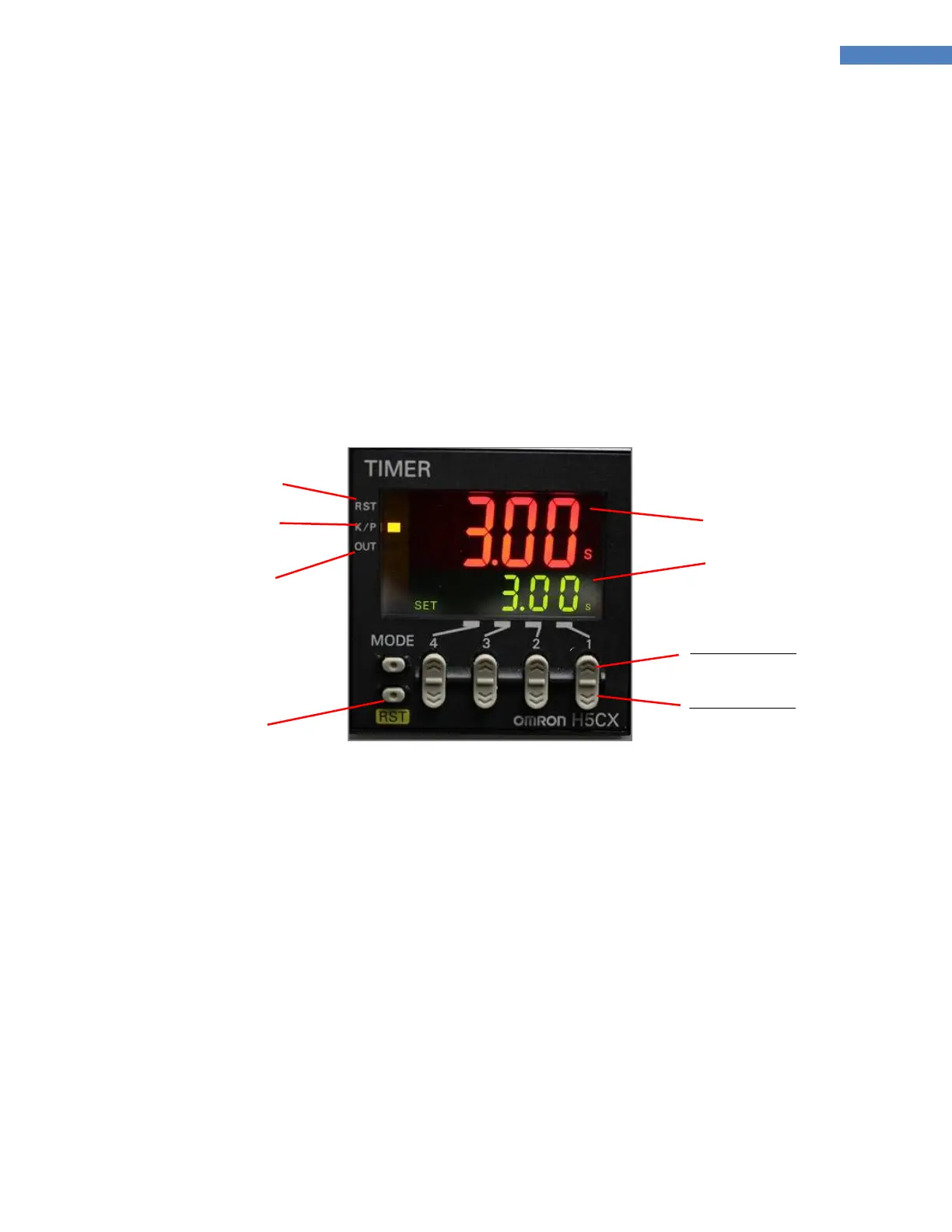
The Shutter Timer has an LCD Display and Keypad. The LCD Display has a Reset Indicator, Key Protect
Indicator, Output Indicator, Preset Value, Set Value, and Timing Operation Indicator. Below is a brief
description of each display and location.
Figure 9. Shutter Timer
■ RST [Reset Indicator] – This setting becomes active when the Shutter Timer is reset by pressing the
“RST” Button (Reset Button) on the lower left face of Shutter Timer.
■ K/P [Key Protect] – This setting is always lit as the function of the Shutter Timer is programmed at the
factory and locked before shipment.
■ OUT [Output Indicator] – This setting is displayed when the relay is switched on and is not displayed
when the relay is switched to off.
■ RST [Reset] Button – This button is located in the lower left corner of the Shutter Timer. Pressing this
button will reset the Shutter Timer.
■ Timing Value – This is a four-digit segmented display in the center of the Shutter Timer. It shows the
current status of time.
■ Set Value – This is a four-digit segmented display in lower right corner of the Shutter Timer. It shows the
set length of time.
In addition to the indicators, the Shutter Timer contains six buttons with their functions described as follows:



 To Next Page