ASSEMBLY INSTRUCTIONS
9
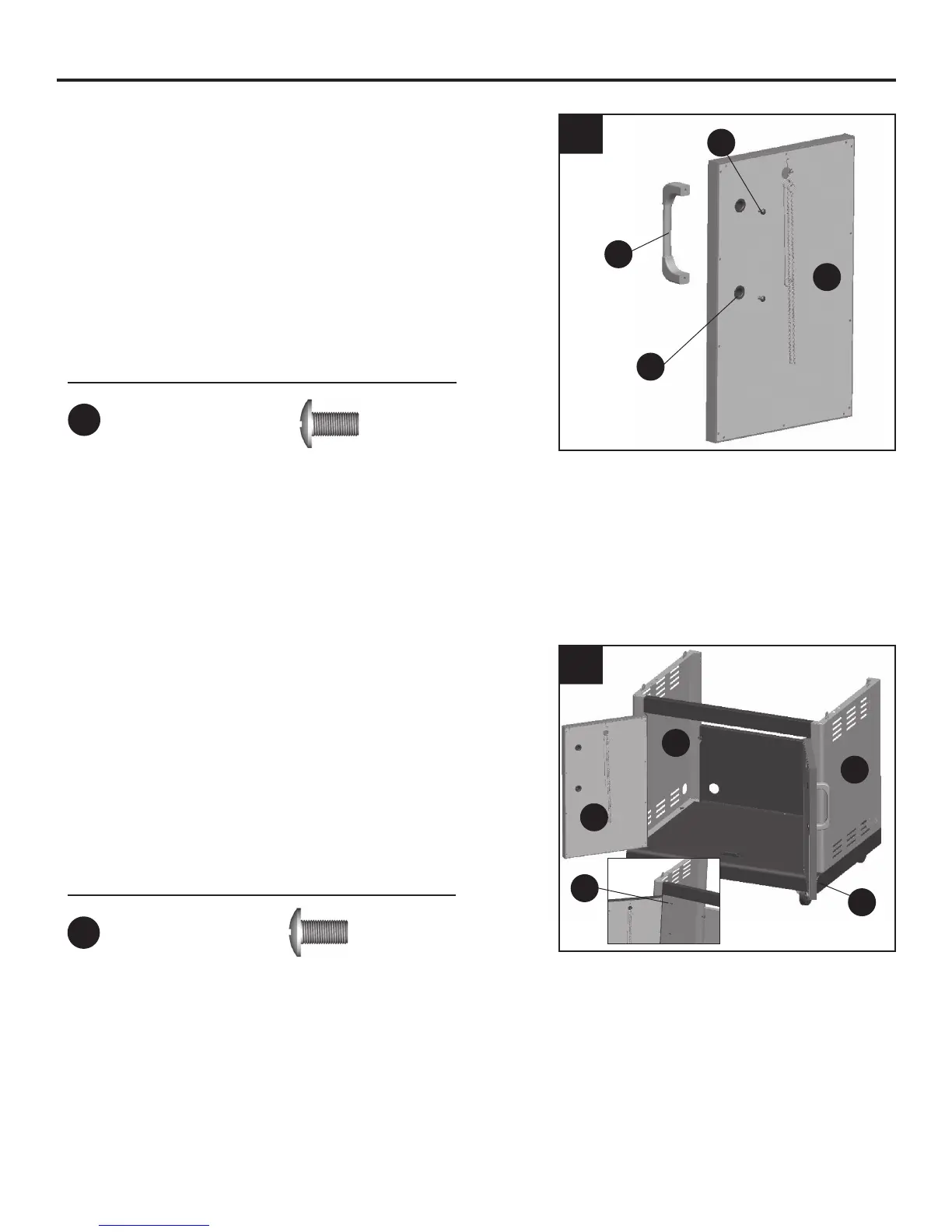
5. Remove 2 preassembled M4x10 screws (GG)
from the door handles (J). Insert 2 door handle
sleeves (K) into the holes located on the back
of the left door assembly (H). Insert the 2
screws into the door handle sleeves (K) and
into the threaded holes in the door handle (J).
Tighten the screws.
Repeat with right door assembly (I).
6. Attach the left door assembly (H) to the cart
body by aligning the holes in the hinge of the
left door assembly (H) with the holes in the
cart left side panel (D), inserting 4 M4x10
screws (DD) and tightening.
Repeat with right door assembly (I).
6
5
Hardware Used
GG
x 4
H
GG
K
J
Hardware Used
DD
x 8
M4 x 10 Screw
H
DD
D
E
I
M4 x 10 Screw
(preassembled)














 To Next Page