Setting Limits
DYNACO USA, INC, 5 The Leader in Door Safety & Design
2.1 Setting/Adjusting Limits after Initial Power Up
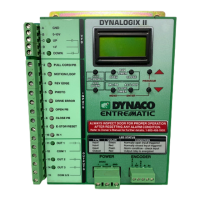
Figure 2.0-5: JOG UP/RESET Button
JOG
UP/RESET
JOG
DOWN
OPEN CLOSE
MC/PB AC/LOOP
PROGRAM
CLOSE
TIMERS
RUN
TIMERS
MENU
ENTER
Press the
JOG UP/RESET
button to bring
door up
12. Press and release the ENTER button to save limit setting. Display will
change to: PhtLimit_Set—OK.
13. Press and release either red arrow buttons to scroll to the OpnLimit.
14. Press and release ENTER button. Display will change to:
JogToOpn_Enter.
15. Use the JOG UP/RESET button to bring door up desired open position
(roughly a inch and a half above the reintroduction point).
16. Press and release ENTER button to save limit setting. Display will change
to: OpnLimit_Set--OK
17. Press and release the MENU button twice. Display will change to: Ready.
See figure: 2.0-6.
MESSAGE DISPLAY / COUNTER
JogToPht
Enter
Figure 2.0-6: Menu Button
JOG
UP/RESET
JOG
DOWN
OPEN CLOSE
MC/PB AC/LOOP
PROGRAM
CLOSE
TIMERS
RUN
TIMERS
MENU
ENTER
Press and
release the
MENU button
twice to exit
program
mode
MESSAGE DISPLAY / COUNTER
Ready
###
STOP
For first time users it is recommended not to use section 2.1. Please go back to
section 2.0 and go through the step by step procedure.


 To Next Page
 Loading...