Setting Limits
DYNACO USA, INC, 6 The Leader in Door Safety & Design
9. Press and release the MENU button twice and the display changes to Ready.
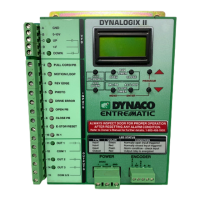
1. Press and hold both PROGRAM buttons until display changes to: Password
After display changes release buttons.
2. Press and release the up red arrow buttons to scroll to 562.
3. Press the ENTER button. Display will change to Limit Set.
4. Press and release the ENTER button to enter limit menu. Display will
change to: ClsLimit.
5. Press the red arrow buttons to scroll through the menu to PasLimits.
6. Press the ENTER button. Display will change to: JogToPas_Enter
7. Press the JOG DOWN or JOG UP button to bring the door down/UP to
desired second height position.
8. Press the ENTER button to save limit setting. Display will change to:
PasLimit_Set—OK.
2. Press and release either red arrow buttons to scroll to 562.
3. Press the ENTER button. Display will change to: Limit Set.
4. Press and release the ENTER button to enter limit menu. Display should
change to: ClsLimit.
5. Press and release either red arrow buttons to scroll to the limit desired to
set or adjust. (Choices: ClsLimit, OpnLimit, PhtLimit and PasLimit)
6. Press the ENTER button. Display will change to:
JogTo(limitchosen)_Enter.
7. Press the JOG DOWN or JOG UP/RESET button to bring the door down or
up to desired limit position.
8. Press the ENTER button to save desired limit. Display should change to:
(chosen limit)_Set--OK.
9. Press and release the red arrow buttons to scroll to another limit or exit by
pressing and releasing the MENU button twice. Display will change to
Ready.
Note: Password number will be stored for 4 minute after entering it in. Entering
program mode at this time will not require reentering of password number.
Note: Password number will be stored for 4 minute after entering it in. Entering
program mode at this time will not require reentering of password number.
2.2 Optional Dual Height Limit
If door was not purchased with the dual height option ignore this section
STOP
1. Press and hold both PROGRAM buttons until display changes to Password.
After display changes, release buttons.


 To Next Page
 Loading...