10
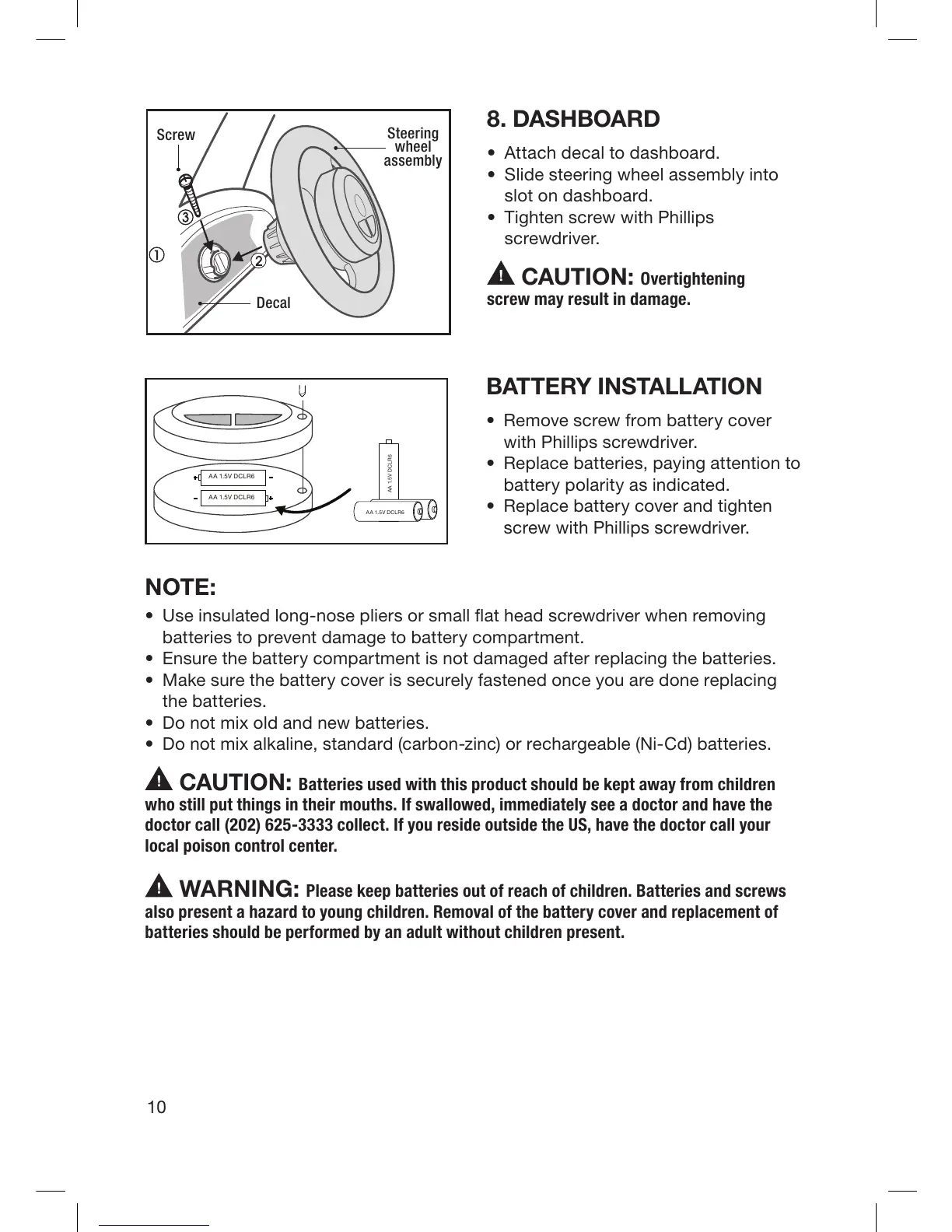
8. DASHBOARD
• Attach decal to dashboard.
• Slide steering wheel assembly into
slot on dashboard.
• Tighten screw with Phillips
screwdriver.
CAUTION: Overtightening
screw may result in damage.
BATTERY INSTALLATION
• Remove screw from battery cover
with Phillips screwdriver.
• Replace batteries, paying attention to
battery polarity as indicated.
• Replace battery cover and tighten
screw with Phillips screwdriver.
AA 1.5V DCLR6
AA 1.5V DCLR6
AA 1.5V DCLR6
AA 1.5V DCLR6
NOTE:
• Use insulated long-nose pliers or small flat head screwdriver when removing
batteries to prevent damage to battery compartment.
• Ensure the battery compartment is not damaged after replacing the batteries.
• Make sure the battery cover is securely fastened once you are done replacing
the batteries.
• Do not mix old and new batteries.
• Do not mix alkaline, standard (carbon-zinc) or rechargeable (Ni-Cd) batteries.
CAUTION: Batteries used with this product should be kept away from children
who still put things in their mouths. If swallowed, immediately see a doctor and have the
doctor call (202) 625-3333 collect. If you reside outside the US, have the doctor call your
local poison control center.
WARNING: Please keep batteries out of reach of children. Batteries and screws
also present a hazard to young children. Removal of the battery cover and replacement of
batteries should be performed by an adult without children present.
Screw
Steering
wheel
assembly
Decal



 To Next Page