t
Confirm the meter is properly connected to the SST-2000A/H.
t
Use a frequency generator (e.g. F-16) to apply full-scale frequency
to terminal 5 (HI) & 6 (COM) on the SST-2000A/H. Maximum
signal input is 50 Vrms for a standard unit.
t
Adjust the METER CALIBRATE potentiometer on the
SST-2000A/H for the appropriate full-scale reading on each
DPM-105.
t
Use a DPM-105 data sheet, if necessary, to calibrate the
DPM-105 meters.
Connecting more than one DPM-105
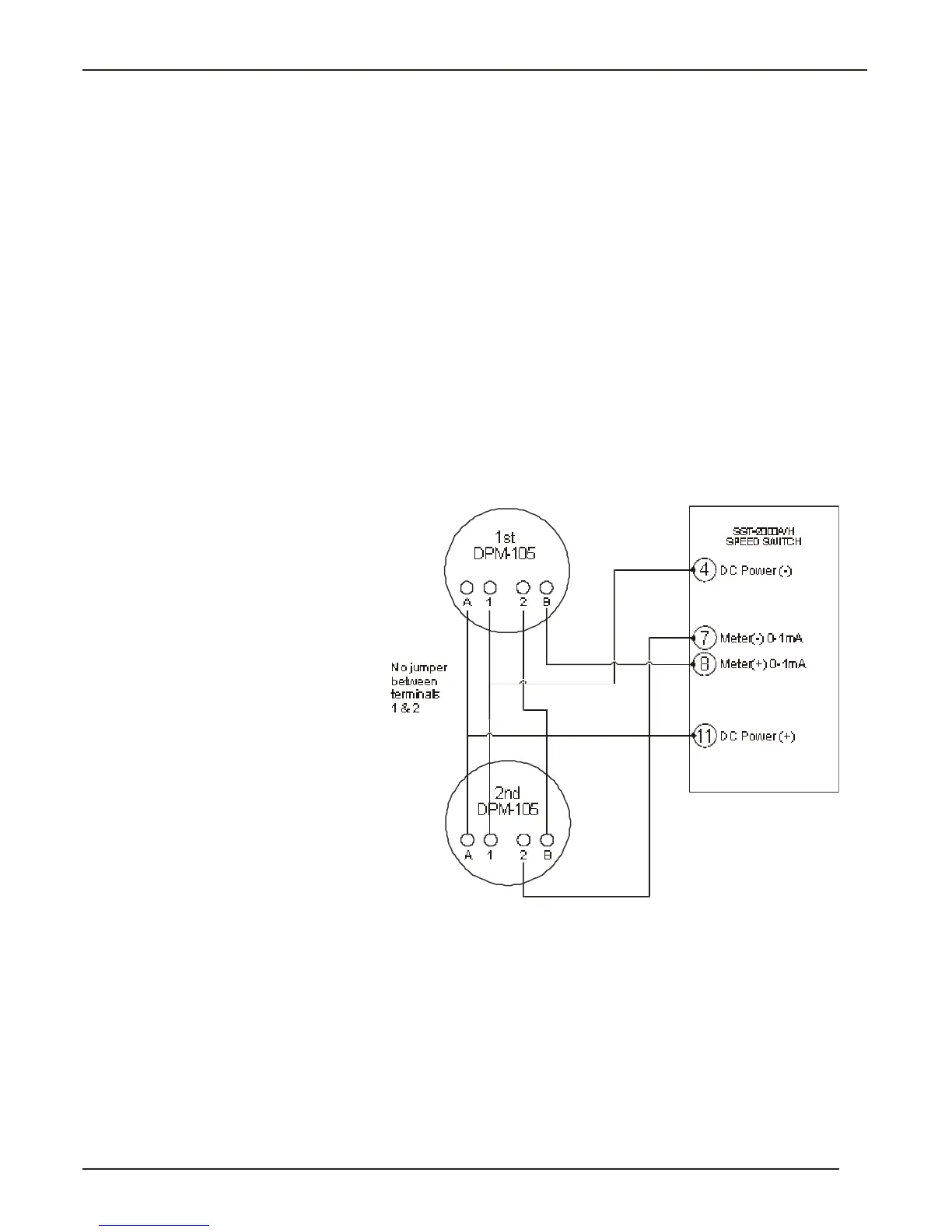
1 Remove the jumper across terminals 1 and 2 on each DPM-105.
2 Connect the meters as shown in Fig. 3-4.
3 Calibrate the SST-2000A/H.
t
Confirm the meter is properly connected to the SST-2000A/H.
t
Apply full-scale frequency to terminal5 (HI) & 6 (COM) on the
SST-2000A/H. Maximum signal input is 50 Vrms for a standard
unit.
t
Adjust the ME TER CAL I BRATE po ten ti om e ter on the
SST-2000A/H for the ap pro pri ate full -scale read ing on each
DPM-105.
t
Use a DPM-105 data sheet, if necessary, to calibrate the
DPM-105 meters.
15
Powering External Devices
Fig. 3-4 Connecting
more than one DPM-105
to the SST-2000A/H.


 To Next Page