- 7 –
Note: All measurements shown on Dynamic Mounting are approximate. The measurements could vary depending on how the mount
is setup, manufacturing tolerances, and the weight of the television.
Attaching the television to the Down And Out Mount
After the above steps are finished you are ready to put the television on the mount.
1. Adjust the counterbalance to the approximate force to handle the weight of your television. See the Adjusting the Counterbalance
section for more details. If in doubt, error to the counterbalance supplying too much force. You can easily adjust force later.
2. Make sure that the Top Tilt Adjustment Bolt is loose and ensure the Top Tilt Cam is free to move, it should come loose out of the
box. See the Setting the Tilt section for more details.
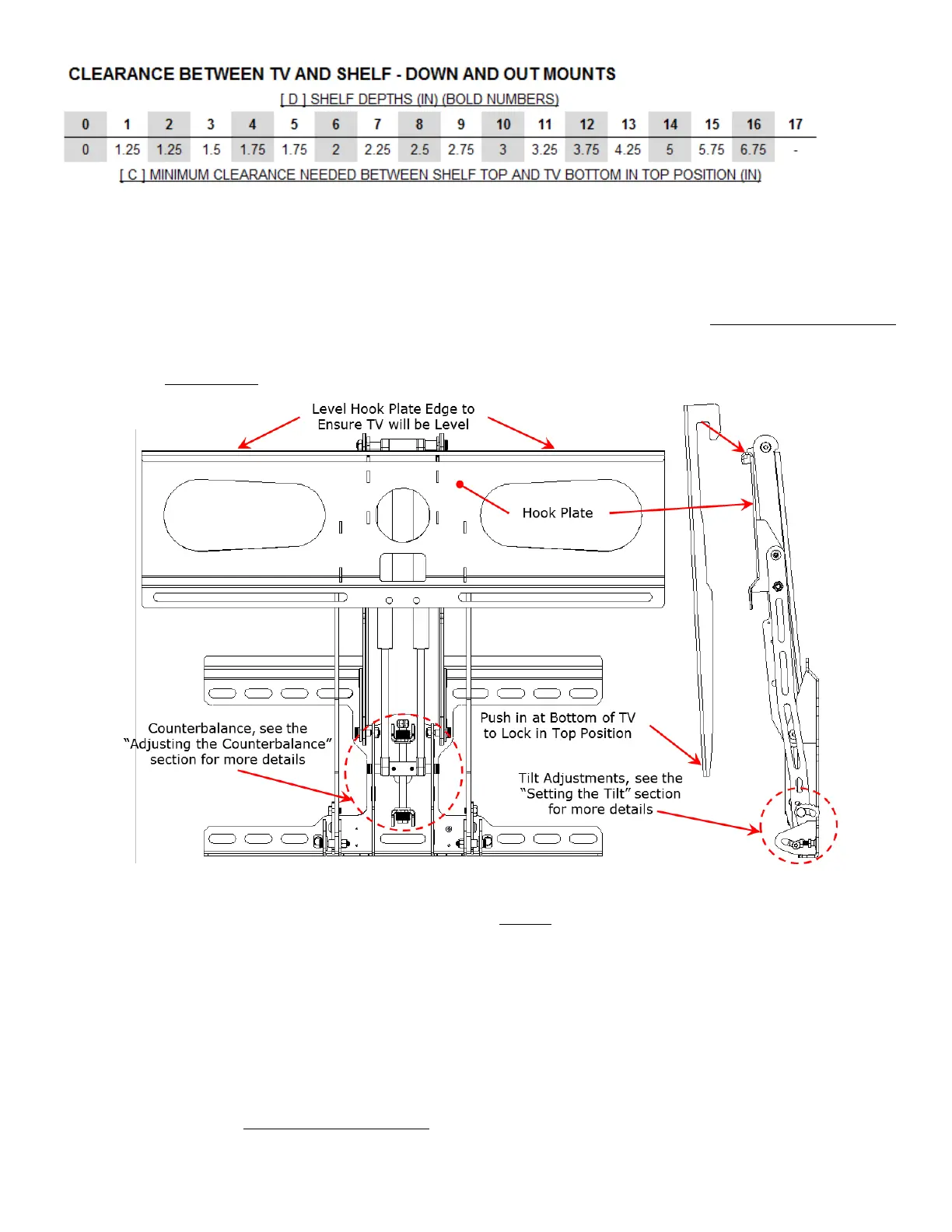
Figure 7 Attaching the Television
3. After the tilt and counterbalance are set, you are ready to put the TV on the mount. You may need a friend to help for heavier
TV’s. Hook the TV Attach Arms over the Hook Plate as shown in Figure 7.
4. As you are hooking the Attach Arms over the Hook Plate, push in on the bottom of the TV to ensure that it locks in the top
position.
5. If the mount doesn’t lock in the top position, the weight of the TV will cause the mount to come down until the counterbalance
takes the load or the mount runs out of travel, while this is happening simply guide the TV down until it stops. Do NOT let go of
the TV until it stops on its own.
6. Before positioning the television side to side, insert the 2 #10 x 7/8 inch long machine screws with washer through the Hook Plate
and into the Attach Arms finger tight to ensure the television will not fall off. Adjust the television to where you want it. Tighten
the screws down with a screwdriver.
7. Adjust the counterbalance so that the television can be moved around as easily as possible but still be able to stay in the desired
bottom position. See the Adjusting the Counterbalance section for more details.


 To Next Page
 Loading...
