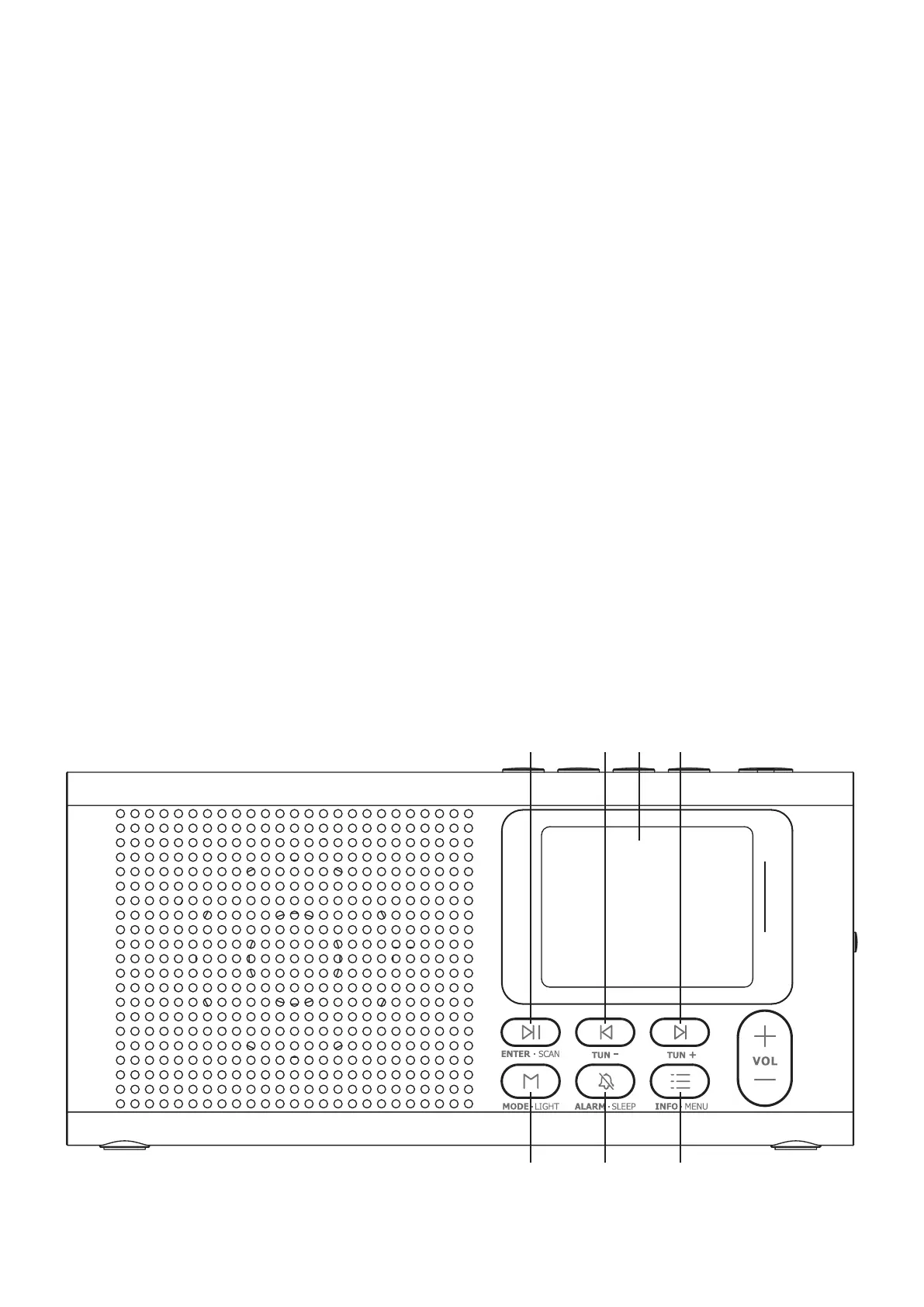
CONTROLS AND CONNECTIONS
1. ENTER/SCAN button 2. [Tune-] button 3. TFT-Display
4. [Tune+] button 5. MODE/LIGHT button 6. ALARM/Sleep button
7. INFO/MENU button 8. Volume button 9. Antenna
10.
Preset station buttons
11. PRESET button 12. Earphone jack 3.5 mm
13. On/Off switch 14. Power supply LED 15.
USB-C Input for power supply
safety guidelines and the guidelines for low-voltage devices).
Dynavox is constantly working on improving and developing its products. Therefore,
changes to the design and technical design of the device are reserved, as long as they
serve the purpose of progress. The content of this manual is for informational purpo-
ses only. It is subject to change without notice and does not constitute an obligation
on the part of the trademark owner. The latter assumes no responsibility or liability
for errors or inaccuracies, which may be contained in this manual.
Dynavox is a registered trademark of Sintron Distribution GmbH, 76473 Iffezheim,
Germany.
This document is a product of Sintron Distribution GmbH, 76473 Iffezheim and may not
be copied or distributed in whole or in part without explicit and written permission.
4
8
1 32 4
7
65


 To Next Page