INTRODUCTION TO THE ICONS ON METER INTERFACE
FUNCTION OF BUTTON
ELECTRIC INSTRUCTION
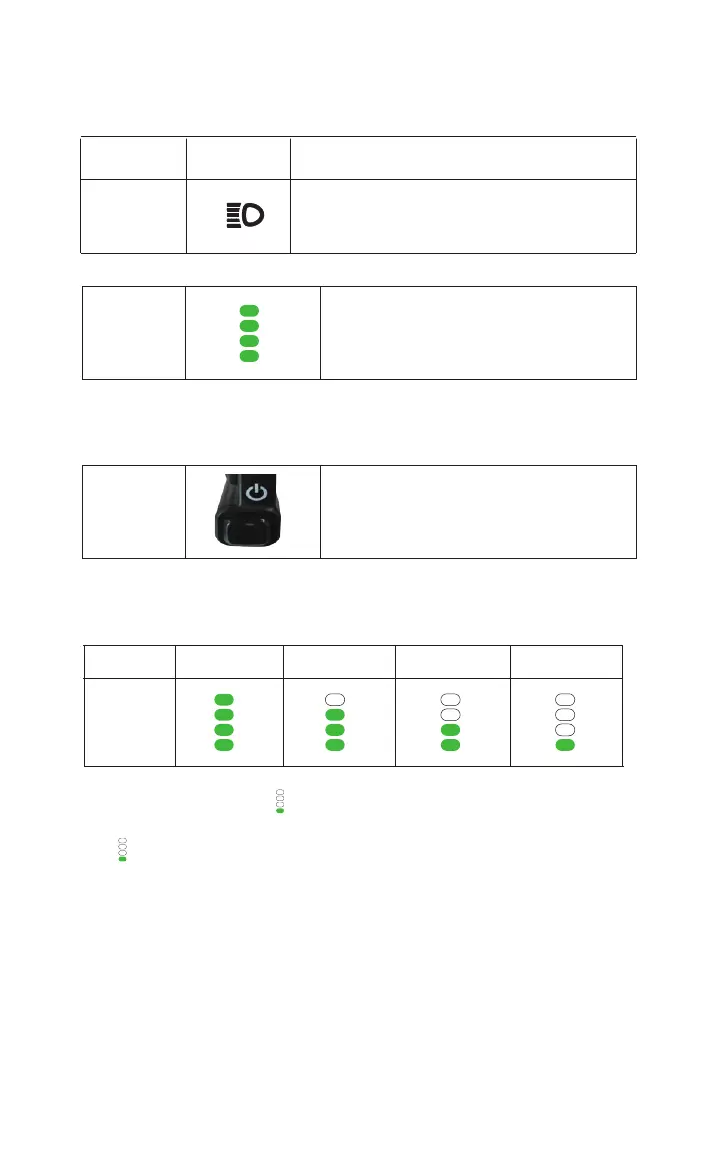
When the battery power less -than 1% “ ”,the power meter will monitor if the power lobat is less than low-voltage
protection standard.After the power meter has detected that power lobat is lower than low-voltage protection standard,the
icon “ ” will keep flashing,which warns a battery low-voltage.
Definition of
Display Icon
Front Light
Power button
Display Icon Display
Push the front light button forward to turn on
the front light, push it backward to turn off the front light.
Click to turn on/display battery, then click to turn off
100% 55%~75% 25%~50% ﹤25%
Power
Percentage
Display
Current Power
It displays power range.


 To Next Page