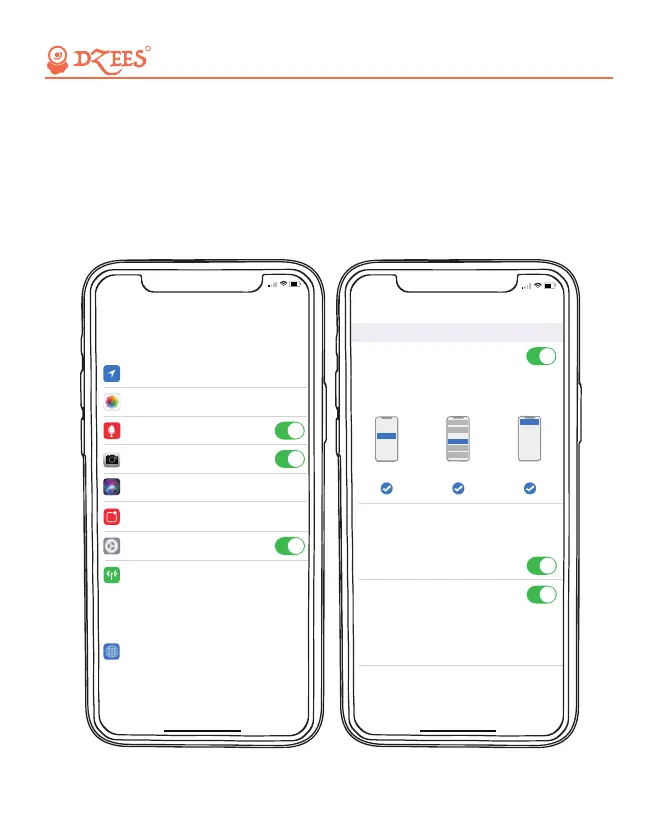
1. Allow 'Dzees Home' App to access mobile cellular data and wireless
LAN, or it will fail to add camera.
2. Allow 'Dzees Home' App to receive pop-up messages, otherwise the
smart phone will not receive notification when motion is detected.
5. Add Camera to App
5:44
<
Settings
Dzees Home
ALLOW Dzees Home TO ACCESS
PREFERRED LANGUAGE
Always
Location
>
English
Language
>
Microphone
Camera
Siri & Search
Notifications
Background App Refresh
Banners,Sounds,Badges
Wireless Data
WLAN & Cellular
Read and Write
Photos
>
>
>
>
5:43
>
>
<
Notifications
Dzees Home
ALERTS
Allow Notifications
9:41
Lock Screen
Banner Style
Sounds
Badges
OPTIONS
When Unlocked(Default)
Show Previews
Temporary
>
>
Automatic
Notification Grouping
>
Notification Center Banners
All about Your Smart Security
R
05


 To Next Page