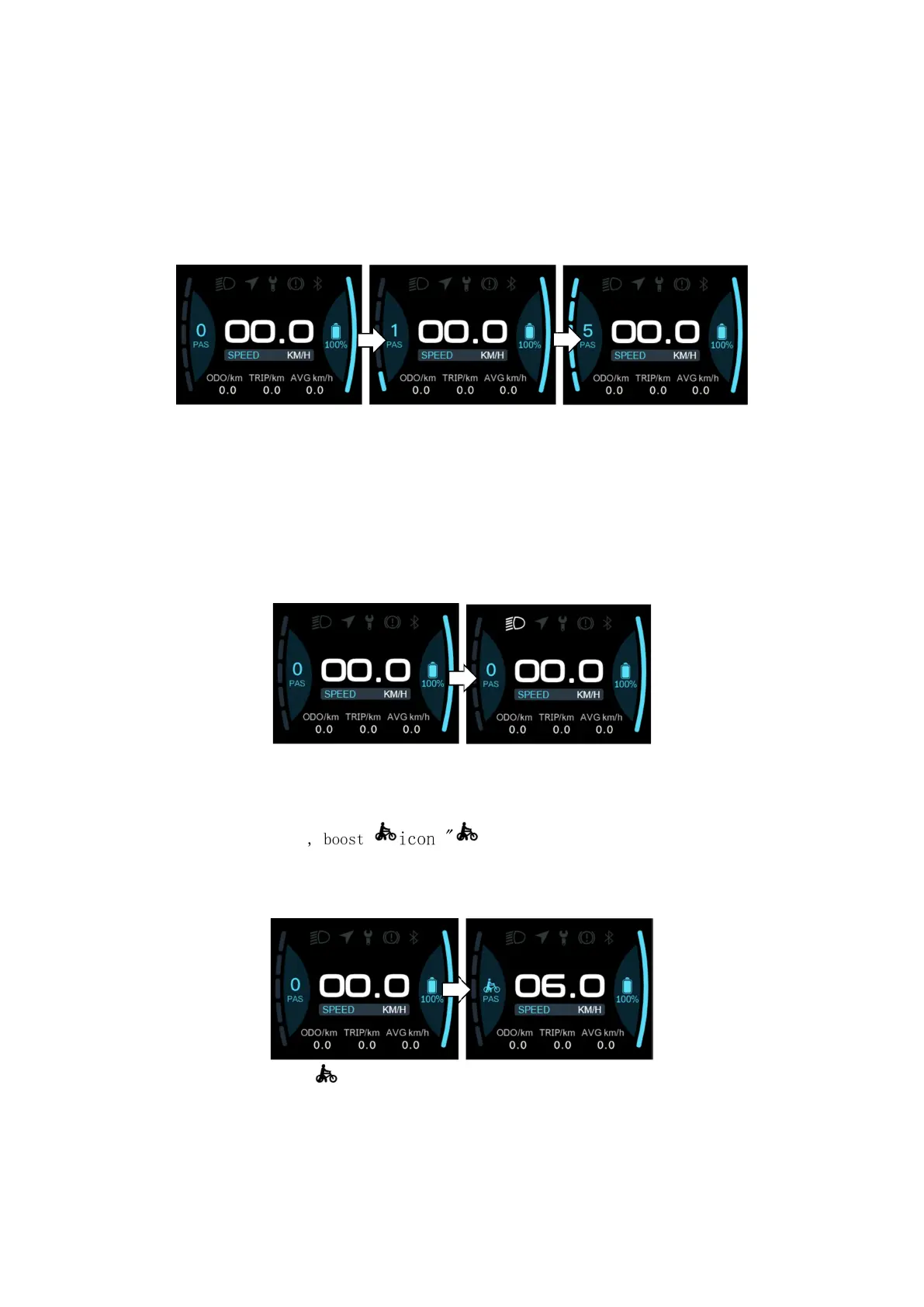
After entering the main display, click "+" or "-" to increase or
decrease the gear level and change the motor output power, the
default gear of the instrument is 0-5 (support customization); No
power output in 0 gears, 1 is the lowest power, and 5 is the highest
power. When the monitor is powered on, the default setting is Gear 0.
The gear level selection screen is shown in the following figure:
③ Headlight/backlight switch
Turn on the light: Press and hold "+" when the light is off, the
headlight indicator lights up, and the brightness of the display
dims.
Turn off the lights: When the light is on, press and hold the "+"
key, the headlight indicator becomes dimmed, and the display
brightness becomes brighter.
The headlight switch interface is shown in the figure below:
④ Boost mode
In any gear, long press "-" to enter boost mode, the speed is 6km/h,
when entering boost mode, the icon "" is in dynamic, release the button"
- "exit boost mode " disappears, and the speed
returns to zero.
The interface is shown in the following figure:
In boost mode, the indicator is displayed dynamically. When
the speed is lower than 6km/h, release the "-" to exit the boost
state. If there is no operation within 5 seconds under static, it
will automatically jump to 0 gear.
7/20


 To Next Page