more clicks of trim per channel), return the transmitter trim to zero and adjust the linkages mechanically so that the
control surfaces are in the flight trimmed position.
Settings for Control Horns
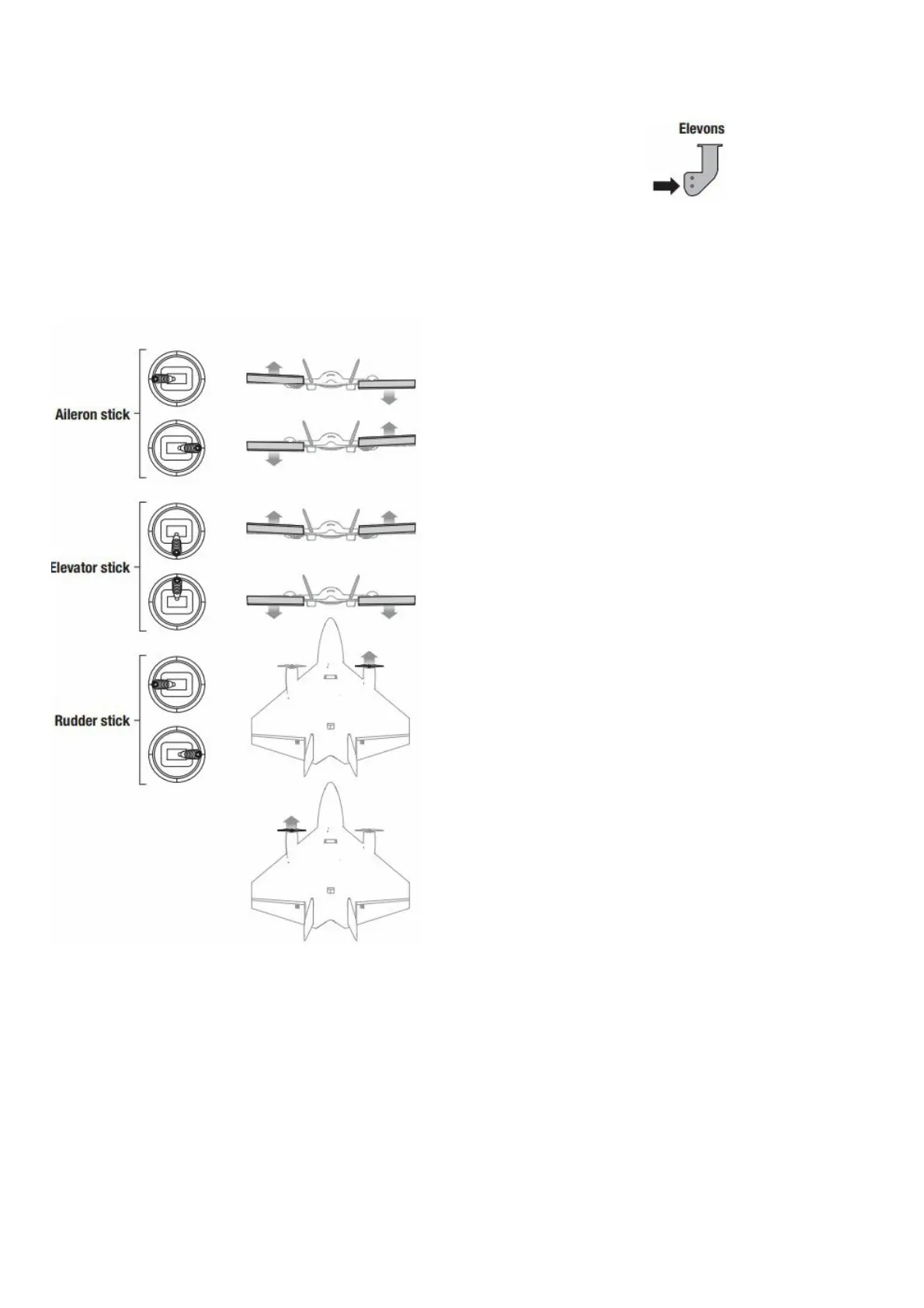
The following illustration shows the factory settings for linkages on the control horns. After the initial
flights, adjust the linkage positions for the desired control response.
Control Direction Test
Properly bind your aircraft and transmitter before doing these tests. Verify the linkages
move freely. Switch ON the transmitter and connect the battery.
Use the transmitter to operate the aileron and elevator controls. View the aircraft from the rear when checking the
control directions.
Ailerons
1. Move the aileron stick to the left. The right elevon should move down and the left elevon up, which will cause the
aircraft to bank left in flight.
2. Move the aileron stick to the right. The right elevon should move up and the left elevon down, which will cause the
aircraft to bank right in flight.
Elevators
3. Pull the elevator stick back. The elevons should move up, which will cause the aircraft to pitch up in flight.
4. Push the elevator stick forward. The elevons should move down, which will cause the aircraft to pitch down in
flight.
Rudder/ Differential Thrust
5. Move the rudder stick to the left. The right motor will accelerate, which will cause the aircraft to yaw left in flight.



 To Next Page