6. Move the rudder stick to the right. The left motor will accelerate, which will cause the aircraft to yaw right in flight.
Tip: The motors will not accelerate with rudder input when the throttle is in the OFF position.
SMART Technology Telemetry
This aircraft includes Spektrum SMART Technology in the receiver, which can provide telemetry information like
battery voltage. To take advantage of SMART Technology, you will need a compatible transmitter. A firmware update
for your transmitter may be required.
To View SMART Telemetry:
1. Begin with the transmitter bound to the receiver
2. Power on the transmitter.
3. Power on the aircraft.
4. The SMART Logo appears under the battery logo on the home page. A signal bar appears in the top left corner of
the screen.
5. Scroll past the servo monitor to view SMART technology screens.
For more information about compatible transmitters, firmware updates, and how to use the SMART Technology on
your transmitter, visit www.SpektrumRC.com.
SAFE® Technology
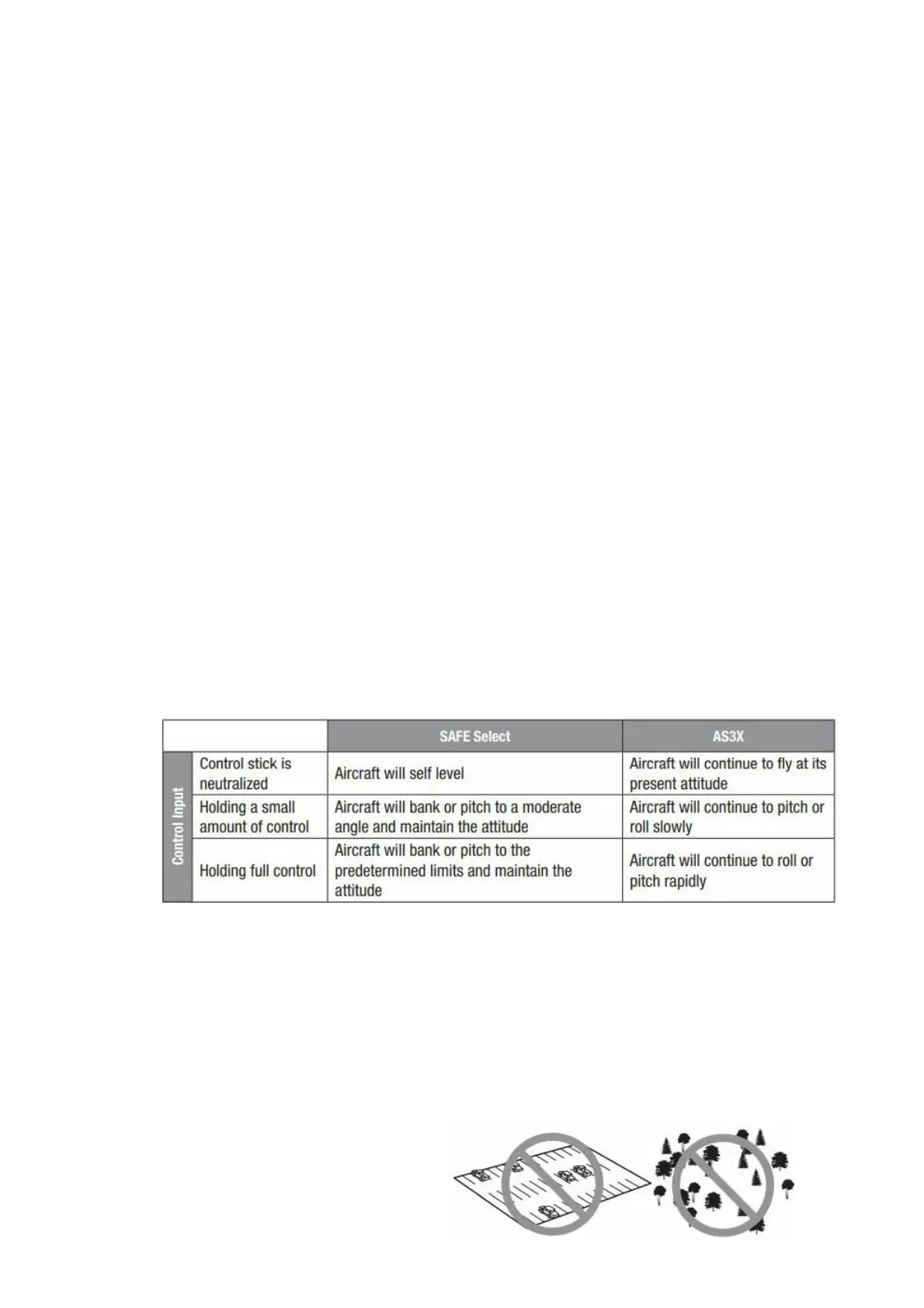
The Ultrix has two flight modes on Channel 5, SAFE and AS3X. When flying in SAFE mode, the aircraft will return to
level flight any time the aileron and elevator controls are neutral. Applying aileron or elevator control will cause the
airplane to the bank, climb, or dive. The amount the stick is moved will determine the attitude the airplane flies.
Holding full control will push the aircraft to the predetermined bank and pitch limits, but it will not go past those
angles. When flying in SAFE mode, it is normal to hold the control stick deflected with moderate aileron input when
flying through a turn. To fly smoothly with SAFE, avoid making frequent control changes and don’t attempt to correct
for minor deviations. Holding deliberate control inputs will command the aircraft to fly at a specific angle, and the
model will make all corrections to maintain that flight attitude. Return the elevator and aileron controls to neutral
before switching from SAFE mode to AS3X mode. If you do not neutralize controls when switching into AS3X mode,
the control inputs used for SAFE mode will be excessive for AS3X mode and the aircraft will react immediately.
Differences between SAFE and AS3X modes
This section is generally accurate but does not take into account flight speed, battery charge status, and other
limiting factors.
Flying Tips and Repairs
WARNING: If your transmitter supports it, always engage throttle cut before approaching the aircraft.
Range Check your Radio System After final assembly, range check the radio system with the aircraft. Refer to your
specific transmitter instruction manual for range test information.
Flying We recommend flying your aircraft outside in no greater than moderate winds or inside in a large gymnasium.
Always avoid flying near houses, trees, wires and buildings. You should also be careful to avoid flying in areas where
there are many people, such as busy parks, schoolyards



 To Next Page