“Start”
position
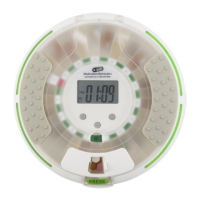
Begin Loading Here
Counter-Clockwise
Loading Direction
Noon (2) will
be your “first”
dose loaded
Night (4) will
be your “first”
dose loaded
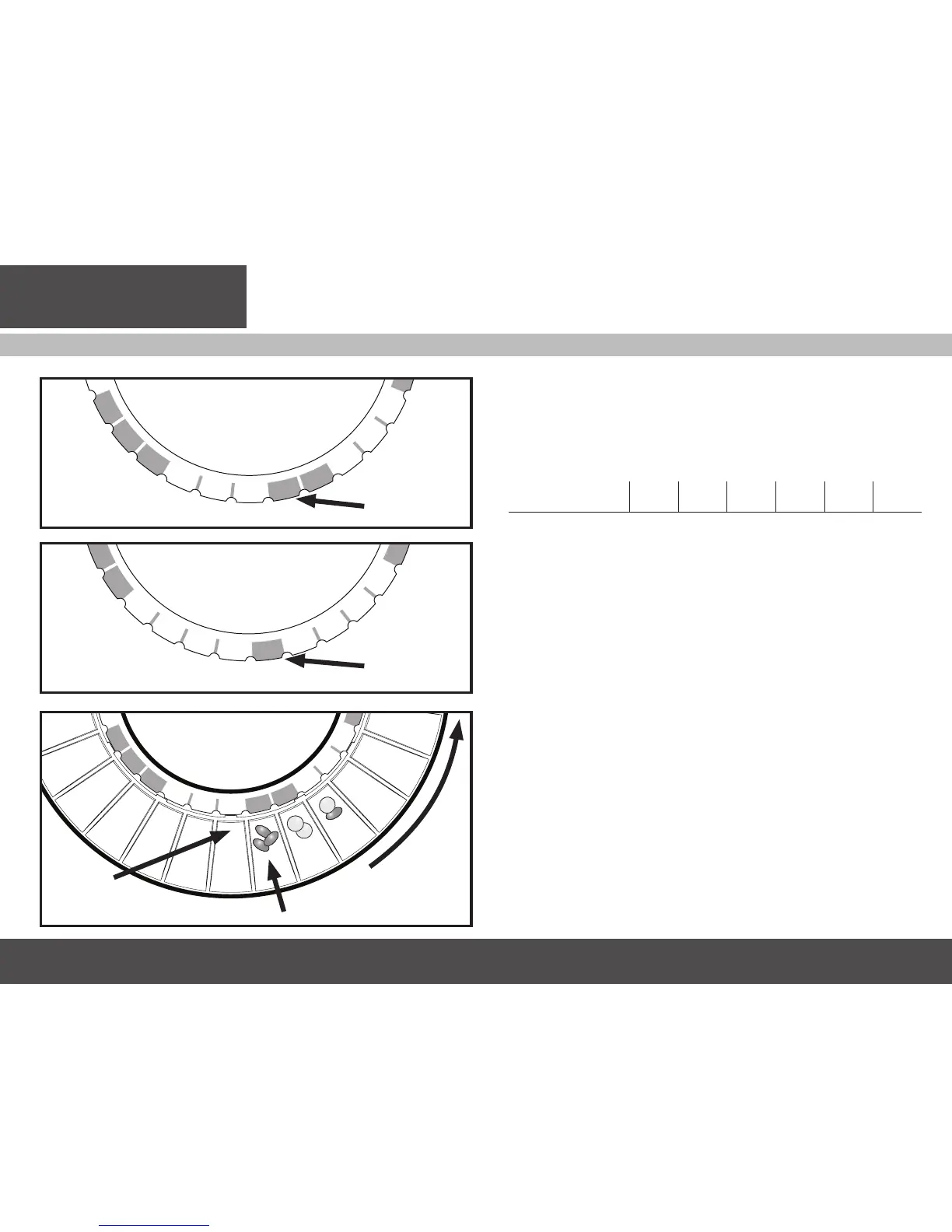
Example 1: Doses Per Day = 3
Current Time = 11am
Next Scheduled Dose/
Alarm = 12pm
3 times a day Loading
Guide Disk started
before the Noon
dose.
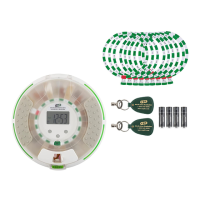
Example 2: Doses Per Day = 4
Current Time = 8pm
Next Scheduled Dose/
Alarm = 9pm
Getting Started
Loading Medications
MedSmart comes with Loading Guide Discs to help you with filling
the tray.
■ Select disk(s) corresponding to the number of Reminder/Alarms
per Day determined on the Medication Planning Chart.
Reminder/Alarms Per
Day
1 2 3 4 5* 6*
Color Yellow Red Blue Green Purple Orange
# of Disks 1 1 2 2 1* 1*
■ Based on when you load the tray (prior to Morn(1), Noon(2)
Eve(3) or Night(4) etc.), select the disk with the “Start” prior to the
correct next Reminder/Alarm number.
Example 1: (Illustration A) If you take 3 medication doses per day, and the next
scheduled dose is at noon, then use the disk shown.
Example 2: (Illustration B) If you take 4 medication doses per day, and the next
scheduled dose is that night, the last dose that day, then use the disk shown.
■ Seat the chosen disk onto the tray and begin loading medications
into the first cell to the right of Start using the Medication
Planning Chart as reference.
■ Moving counter-clockwise (to the right), load your pills into each
of the appropriate cells (Illustration C).
* The 5 and 6 times a day guide disk are included on the front and back of
one disk and can be filled in with a nonpermanent marker or pencil to
accommodate your own dosing schedule.
IMPORTANT: NEVER LOAD PILLS INTO THE START POSITION.
Illustration A
Illustration B
Illustration C


 To Next Page