Need help?
Do you have a question about the E-Seek M500 and is the answer not in the manual?
Describes the key capabilities of the ID card authentication system.
Lists the necessary item required for the device to function.
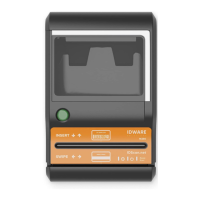
Illustrates the major modules and components of the M500 device.
Details the technical specifications including processor, memory, and interfaces.
Lists specific technical features like image capture, decoding, and connectivity.
Outlines the items included in the M500 package.
Explains the function and connection of the provided USB interface cable.
Details the purpose and usage of the calibration card for white balance.
Describes the cleaning card for maintaining the device's rollers and heads.
Explains how to upgrade firmware using the demo application.
Details the procedure to upgrade firmware by restarting the scanner.
Describes how developers can upgrade firmware via their application.
Provides a table explaining the status indicated by the M500's LEDs.
Explains the function of the button used to eject a jammed card.
Details the seven small panes displaying scanned card images under different lighting.
Describes the functions of the toolbar buttons and status indicators in the GUI.
Explains the different scan modes available in the application, like RGB-IR-UV and RGB.
Explains how to access the dialog box showing version information.
Describes the status bar elements indicating card orientation and data availability.
Explains error handling, including firmware mismatch dialogs and error events.
Describes the main form and its interface with the M500 C# API.
Details the GUI code module, separated for simplification.
Contains subroutines responsible for updating the GUI.
Manages the floating magnifier window, not essential for M500 interface.
Supports resizing bitmap windows as the main window changes size.
Displays version information for the application, API, DLL, and firmware.
Lists and describes the functions available in the C# API for M500 interaction.
Details the data structures used by the C# API for images and barcode data.
Explains the main purpose of the white calibration card for color balance.
Details the process of cleaning the M500 mirrors using air and a divider.
Provides dimensional drawings of the M500 device.
 General
| Type | Magnetic Stripe Card Reader |
|---|---|
| Interface | USB |
| Track Support | Tracks 1, 2, and 3 |
| Power Source | USB powered |
| Compatibility | Windows, macOS, Linux |
| Read Capability | Magnetic Stripe |
| Dimensions | 3.94 x 1.30 x 1.18 inches (100 x 33 x 30 mm) |

 To Next Page