

EasyManua.ls Logo

Eachine LCD5802D - User Manual

Eachine LCD5802D
4 pages
Print Icon
To Next Page IconTo Next Page
Loading...
LCD 5802D
User's manual
Feature:
With DVR, you can record videos anytime and anywhere;
Low power consumption;
Double module receive, make the signal more stable;
●Auto-Searching, support a key search frequency;
7 Inch 800*480 dot high brightness LCD screen;
Built-in super sensitiveness 5.8GHz 40ch receiver, especially with RaceBand;
Built-in 7.4V/2000mAh high-capacity Li-ion polymer Battery;
Universal DC12V 3.5 charging interface;
Real-time video return, Very low time-delay;
The menu supports 8 languages;
Support external audio/video signal input;
Supports audio/video signal output;
Thank you for your choose and buy the products of this company.
Question and Answer IconNeed help?

Do you have a question about the Eachine LCD5802D and is the answer not in the manual?

Summary

Product Features Overview

Technical Specifications

Device Description and Operation

Menu Navigation Instructions

Guidance on navigating the device's menu system using specific button presses.

Playback Control Instructions

Instructions for controlling video playback functions within the DVR mode.

Physical Dimensions

Safety Precautions

Overview

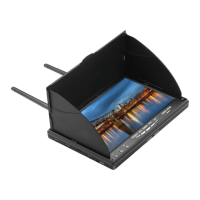
The LCD 5802D is a 5.8G FPV display with an integrated DVR, designed for real-time video return with very low time-delay. It offers a comprehensive set of features for both casual and enthusiast users, including recording capabilities, a high-brightness display, and robust signal reception.

Function Description:

The primary function of the LCD 5802D is to provide a real-time video display for FPV (First Person View) applications, coupled with the ability to record video footage directly. It features a dual-module receiver for enhanced signal stability and an auto-searching function to easily find frequencies. The integrated DVR allows users to record videos anytime and anywhere, making it a versatile tool for capturing aerial footage or other FPV-related activities. The device supports external audio/video signal input and provides audio/video signal output, expanding its connectivity options.

Important Technical Specifications:

  • Display: 7-inch LCD screen with a resolution of 800x480 dots.
  • Aspect Ratio: 16:9.
  • View Angle: 6 o'clock.
  • Brightness: 300 cd/m² with a high-brightness backlight.
  • Video Delay: Less than 20ms.
  • Antenna: 2 x RP-SMA male.
  • Receiver: Built-in super sensitiveness 5.8GHz 40-channel receiver, including RaceBand.
  • DVR:
    • Recording Sizes: VGA / D1 / HD (selectable).
    • Recording Sound: ON / OFF (selectable).
    • Recording Time: OFF / 3min / 5min / 10min (selectable).
    • Frame Rate: 30 Frames.
    • Compression Format: MJPEG.
    • Record File Format: AVI.
    • Card Slot: TF-Card, supporting up to 32GB (C10 recommended).
    • Note: Cannot record video input from the AV port.
  • Battery: Built-in 7.4V/2000mAh high-capacity Li-ion polymer battery.
    • Working Time (DVR ON): Approximately 4 hours per full charge.
    • Working Time (DVR OFF): Approximately 3 hours per full charge.
  • Power Consumption:
    • Normal Mode: 400mA at 7.4V.
    • Record Mode: 620mA at 7.4V.
    • Maximum Charge Current: 800mA.
  • Charging Interface: Universal DC12V 3.5 charging interface.
  • Power Adapter: DC12V/2A (DC3.5 interface).
  • Dimensions: 180mm x 120mm x 50mm (Sunshield height: 28mm).
  • Weight: 430g (not including antennas).
  • Frequency Table (MHz):
    • Band A: 5865, 5845, 5825, 5805, 5785, 5765, 5745, 5725
    • Band B: 5733, 5752, 5771, 5790, 5809, 5828, 5847, 5866
    • Band E: 5705, 5685, 5665, 5645, 5885, 5905, 5925, 5945
    • Band F: 5740, 5760, 5780, 5800, 5820, 5840, 5860, 5880
    • Band R: 5658, 5695, 5732, 5769, 5806, 5843, 5880, 5917
  • Languages: English, German, French, Spanish, Italian, Chinese, Russian, Japanese.

Usage Features:

The device is designed for intuitive operation with a set of five keys and clear indicators.
  • Key 1 (MENU/POWER): Short press for MENU mode; Long press (over 2 seconds) for Power ON/OFF. In MENU mode, it scrolls the options bar. In DVR mode, it returns/quits playback.
  • Key 2 (SEARCH): Short press for Auto-Searching. In MENU mode, it performs auto-searching. In DVR mode, it deletes the current file.
  • Key 3 (REC): Short press to start or stop recording. In DVR mode, it plays/pauses.
  • Key 4 (BAND+): Short press to change bands (A-B-E-F-R circularly). In MENU mode, it acts as Enter/Value +. In DVR mode, it forwards video/fast forwards.
  • Key 5 (CH+): Short press to change channels (1-2-3-4-5-6-7-8 circularly). In MENU mode, it acts as Enter/Value -. In DVR mode, it rewinds video/fast rewinds.
  • AV OUT: Outputs video and audio signals when in RF receiving mode.
  • AV IN: Audio and video can be input when in AV mode.
  • RF Module Work Indicator (A/B): Indicates the active RF module.
  • Charging Indicator: Red light when charging, green light when fully charged.
  • Menu Instructions: Access the menu by short pressing Key 1. Navigate options with Key 1, auto-search with Key 2, and adjust values/enter with Keys 4 and 5.
  • Playback Instructions: From the menu, select "Replay" to enter DVR mode. Use Key 1 to exit, Key 2 to delete, Key 3 to play/pause, Key 4 for forward/fast forward, and Key 5 for backward/fast rewind.

Maintenance Features:

  • Charging: Use a standard DC3.5 charger; charging voltage must be DC12V. The charging indicator provides clear status (red for charging, green for full).
  • Reset: A dedicated RESET button is available for power reset.
  • Storage: The device supports TF-Cards up to 32GB (C10 recommended) for DVR functionality.
  • Environmental Considerations: Avoid wet or humid environments to ensure longevity and proper functioning.
  • Safety: Read the entire instruction manual before operation. The device is recommended for users over 14 years old, as near-eye displays can affect eye development in younger children. It is not a toy.
  • Operational Limitations: Audio output and video input cannot operate simultaneously. The DVR cannot record video from the AV input port.

Eachine LCD5802D Specifications

General IconGeneral
BrandEachine
ModelLCD5802D
CategoryMonitor
LanguageEnglish