support@hobbyeagle.com 11
If you don’t want to change anything, just wait for timeout without any operation.
1. Again make sure that there are no mixing functions active on your transmitter. Have a look at the radio’s servo
monitor and verify that each stick controls only one output channel ;
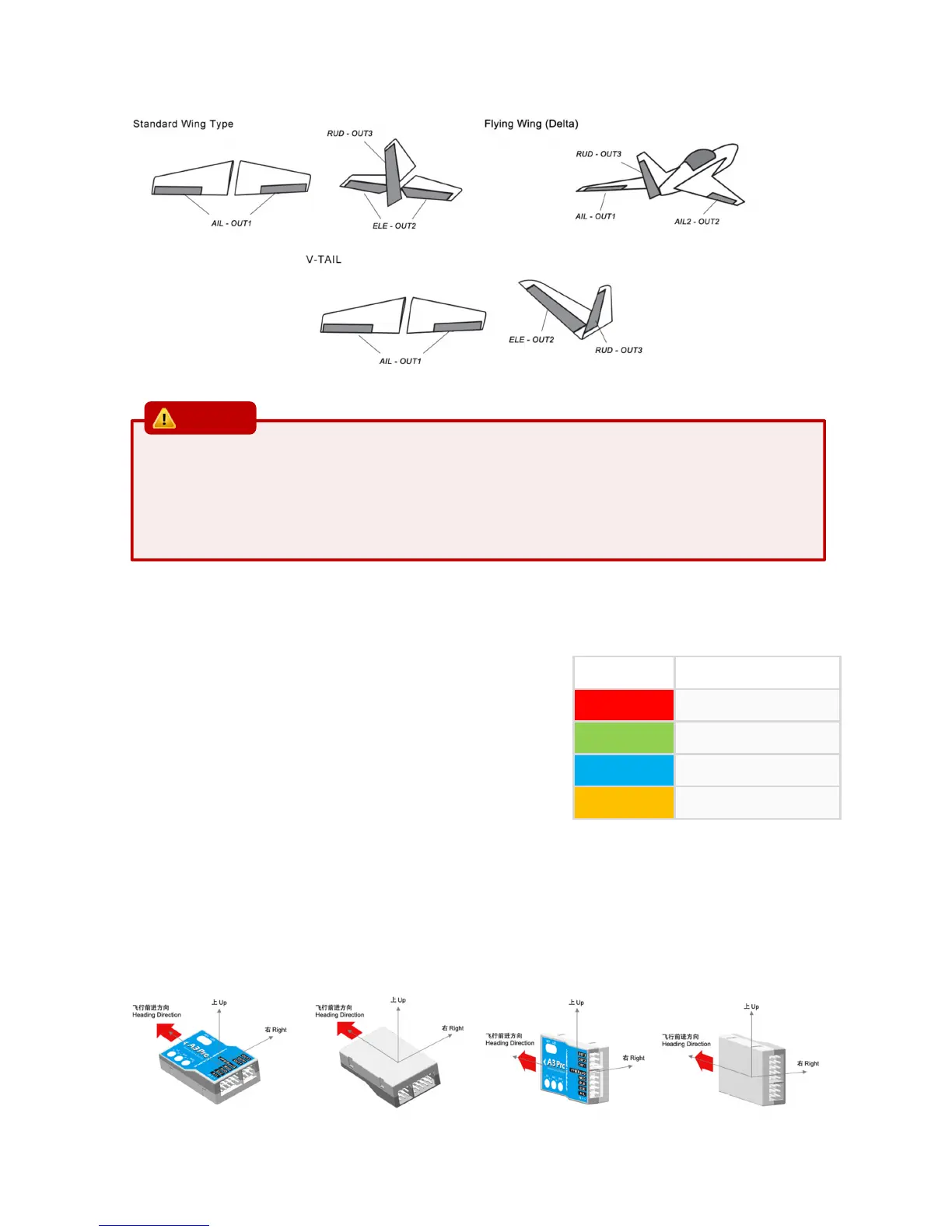
2. If two aileron servos are being used, please connect a Y-extended lead to [OUT1];
3. Most flying-wings have no rudder, in this case, [RUD] is unnecessary to connect.
8.2. MOUNT ORIENTATION
A3 Pro can be mounted flat or upright, and even upside down, however, you
have to ensure the arrow on the sticker always point to the heading direction.
After entering in this function, the color of LED shows you the orientation
currently selected. The default setting is Flat (Red), each short press of the
button will switch to the next type. After you finish making your selection,
just wait for 5 seconds until LED starts blink quickly which indicates that the
modified is saved and then you will be brought back to the Setup Menu level
automatically.
If you don’t want to change anything, just wait for timeout without any operation.
The setting here should be the same as the mounting orientation of your unit installed in the airplane, otherwise the gyro will
not work normally.
Flat Flat Inverted Upright Upright Inverted
LED Color Description
Solid Red
Flat (default)
Solid Green
Flat Inverted
Solid Blue
Upright
Solid Yellow
Upright Inverted



 To Next Page