support@hobbyeagle.com 17
11.FACTORY RESET
Enter Factory Reset Mode
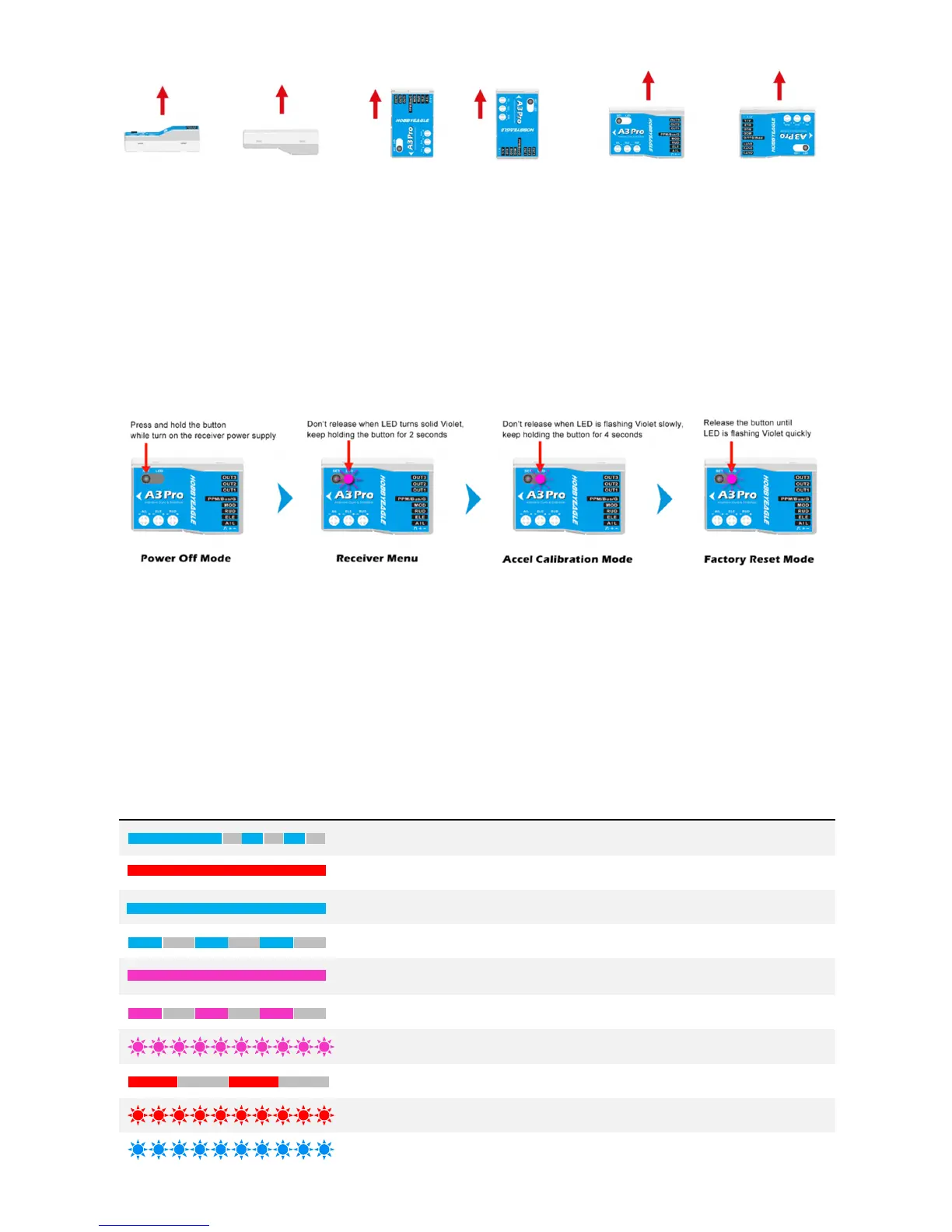
To reset the A3 Pro to factory settings, press and hold the button while turn on the receiver power supply, release it when
LED starts flash Violet quickly. (FYA: You should need to hold the button for at least 8 seconds until the LED quickly blinks
Violet to get into the reset program)
How to reset?
After entering the reset mode, the LED will blink in different colors. Press and hold the button for 2 seconds until LED
flashes Violet once slowly to confirm the reset. After reset is done, the gyro will start the initialization normally. If you don’t
want to reset, just remove the battery when LED is blinking in different colors.
12.LED DESCRIPTIONS
Blue, Flashing Power-on initialization and self-test
Solid Red Gyro-Off Mode
Solid Blue Normal Mode
Blue, Flashing Atti-Lock Mode
Solid Violet Trainer Mode
Violet, Flashing Auto-Level Mode
Violet, Fast Flashing Auto-Hover Mode
Red, Slow Flashing TX signal lost. Check the connection to the receiver
Red, Fast Flashing Gyroscope sensor error
Blue, Fast Flashing Calibrating or testing



 To Next Page