17
Go to Table of Contents
Pairing the Headset and Transmitter
NOTE: Your STEALTH 520 Headset ships from the factory already paired for communication with
your Wireless Transmitter. In normal operation, it should not be necessary for you to pair the two
again. You should only need to perform pairing yourself in the event that wireless communication
fails. First check that the headset is powered on and is within range. If the Connection Status LED
on the Wireless Transmitter is still pulsing, the Wireless Transmitter can’t communicate with
the Headset. Perform the following pairing procedure.
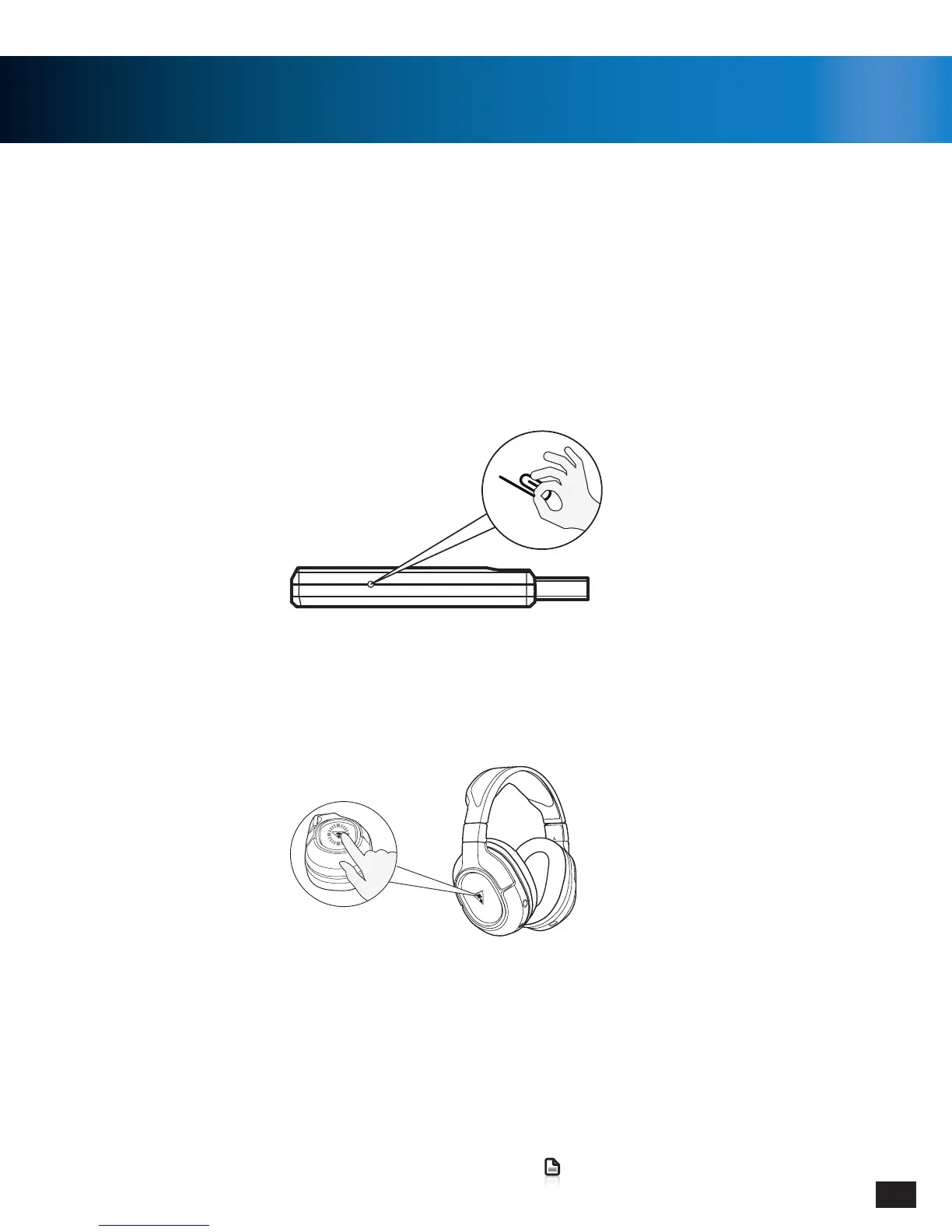
3. Within 10 seconds, the Transmitter and Headset’s LEDs will remain on solid, indicating that pairing has
been successful.
2.PressandholdthePowerButtonontheHeadsetuntiltheHeadset’sPowerLEDashesrapidly(5seconds),
then release.
1. Start this process with the headset powered OFF. Press and hold the Pairing Button on the Transmitter until
theTransmitter’sPairingLEDashesrapidly(1-2seconds),thenrelease.(Useapapercliporsomething
similar to press the Pinhole button)



 To Next Page