Need help?
Do you have a question about the Ear Force P12 and is the answer not in the manual?
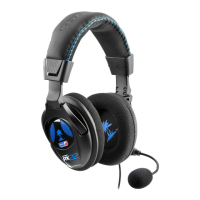
The main headset unit included in the package.
The inline control unit with features for audio adjustment.
A branding sticker provided with the product.
High-quality digital game and chat audio experience.
High-sensitivity microphone for clear communication.
Easy connection via a single USB cable for game and chat audio.
Use with mobile devices for calls, video, and music.
Hear your voice in the headset to avoid shouting.
50mm speakers, breathable ear cushions for comfort.
Variable Bass Boost control for enhanced bass.
Master volume, Bass Boost, and mic mute controls.
Use for games, streaming, music, and mobile calls.
Adjustable, high-sensitivity, omni-directional microphone.
Removable, over-ear, noise-isolating earpads.
Articulating earcups with 50mm drivers.
Adjustable headband for a perfect fit.
3.5mm plug for multi-platform compatibility.
Master volume, Bass Boost, and mic mute controls with status LED.
Connect the 3.5mm headset plug to the inline amplifier.
Connect the inline amplifier's USB plug to the PS4's USB port.
Configure output to headphones and select "All Audio".
Set headphone volume to maximum.
Adjust microphone level using on-screen instructions.
Connect the headset plug to the mobile device's headset jack.
Device is automatically detected as primary audio/mic.
50mm Diameter Drivers with Neodymium Magnets.
20 Hz - 20kHz range.
Flexible Omni-Directional design.
3.5mm 4-Pole headset input and USB-A, 3.5mm 4-Pole amplifier interface.
6.5oz (186g).
Solutions for volume, connection, and PS4 settings problems.
Solutions for muted mic and incorrect PS4 settings.
Warning about permanent hearing damage from high volumes.
Guidelines for safe volume adjustment and usage.
Statements regarding Class B digital device interference limits.
Radio interference regulations for Canadian apparatus.
Declarations for EMC, safety, and environmental directives.
Compliance with EU EMC, Safety, Emissions, and Immunity standards.
Instructions for responsible disposal of electronic waste.
VCCI-B statement for Class B digital device in Japan.
Statement for Class B broadcasting communication equipment in Korea.
Details on obtaining RMA, shipping, and VTB's support.
Conditions under which warranty is void or limited.
Information on replacement parts and limited warranties.
Conditions like commercial use, tampering, or unauthorized service.
 General
| Type | Over-ear |
|---|---|
| Driver Size | 40 mm |
| Frequency Response | 20 Hz - 20 kHz |
| Impedance | 32 Ohms |
| Microphone | Yes |
| Connection Type | 3.5 mm |
| Platform | PC, PS3, Xbox 360 |

 To Next Page