Need help?
Do you have a question about the EARDATEK KINGSAT KM-V6 and is the answer not in the manual?
Provides a brief overview of the KINGSAT KM-V3/V4/V6/V7 digital satellite antenna system for vessels.
Details the key features, including signal reception, tracking, and design aspects of the antenna system.
Lists standard components and necessary tools required before starting the installation.
Provides guidelines for optimal antenna placement, ensuring a clear horizon and avoiding obstructions.
Covers confirming antenna size, mounting position, cable connection, and the physical mounting process.
Details ACU dimensions, site selection criteria, and methods for mounting the Antenna Control Unit.
Introduces the section that explains how to set up and operate the Satellite TV System using the ACU.
Guides on using ACU soft keys and navigating modes like Start Up, Sleep, and Satellite Selection.
Lists common error codes (E01-E08) with their potential causes and recommended solutions for troubleshooting.
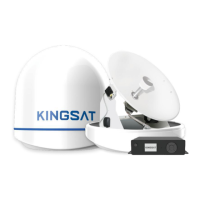
The KINGSAT KM-V3/V4/V6/V7 is a series of digital satellite TV antenna systems designed for maritime use, enabling automatic search, tracking, and capture of satellite signals from Digital Video Broadcasting (DVB) compatible satellites. These systems are manufactured by EARDATEK.
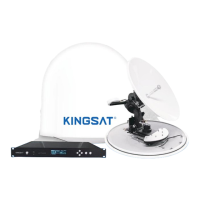
The KINGSAT KM-V3/V4/V6/V7 antenna system provides stable satellite TV reception on various types of vessels. It automatically tracks and locks onto satellite signals, ensuring continuous entertainment even in challenging marine environments. The system includes an Antenna Unit (AU) and an Antenna Control Unit (ACU) for managing operations and settings.
Antenna Unit (AU):
Antenna Control Unit (ACU):
Cables:
LNB Types (for reference):
Strong Signal Receiving Performance: Utilizes self-made LNB and RF processing components to ensure optimal reception quality and maximum antenna performance.
Fast Satellite Search and Position: Features an integrated GPS antenna that automatically updates GPS data for accurate positioning and quicker satellite locking.
Excellent Anti-Heavy Sea Tracking Ability: Incorporates a proprietary algorithm, advanced mechanical design, embedded GPS, and a high-sensitive gyro to maintain continuous connectivity and enable worldwide deployment, even in heavy seas.
Expendable Worldwide Satellite Library: The ACU comes pre-installed with a worldwide satellite database, which can be easily revised or expanded manually by the user.
Easy-to-install Aesthetic Design: Designed for simple installation and setup, featuring an aesthetic maritime white finish and environment-resistant properties, which helps reduce labor and maintenance costs.
Multi-Receivers Solution: Supports multiple receivers by integrating a suitable Multi Switch (not supplied) between the antenna and the receivers. The system can connect up to four RF outputs (RF1, RF2, RF3, RF4) to the Multi Switch.
ACU DiSEqC 1.0 Function (Additional Version): Allows the ACU to support DiSEqC 1.0 protocol, enabling easy switching between 1-4 satellites from a receiver's DiSEqC 1.0 command. This requires the ACU satellite list to be matched with the receiver's DiSEqC 1.0 port configuration.
Normal Mode Operations:
Setup Mode Operations:
Monitor/Diagnost Mode:
Cable Protection: All cables must be properly clamped and protected from physical damage, heat, and humidity. Excessive bending of cables should be avoided. Watertight grommets or swan neck tubes should be used where cables pass through exposed bulkheads or deck heads.
Antenna Mounting: The mounting platform must be firm and free from excessive vibration. The antenna should be installed with a clear, all-around view of the horizon and no obstacles within 1 degree above it. It should also be placed far from radar systems (minimum 1.2m/4ft clearance from radar beam).
Connector Care: When connecting RF cables, users should be careful not to overtighten and damage the connectors. Connectors should not touch the mounting surface of the antenna to prevent critical malfunctions and damage.
Error Code and Solutions: The system provides error codes (E01-E08) to assist in troubleshooting:
Preparation for Transportation: Specific procedures must be followed to secure the antenna internally to prevent damage during transport:


 To Next Page
 General