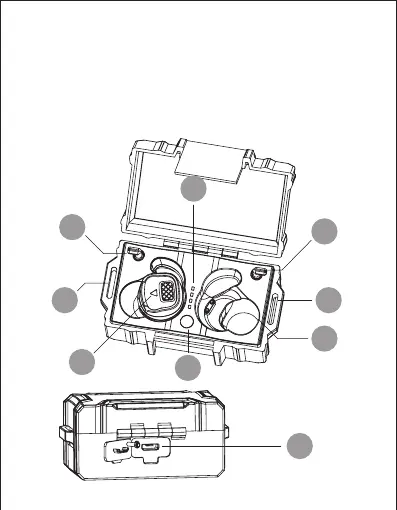
CHARGING CASE
2.Status button
1.Retention cord storage posts
3.Earpieces charging receptacle
4.Indicator light 7. Indicator light for earbuds (red light is charging
status; red and blue light flashing alternately is
power-on status)
6.Type-C USB charging port
5.Hanging holes
* The storage posts both sides of the charging box can be rotated 360°,
and the Retention cord can be stored on the posts when not in use .
* Hanging holes on both sides of the case allow the charging case to be attached to the MOLLE webbing
* Charge before the first use, please tear off the insulating film on the charging slot of the earbuds, and then put the earbuds into
the charging box for charging about 2 hours.
1
1
2
3
55
7
4
6



 To Next Page