EasyManua.ls Logo

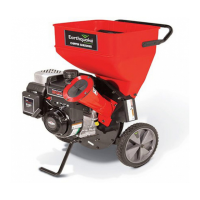
EarthQuake 9060300 - User Manual

Default Icon
40 pages
Print Icon
To Next Page IconTo Next Page
Loading...
Operator’s Manual
Original Operating Instructions
Chipper/Shredders
P/N: 14306
ECN: 9496
REV2: 01/03/13
© 2013 Ardisam, Inc.
All Rights Reserved
Get parts online at
www.getearthquake.com
GAS/OIL
RATIO
50:1
Model No. Description
14267 212cc Viper Earthquake Chipper / Shredder
14268 212cc Viper Earthquake Chipper / Shredder (CE)
9060300 8.50 Torque Rated Briggs Earthquake Chipper / Shredder
9060140 8.25 Torque Rated Briggs Earthquake Chipper / Shredder (CE)
9070300 11.50 Torque Rated Briggs Earthquake Chipper / Shredder
9010400 14.50 Torque Rated Briggs Earthquake Chipper / Shredder
12547 14.50 Torque Rated Briggs Earthquake Chipper / Shredder (CE)
1692327 Tow Bar Kit
1692210 Vacuum Kit
Includes:

Questions and Answers

  • K
    Kendra CampbellAug 8, 2025
    What to do if the vacuum is not working on EarthQuake 9060300?
    • J
      Jason SmithAug 8, 2025
      If the EarthQuake Chipper's vacuum isn't working, consider these potential causes: * **Hopper lid not in place:** Install the lid. * **Material too wet:** Allow the material to dry. * **Hose not attached properly:** Attach the hose per the instructions (see the Hose Kit). * **Hose obstructed or damaged:** Clear any blockage or replace the hose. * **Engine not running at full RPM:** Set the throttle control to FAST.
  • H
    haynesthomasAug 14, 2025
    What to do if EarthQuake Chipper runs but no material is discharged?
    • A
      alexiswalshAug 14, 2025
      If the EarthQuake Chipper engine runs, but no material is discharged, check the following: * **Discharge chute clogged:** Clean out any debris. * **Engine not running at full speed:** Set the throttle control to FAST.
  • A
    amandaallenAug 19, 2025
    Why EarthQuake Chipper engine exhaust is black?
    • E
      Emily BrownAug 19, 2025
      Black exhaust from your EarthQuake Chipper engine can result from: * **Dirty air filter:** Replace the air filter (refer to the engine manual). * **Choke closed:** Open the choke.
  • J
    Joan StevensonAug 26, 2025
    Why is there unusual noise or vibration when chipping materials with EarthQuake 9060300 Chipper?
    • L
      Leslie QuinnAug 26, 2025
      Unusual noise or vibration when chipping materials with your EarthQuake Chipper can be caused by: * **Rotor overloaded with material:** Allow the unit to clear itself before adding more material to the hopper. * **Hammers are broken, bent, or loose:** Check the assembly and tighten or replace parts as necessary. * **Hammers frozen in place:** Check for obstructions and debris, then repair or replace parts as needed.
  • J
    James HooverAug 31, 2025
    Why is there excessive branch vibration when chipping materials with EarthQuake Chipper?
    • A
      Anna MacdonaldSep 1, 2025
      Excessive branch vibration when chipping materials with your EarthQuake Chipper may occur due to: * **Chipper knives dull:** Sharpen or replace the chipper knives. * **Tree limbs are extremely hard or dried out:** The material may not be suitable for chipping.

Summary

REGISTRATION AND SERVICE

OWNERSHIP RECORDS

Section to record owner's personal and product details for reference.

SAFETY GUIDELINES

Owners Responsibility and General Safety

Details owner's responsibility for safe operation and general safety precautions.

Preparation and Safety Precautions

Guidance on preparing for operation and specific safety measures to follow.

GENERAL OPERATION

TRANSPORTING AND STORAGE

SERVICE AND MAINTENANCE

Safe Gasoline Handling

Instructions for safe handling of gasoline, including refueling and storage.

Safety Decals

Safety Icons (European Models)

Identification Numbers

CE Identification Tag Markings

Information regarding CE identification tag markings and compliance.

Assembly Procedures

Chipper Cone, Hopper, and Handle Installation

Step-by-step guide for assembling the chipper cone, hopper, and handle.

Hopper Extension Assembly

Discharge Bag Installation and Fueling Procedures

Features & Controls

Control Functions Overview

Brief description of individual controls and their functions.

Operating Procedures

Chipper, Shredder, and Vacuum Operation

Guidelines for operating the chipper, shredder, and vacuum functions.

Operating Location and Engine Starting

Selection of operating location and procedures for starting the engine.

Engine Stopping and Material Processing

Chipping and Shredding Tips

Tips for efficient chipping and shredding of materials.

Storage Procedures

Chipping & Shredding Recommendations

Maintenance Schedule & Procedures

Cleaning Engine and Chipper Debris

Shredding Hammer Maintenance

Chipping Knife Maintenance and Air Cleaner Service

Engine Oil Specifications and Service

Checking and Changing Engine Oil

Instructions for checking engine oil level and performing oil changes.

Troubleshooting Chart

Repair Procedures

Hammer and Knife Repair

Procedures for rotating and replacing shredding hammers and chipping knives.

Specifications

Parts & Accessories

Replacement and Optional Parts

Information on ordering replacement parts and available optional accessories.

Optional Accessories: Vacuum Kit

Optional Accessories: Tow Bar Kit

CE European Model Hopper Extension Assembly

Declaration of Conformity

EC Declaration of Conformity (Noise)

Warranty Terms and Conditions

Product Warranty Details

Details of the 1-year limited warranty for the chipper/shredder unit.

Engine Emissions Control Warranty

Information on the 2-year limited emissions control warranty for Viper engines.

Emissions Control Warranty Provisions

Warranty Limitations and Requirements

Outlines limitations of the warranty and owner's maintenance requirements.

EarthQuake 9060300 Specifications

General IconGeneral
BrandEarthQuake
Model9060300
CategoryChipper
LanguageEnglish

Related product manuals