EasyManua.ls Logo

EASTHOUSE EM-1701A-C10 - User Manual

EASTHOUSE EM-1701A-C10
7 pages
Print Icon
To Next Page IconTo Next Page
Loading...
-
Doc.No.:EM1701A190416
Vers ion No.: V1. 0020190416(E)
Date: 2019-9-23
Operating Instructions
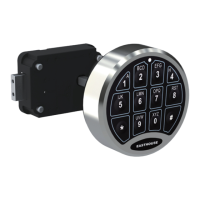
D-Drive EM-1701A-C10 Electronic Combination Controller
l This manual is used for SafeLogic C10 D-Drive EM-1701A-C10 EntryPad used in conjunction
with DL-1701 D-Drive DeadBolt Lock Body.
l
ATTENTIONS:
l For indoor use only.
l Battery Low Voltage: The entrypad will alert low battery, when battery voltage is low. PLEASE
REPLACE THE BATTERY IMMEDIATELY. MAKE SURE A 9V ALKALINE BATTERY
IS USED.
l Install the 9V ALKALINE battery in the back of the EntryPad. Refer to the instructions of
“Replace the battery”.
l For Mounting and wiring, please refer to the installation instruction.
FEATURES:
1. 10 User Codes Capacity
a. Recovery code: Resets controller back to manufacturer’s default settings. Can’t open lock.
Recovery Code must be changed from default.
b. Super Code (ID0): Open lock, set functions, and manage Manager Code. Manufacturer default
super code is 1-1-1-1-1-1.
c. Manager Code (ID1): Open lock and manage user code(s). Manufacturer default super code is
1-2-3-4-5-6.
d. User Code (ID2~9): Opens lock. No default user code(s) and can be added.
2. Wrong Entry Penalty
Entry of four (4) consecutive invalid codes results in a 5-minute penalty time period.
a. The unit beeps at 5 second intervals indicating that it is still in the penalty time period.
b. While the system is in the penalty time, the entrypad buttons remain unresponsive. Pressing
buttons during penalty will not restart or lengthen the penalty time period. It will continue to
count through the 5 minute penalty time period.
c. While the system is in penalty time, removal of the battery will not interrupt the penalty time
countdown. Upon reinstallation of the battery, the entrypad continues to count down until the 5
minute penalty time expires.
Question and Answer IconNeed help?

Do you have a question about the EASTHOUSE EM-1701A-C10 and is the answer not in the manual?

Summary

Operating Instructions

Features

Overview of key features including user codes, penalty time, and battery alerts.

User Operating Instructions

Detailed steps for managing user codes, enabling/disabling features, and opening the lock.

Operate Entry Pad Without Time Delay & Time Window

Instructions for operating the entry pad in single and dual user modes without time delays.

Operate Entry Pad With Time Delay & Time Window

Instructions for operating the entry pad with time delay and time window features.

Recovery and Reset Procedures

Guide for recovery, resetting the controller to default, and binding a new entrypad.

Specifications and Installation

Technical specifications and reference to installation instructions for the lock.

Overview

The D-Drive EM-1701A-C10 Electronic Combination Controller is a security device designed for indoor use, intended to be used in conjunction with a SafeLogic C10 D-Drive EM-1701A-C10 EntryPad and a DL-1701 D-Drive DeadBolt Lock Body. This controller offers a range of security features and user management options, making it suitable for various access control applications.

Function Description

The primary function of the D-Drive EM-1701A-C10 is to control access to a secured area via an electronic combination lock. It supports multiple user codes with different access levels and functionalities, including a Recovery Code, Super Code, Manager Code, and User Codes. The device incorporates a penalty system for incorrect code entries and features an automatic re-lock mechanism for enhanced security. It also supports both single and dual user modes, as well as configurable time delay and time window settings for opening the lock.

Important Technical Specifications

  • Rated Voltage: DC 9V
  • Working Temperature: 0°C to +49°C
  • Working Humidity (max): <90%
  • Password Length: 6 Digits
  • User Codes Capacity: 10 (Recovery, Super, Manager, and 7 User Codes)
  • Maximum Time Delay: 40 minutes
  • Maximum Time Window: 20 minutes

Usage Features

Code Management:

The controller offers a comprehensive system for managing access codes:

  • Recovery Code: This code resets the controller to its manufacturer's default settings. It does not open the lock and must be changed from its default value after installation for security.
  • Super Code (ID0): This is the highest-level code, allowing users to open the lock, set various functions, and manage the Manager Code. The manufacturer's default Super Code is 1-1-1-1-1-1.
  • Manager Code (ID1): This code allows users to open the lock and manage other User Codes. The manufacturer's default Manager Code is 1-2-3-4-5-6.
  • User Codes (ID2~9): These codes are used to open the lock. There are no default User Codes, but they can be added by a Manager or Super Code holder.

Changing Codes:

To change any code, the process generally involves entering "0" six times, then the existing code, followed by the new code twice. It is crucial to verify the new code multiple times before closing the door.

Adding Codes:

  • Adding Manager Code: Requires entering the Super Code (holding the last digit until beeps), pressing "1", then entering the desired 6-digit Manager Code twice.
  • Adding User Code: Requires entering the Manager Code (holding the last digit until beeps), pressing "1", entering a User ID (2-9), then entering the desired 6-digit User Code twice.

Disabling/Enabling Codes:

  • Disabling Manager: Enter the Super Code (holding the last digit), press "2".
  • Disabling User: Enter the Manager Code (holding the last digit), press "2", then enter the User ID (2-9).
  • Enabling Manager: Enter the Super Code (holding the last digit), press "1".
  • Enabling User: Enter the Manager Code (holding the last digit), press "1", then enter the User ID (2-9).

Deleting Codes:

  • Deleting Manager: Enter the Super Code (holding the last digit), press "3". In Dual User Mode, deleting the Manager Code also deletes associated User Codes and reverts to Single User Mode.
  • Deleting User: Enter the Manager Code (holding the last digit), press "3", then enter the User ID (2-9).

Operating Modes:

  • Single User Mode: The lock can be opened with a single valid code (user or manager).
  • Dual User Mode: Requires two codes (manager and user) to open the lock. To enable, enter the Super Code (holding the last digit), then press "8". To disable, press "0". It's important to ensure both manager and user codes are set and enabled before activating Dual User Mode. In this mode, the manager code cannot set user code functions.

Time Delay & Time Window:

This feature adds a waiting period before the lock can be opened and a subsequent window during which the code(s) must be entered.

  • Setting: Enter the Super Code (holding the last digit), press "9", then enter a 6-digit number (e.g., 015003 for 15 min delay, 3 min window). The first three digits represent the Time Delay (001-040 minutes), and the last three represent the Time Window (001-020 minutes).
  • Operation (Single User Mode with Time Delay): Enter the code, wait for the Time Delay period (indicated by beeps), then re-enter the code within the Time Window to unlock.
  • Operation (Dual User Mode with Time Delay): Similar to single user mode, but both user and manager codes must be entered within the Time Window.
  • Super Code Override: Entering the Super Code bypasses any set Time Delay and Time Window, unlocking immediately.
  • Canceling Time Delay: Set the Time Delay parameter to 000 (e.g., 000yyy).

TDO User (Time Delay Override User):

  • Set TDO User: Enter the Super Code (holding the last digit), press "4", then enter a User ID (2-9).
  • Delete TDO User: Enter the Super Code (holding the last digit), press "4", then press "0".

Wrong Entry Penalty:

Entering four consecutive invalid codes will trigger a 5-minute penalty period. During this time, the entrypad will beep at 5-second intervals and remain unresponsive. Removing the battery will not interrupt this countdown.

Automatic Re-lock:

After a valid code entry, the motor turns to open the lock. The keypad should be rotated to the right to fully open. The lock automatically re-locks after 6 seconds, and the keypad should be rotated to the left to close.

Standby Status:

To conserve battery power, the system enters standby status after 10 seconds of no key press, indicated by two short beeps.

Maintenance Features

Battery Management:

  • Battery Low Voltage Alert: The entrypad will beep 8 times during an unlock operation when the battery voltage is low. It is critical to replace the battery immediately with a new 9V alkaline battery (Duracell or Energizer brands are recommended).
  • Installation: Install the 9V alkaline battery in the back of the EntryPad. Refer to the "Replace the battery" instructions for proper installation.

Recovery:

  • To initiate recovery, enter the recovery code (holding the last digit), then press "3". This indicates successful recovery.

Reset to Manufacturer's Default:

  • If actuator and entry pad are connected and battery is installed: Remove the cable, press the reset button with a pin 2-3 times, then press and hold the reset button for more than 3 seconds while reconnecting the cable. A single beep indicates success.
  • To connect with a new entrypad: Remove the old entrypad, press the reset button 2-3 times, connect the new entrypad. Three beeps will sound; press "0" within 10 seconds. A single beep indicates successful binding.

Audit Trail Extraction:

  • Connect a USB receiver to the entrypad. Enter the Super Code (holding the last digit), then press "7". A beep indicates successful extraction.

Important Usage Notes:

  • Always perform operations with the entrypad unlocked and the safe door open.
  • Verify all changes before closing the door.
  • Avoid using simple or easily guessable codes (e.g., six "0"s, "1-2-3-4-5-6", or personal data like birthdays).
  • Always change default codes after installation.
  • For mounting and wiring instructions, refer to the separate installation manual.

EASTHOUSE EM-1701A-C10 Specifications

General IconGeneral
BrandEASTHOUSE
ModelEM-1701A-C10
CategoryController
LanguageEnglish