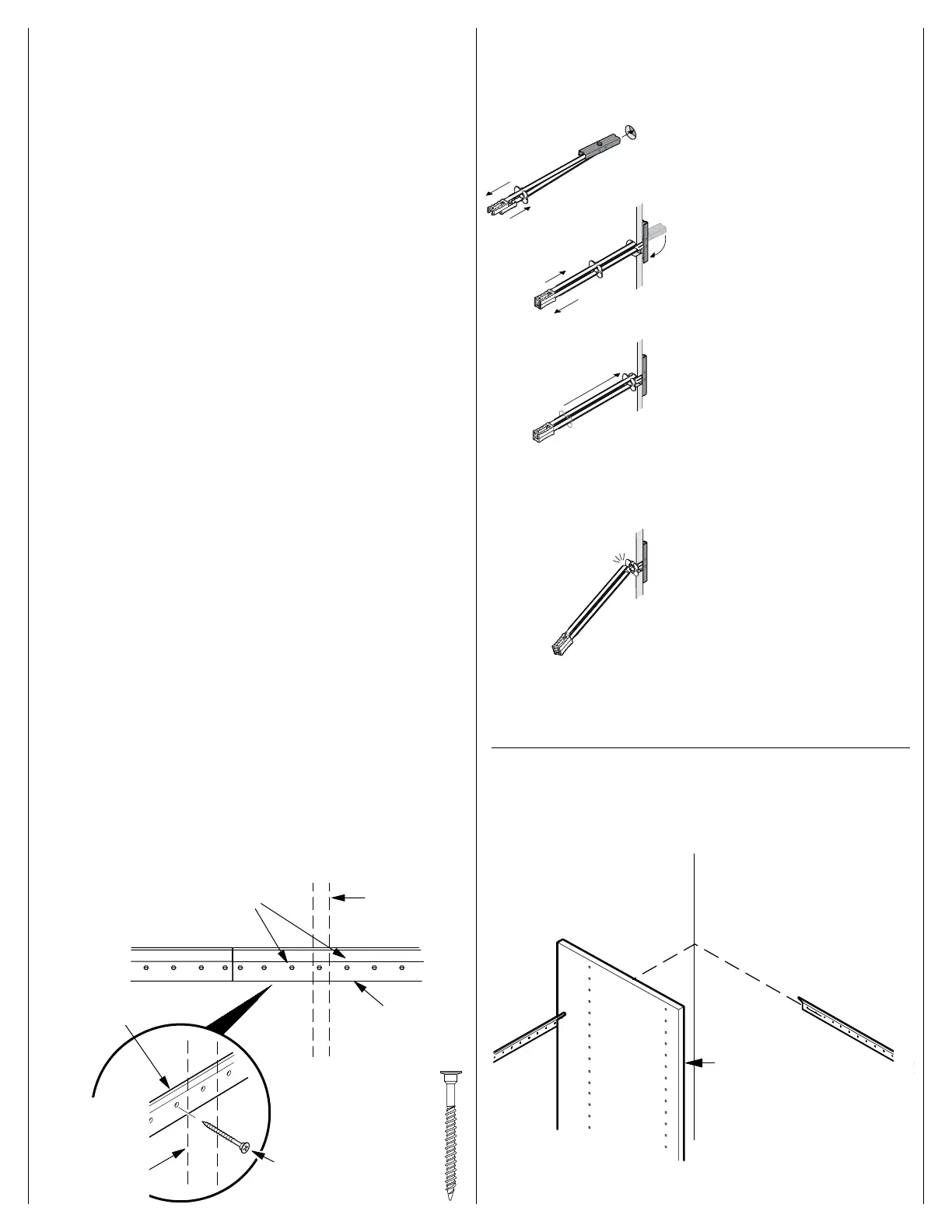
Install toggle channels.
Insert toggle into wall.
Slide plastic straps until they align with
each other.
Slide plastic ring along straps until
flange of ring is flush against wall.
Bend plastic straps back and forth until
they snap off, leaving plastic ring in
place.
For holes marked as studs, drill pilot holes with a
1
⁄8" drill
bit at holes marked for studs. Attach the track to wall using
#8 x 50mm screws. If a toggle is needed, use a
1
⁄2" drill
bit to drill the hole.
Use toggle bolts if vertical panels are not within 3" of a stud. Determine the
location of the toggle bolts by holding the track over the horizontal line. Mark
hole locations near the vertical panels. Keep track level. Any toggle bolts
must be installed prior to attaching track to wall. Do not leave end of track
unsupported. It must be attached to wall.
For wall types other than drywall: Use a suitable wall anchor available
from your local hardware store.
3 4
Do not use holes directly behind a vertical
panel. Mark holes around vertical for stud
or toggle bolt.
Vertical panel
location
Track
#6 x
1
/
2"
zinc screws
Toggle bolt
#8
x 50mm screw
Track
Hang vertical panel on track.
5
Vertical panel
Vertical panel
location
#8 x 50mm screw


 To Next Page