9
INPUT
BAT1
BAT2
OUTPUT
R
S
T
N
L
N
BAT+
BAT-
R
S
T
N
L
N
BAT+
BAT-
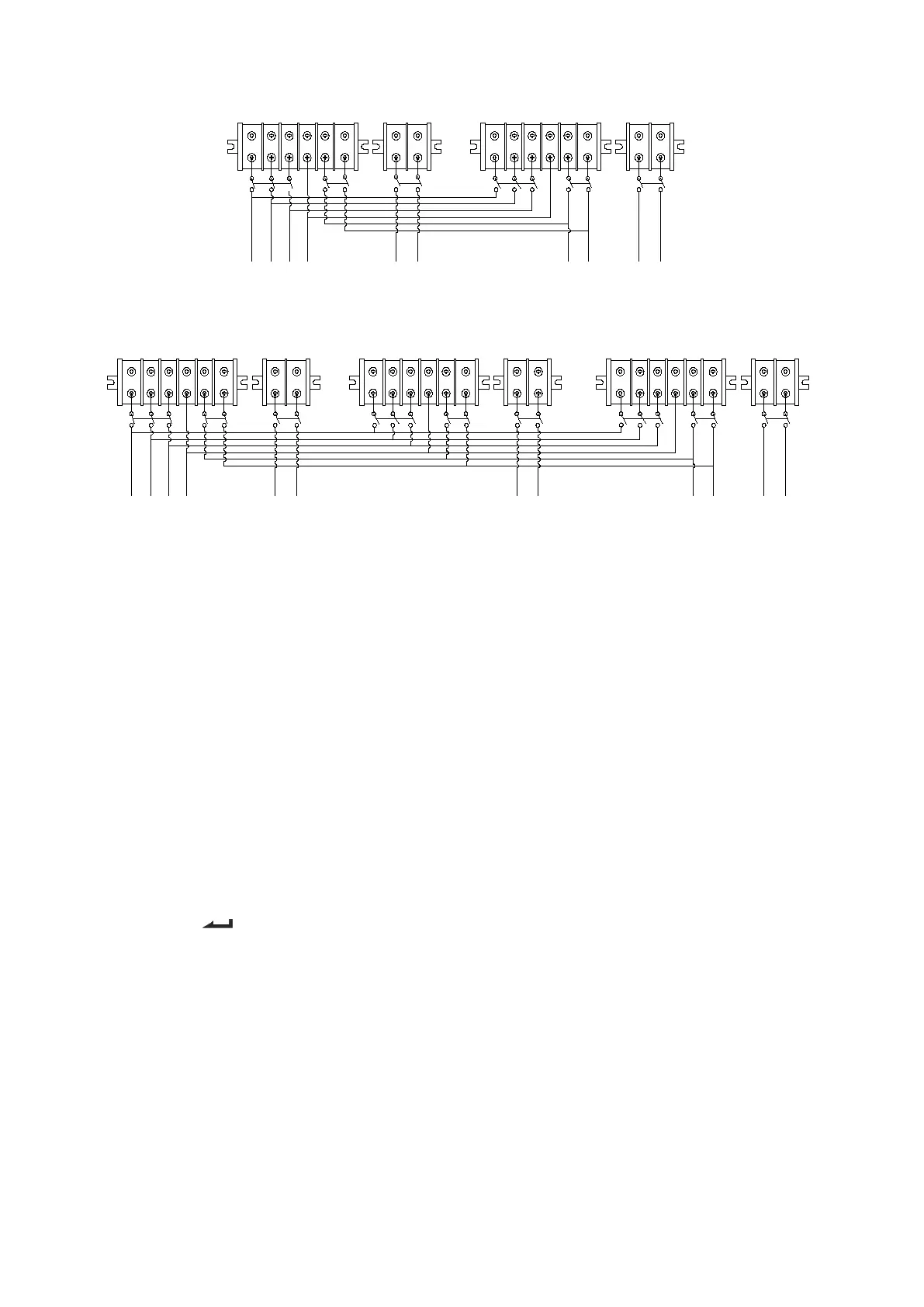
Wiring diagram for two UPS parallel system
INPUT
BAT1
BAT2
R
S
T
N
L
N
BAT+
BAT-
R
S
T
N
L
N
BAT+
BAT-
BAT3
OUTPUT
R
S
T
N
L
N
BAT+
BAT-
Wiring diagram for thee UPS parallel system
④ If the UPS is the standard type, each UPS has batteries inside already. If the UPS is the long-run type,
each UPS should be equipped a individual battery pack.
⑤ After installation, check a ll the wiring ca refully, be sure to confirm correct, then can operate the system.
3.3.2 Parallel system operation and maintenance
General operation of parallel system, please refer to the operation instruction of single UPS. Before starting
the system, need to set up different ID for each UPS, specific settings please refer to the instruction of ID
setting which is given in single UPS panel function setting.
>Turn on the parallel system
● Start the system with mains power: After inputting the mains power,turn on any one UPS of system, others
will start by themself at same time. All UPS will enter into Line mode.
●Start the system without mains power: Make sure the battery pack is connected well and the breaker is in
“ON” position. There are two ways to start the UPS parallel system without utility power supply:
A: Press the key
on each UPS, make each LCD of each UPS light up, then turn on any one UPS of
system, others will start by themself at same time. All UPS will enter into BAT mode.
B: Turn on UPS one by one.
>Turn off the parallel system
Hold on the OFF KEY of any one UPS of system for more than 4 seconds, it would turn off the whole parallel
system. Hold on the OFF KEY of any one UPS of system for more than 1 second(less than 4 seconds), it
would turn off single UPS you choose, of course if you need to turn on it again or turn on any other single
UPS of the system, just press ON KEY of that UPS to start it.
>Parallel system maintenance
●Parallel system maintenance please follow the maintenance of single UPS.


 To Next Page