15
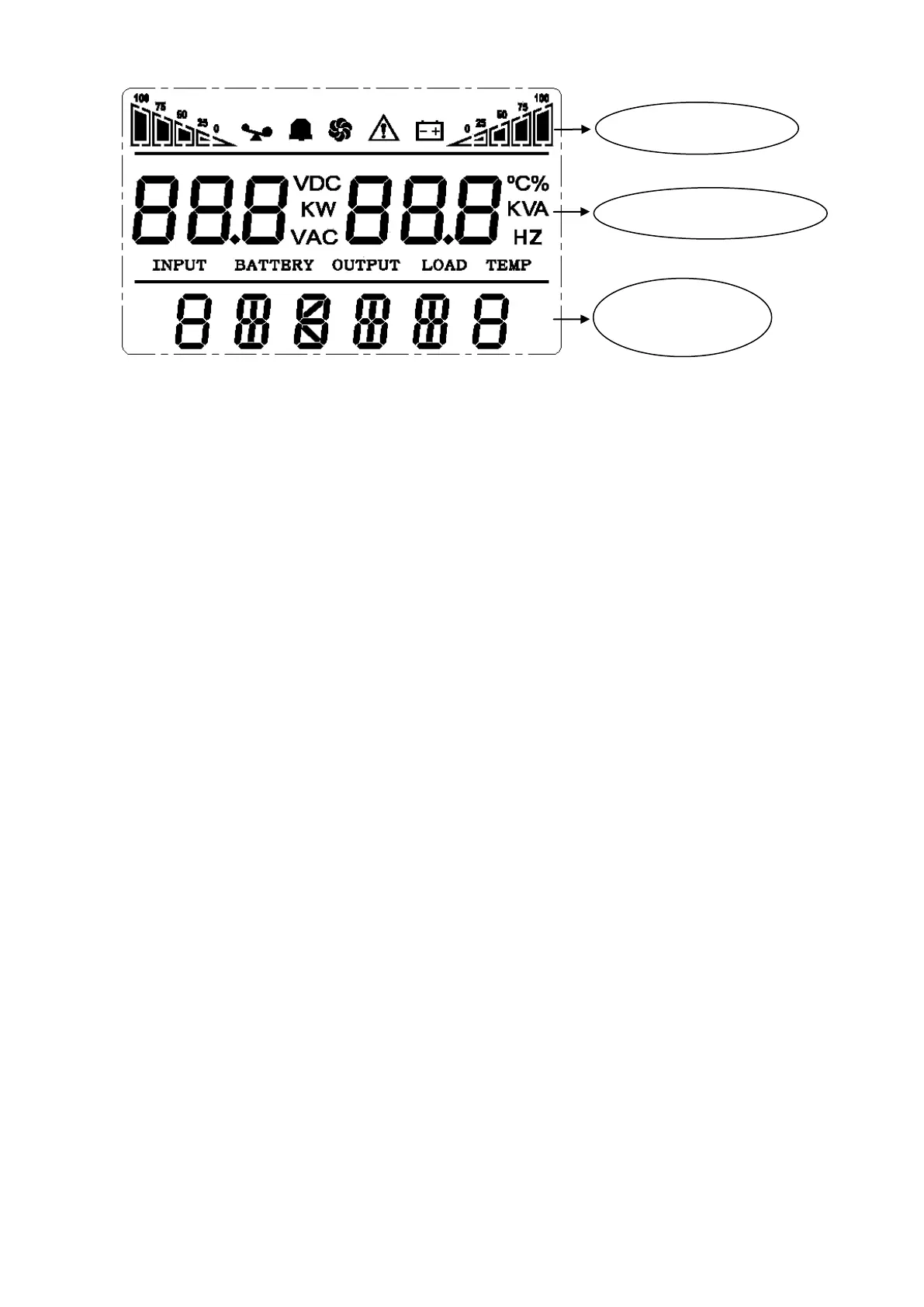
※ Ico n d is p lay area :
A. The top diagram is for load and battery capacity indication, each grid of which represents 25%. When UPS
is over load, the load light will blink the same as the battery light blink when the capacity of battery get low
or battery disconnected.
B. The fan icon is for fan working indication; when fan normally runs, the icon will display rotation; if the fan is
not connected or faulty, the icon blinks;
C. Press the mute button under the battery mode, buzzer icon will blink; it will disappear in other cases.
D. Fault icon will be on when UPS is in fault mode, otherwise it will not.
※ Digital display area:
A. Under none setting mode, it will display UPS output information when UPS normally runs in AC
mode; other information like input, battery, load and temperature will be showed after pressing the inquiring
key; Fault code will be told in fault mode.
B. Under setting mode, users could adjust different output voltage, activate ECO mode, activate CUCF mode,
select an ID number and so on by operating function setting key and inquiring keys.
※ Mode display area:
A. This area will display the power capacity of the machine after starting the UPS within 20 seconds.
B. After over 20 seconds, this area will display the working mode of the machine. Such as STDBY(standby
Mode), BYPASS(Bypass Mode), LINE(AC Mode), BAT(Battery Mode), BATT(Battery Self Test Mode ),
ECO(Economic mode), SHUTDN(Shutdown mode), CUCF(Constant Voltage and Constant Frequency
Mode).
4.4 Single UPS turn On/Off operation
4.4.1 Turn on operation
> Turn on the UPS on line mode
①
Once mains power is plugged in, the UPS will charge the battery, at the moment, LCD shows that the output
voltage is 0, which means UPS has no output as default condition. If it is expected to have output of bypass,
you can set the BPS “ON” by LCD setting menu.
② Press and hold the ON key for m ore tha n half a second to start the UPS, then it will start the inverter.
③Once started, the UPS will perform a self-test function, and LED will light and go off circularly and orderly.
Digital display area
Working mode
Icon display area


 To Next Page