EasyManua.ls Logo

Eaton xComfort - User Manual

Eaton xComfort
24 pages
Print Icon
To Next Page IconTo Next Page
Loading...
xComfort Roo
m Controller Touch User Manual 1
v
00
_EN
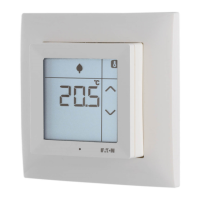
xComfort Room Controller Touch
User Manual

Other manuals for Eaton xComfort

Question and Answer IconNeed help?

Do you have a question about the Eaton xComfort and is the answer not in the manual?

Summary

Introduction and Safety Information

Safety Instructions

Important warnings and safety instructions for fault-free operation of the Room Controller Touch.

Intended Use and Disposal

Designed for residential use; guidance on proper disposal of electronic equipment.

About This Document

Describes operation and menu structure for end users, noting optional functions.

Room Controller Touch Operation

Device Overview and Display

Explains the touch display operation, idle/active states, and icons.

Cleaning and Battery Maintenance

Details on cleaning mode, replacing batteries, and battery disposal warnings.

Operation Modes Explained

Classifies functions into Basic, Enhanced, and Settings edit operations.

Basic Operating Procedures

Instructions for displaying current temperature and active set-point temperature.

Adjusting and Switching Set-Points

How to temporarily adjust and switch between pre-defined set-point temperatures.

Displaying Room Humidity and Outdoor Temperature

Instructions for displaying room humidity and optional outdoor temperature.

Time Display and Touch-Button Functions

Viewing time/day and details on optional touch-button functionality for device control.

Enhanced Room Controller Features

Week Program Activation and Control

How to activate or deactivate the Week Program for automatic set-point switching.

Heating and Cooling Mode Selection

Manual selection of temperature regulation modes: OFF, Heating, Cooling, or Heating&Cooling.

Editing Room Controller Settings

Pre-Defined Set-Point Configuration

How to reprogram pre-defined temperature set-points (operation modes) via the screen.

Week Program Timer Editing

Instructions for manually programming up to 6 points per day for set-point switching.

Humidity Set-Point Adjustment

How to set the humidity set-point in control mode for humidity regulation.

Time and Date Setting

Manual setting of Time (Hours, Minutes) and Date (Day, Month, Year) for Week Program.

Clock Correction Factor

Correcting internal clock inaccuracies by adjusting seconds per month.

Summary

Introduction and Safety Information

Safety Instructions

Important warnings and safety instructions for fault-free operation of the Room Controller Touch.

Intended Use and Disposal

Designed for residential use; guidance on proper disposal of electronic equipment.

About This Document

Describes operation and menu structure for end users, noting optional functions.

Room Controller Touch Operation

Device Overview and Display

Explains the touch display operation, idle/active states, and icons.

Cleaning and Battery Maintenance

Details on cleaning mode, replacing batteries, and battery disposal warnings.

Operation Modes Explained

Classifies functions into Basic, Enhanced, and Settings edit operations.

Basic Operating Procedures

Instructions for displaying current temperature and active set-point temperature.

Adjusting and Switching Set-Points

How to temporarily adjust and switch between pre-defined set-point temperatures.

Displaying Room Humidity and Outdoor Temperature

Instructions for displaying room humidity and optional outdoor temperature.

Time Display and Touch-Button Functions

Viewing time/day and details on optional touch-button functionality for device control.

Enhanced Room Controller Features

Week Program Activation and Control

How to activate or deactivate the Week Program for automatic set-point switching.

Heating and Cooling Mode Selection

Manual selection of temperature regulation modes: OFF, Heating, Cooling, or Heating&Cooling.

Editing Room Controller Settings

Pre-Defined Set-Point Configuration

How to reprogram pre-defined temperature set-points (operation modes) via the screen.

Week Program Timer Editing

Instructions for manually programming up to 6 points per day for set-point switching.

Humidity Set-Point Adjustment

How to set the humidity set-point in control mode for humidity regulation.

Time and Date Setting

Manual setting of Time (Hours, Minutes) and Date (Day, Month, Year) for Week Program.

Clock Correction Factor

Correcting internal clock inaccuracies by adjusting seconds per month.

Eaton xComfort Specifications

General IconGeneral
Temperature Range5°C to 30°C
DisplayLCD
Setback FunctionYes
Operating Temperature0°C to 40°C
Power SupplyBattery or Mains
Device TypeSmart Thermostat
Power SourceBattery or Mains
MountingWall Mount
Operating ModesComfort, Economy
Communication ProtocolRF

Related product manuals