13
第五步:接线
Step 5 - Cables
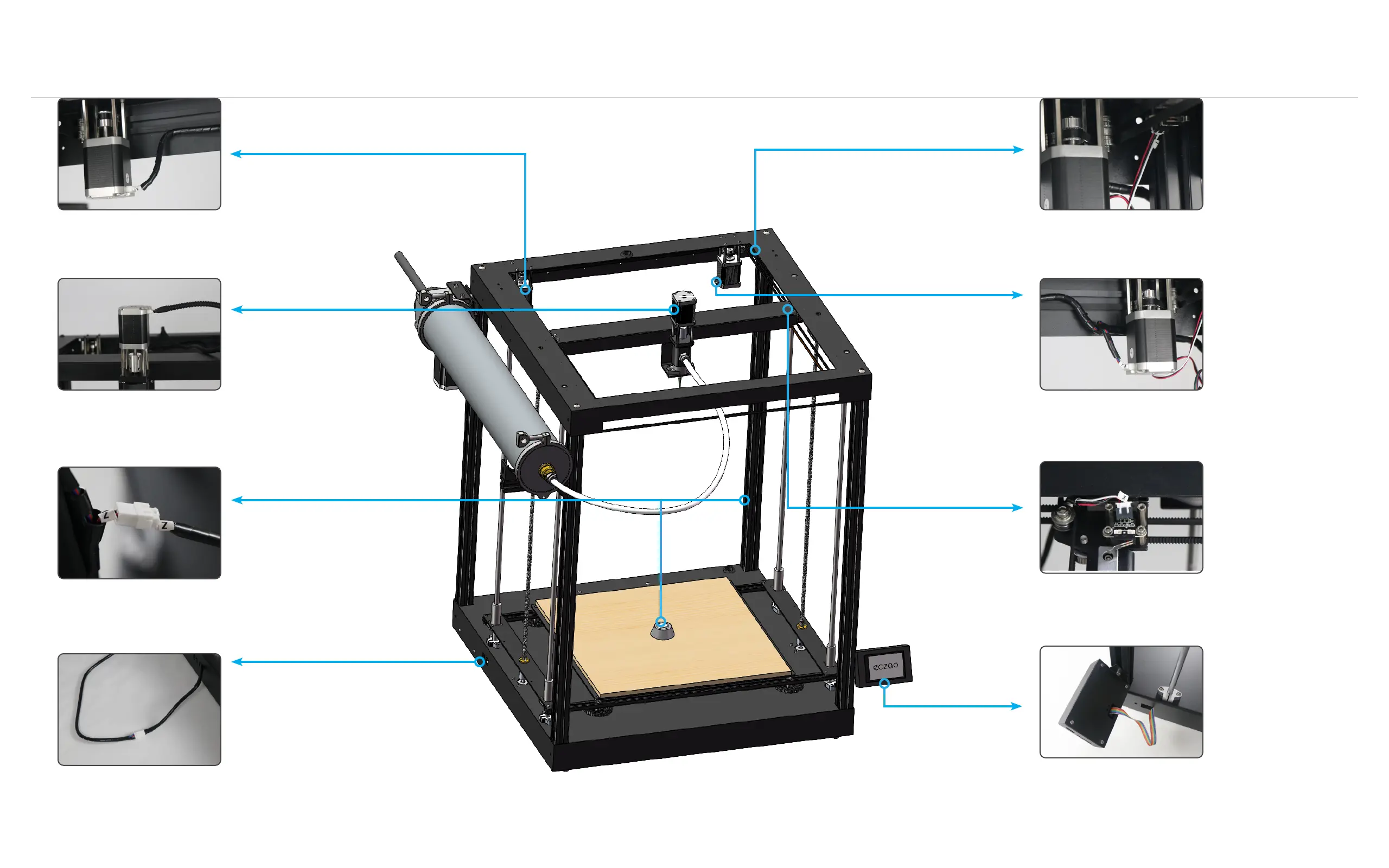
Insert the X-axis motor cable: Connect the 4-core ca-
ble marked with X number to the X-axis motor.
插入X轴电机线:将标有X号码的4芯线缆与X轴电机连接。
Insert the E-axis motor cable: Connect the 4-core ca-
ble marked with E number to the E-axis motor.
插入E轴电机线:将标有E号码的4芯线缆与E轴电机连接。
Plug in the Nozzle Setter Cable: Insert the cable
marked with the Z number.
插入喷嘴设定器线:将标有Z号码的线对插。
Insert the Y-axis limit cable: Connect the 3-core cable
marked with Y number to the Y-axis limit switch.
插入Y轴限位线:将标有Y号码的3芯线缆与Y轴限位开关连接。
Inserting the electric putter cable: insert the electric
putter cables.
插入电动推杆线缆:将电动推杆的线缆对插。
Insert the Y-axis motor cable: Connect the 4-core ca-
ble marked with Y number to the Y-axis motor.
插入Y轴电机线:将标有Y号码的4芯线缆与Y轴电机连接。
Insert the X-axis limit cable: Connect the 3-core cable
marked with X number to the X-axis limit switch.
插入X轴限位线:将标有X号码的3芯线缆与X轴限位开关连接。
Insert the screen cable: Insert the screen cable into the
screen rear case, pay attention to the direction.
插入屏幕线缆:将屏幕线缆插入屏幕后壳中,注意方向。



 To Next Page