16
第八步:开始打印
Step 8 - Start Printing
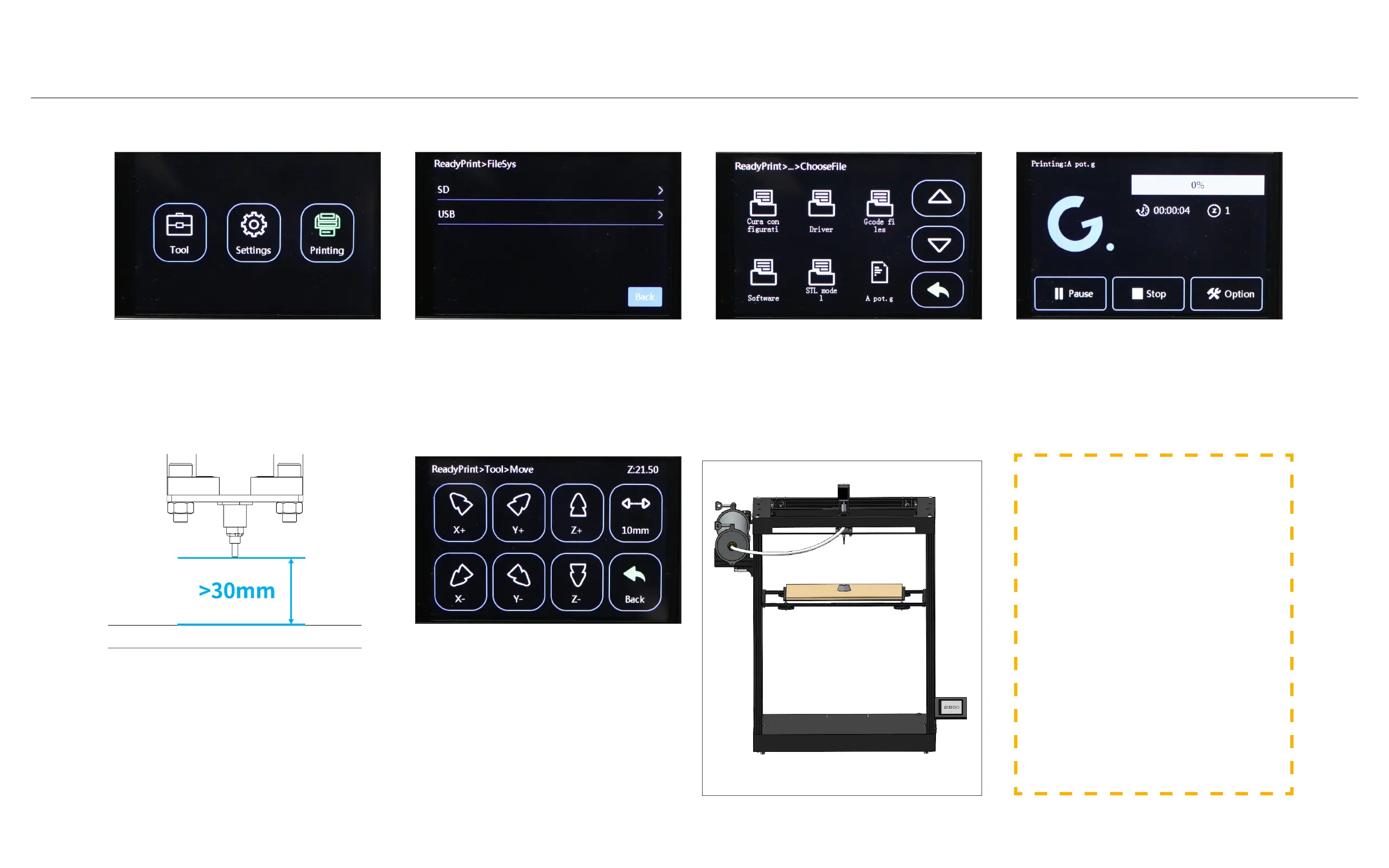
1. After confirming the printing,
the nozzle moves to the center of
the printing platform.
2. The nozzle setter needs to be
manually placed in the center of
the printing platform. After the
nozzle setter is triggered, remove
the nozzle setter.
1.确认打印后,喷嘴向打印平台中央
移动。
2.需要手动将喷嘴设定器放置在打印
平台中央,喷嘴设定器触发后,将喷
嘴设定器移走。
If you are not satisfied, you can move
the printing platform down through
"Tool" -> "Move" -> "Z+".
如不满足,可通过“Tool”->“Move”-
>“Z+”,向下移动打印平台。
Before starting to print, you need to
ensure that the distance between the
nozzle and the printing platform is >
30mm.
开始打印前,需要确保:喷嘴与打印平台距
离 > 30mm。
To start printing, select "Printing".
开始打印,选择“Printing”。
To use a USB card reader, please
click "USB".
使用USB读卡器,请点击“USB”。
Select the sliced "Gcode" file to
print.
选择切片好的“Gcode”文件进行打
印。



 To Next Page