17
第八步:开始打印
Step 8 - Start Printing
If the first layer of clay cannot be attached to the printing platform, the following opera-
tions can be performed.
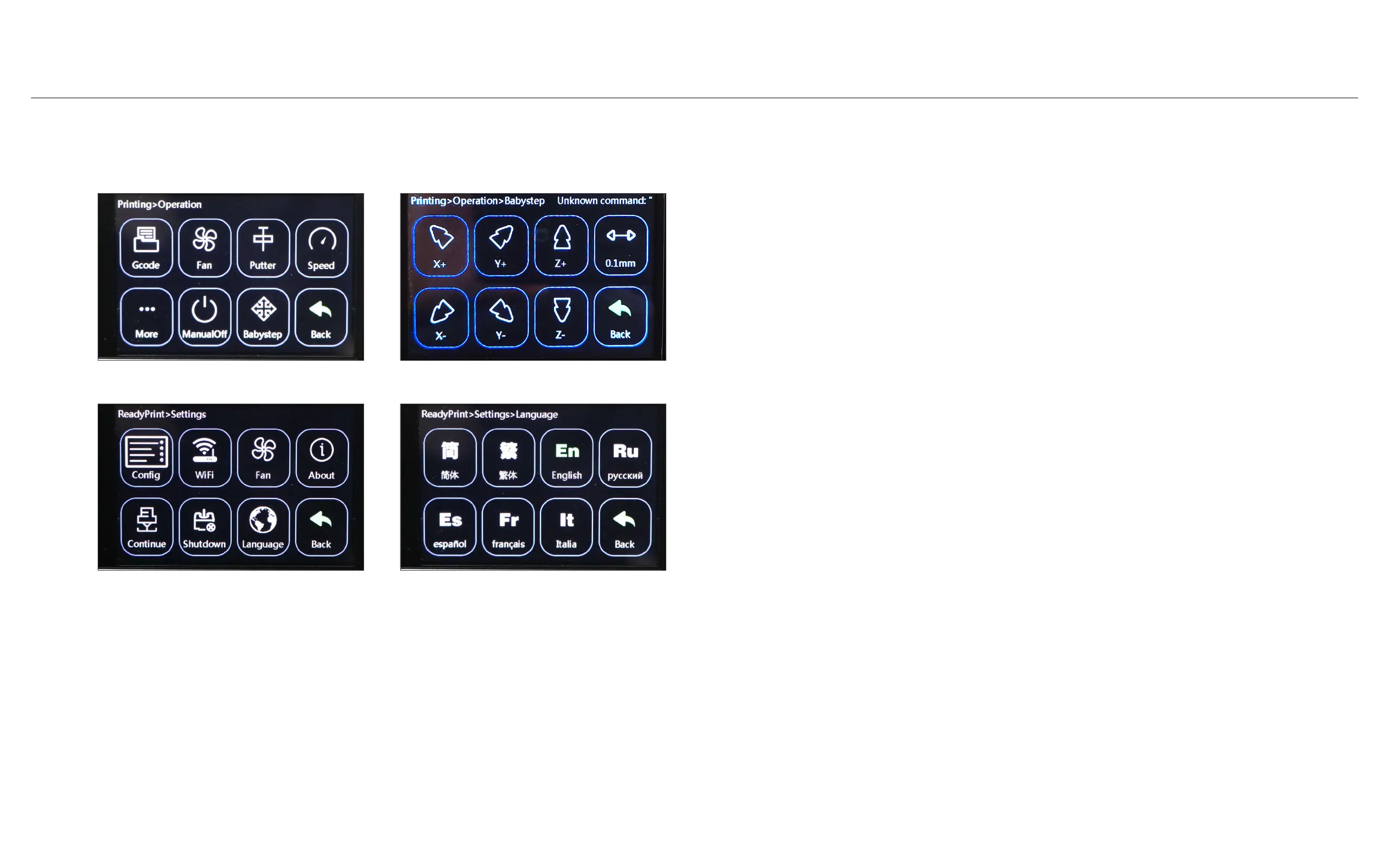
Click "Option" -> "Babystep" -> "Z-" to move the printing platform up so that the first
layer of clay is attached to the printing platform. (The range is switched to 0.1mm)
如果打印首层陶泥无法附着在打印平台上,可进行如下操作。
点击“Option”->“Babystep”->“Z-”,将打印平台向上移动,使陶泥首层附着在打印平台
上。(量程切换到0.1mm)
Switch the touch screen language: Click "Settings", click "Language", and select the lan-
guage you need.
切换触摸屏语言:点击“Settings”,点击“Language”,选择您需要的语言。
1. Babystep settings/ Babystep设置
2. Language settings/ 语言设置



 To Next Page