18
M600M600
M600M600
M600M600
M600M600
第九步:切片软件设置
Step 9 - Slicing Software Settings
1. Software download and install/ 软件下载和安装
According to the computer operating system, it is recommended to download and install the latest version of Cura software:
https://ultimaker.com/software/ultimaker-cura
/
根据电脑的操作系统,下载并安装 Cura 软件最新版本:
https://ultimaker.com/software/ultimaker-cura
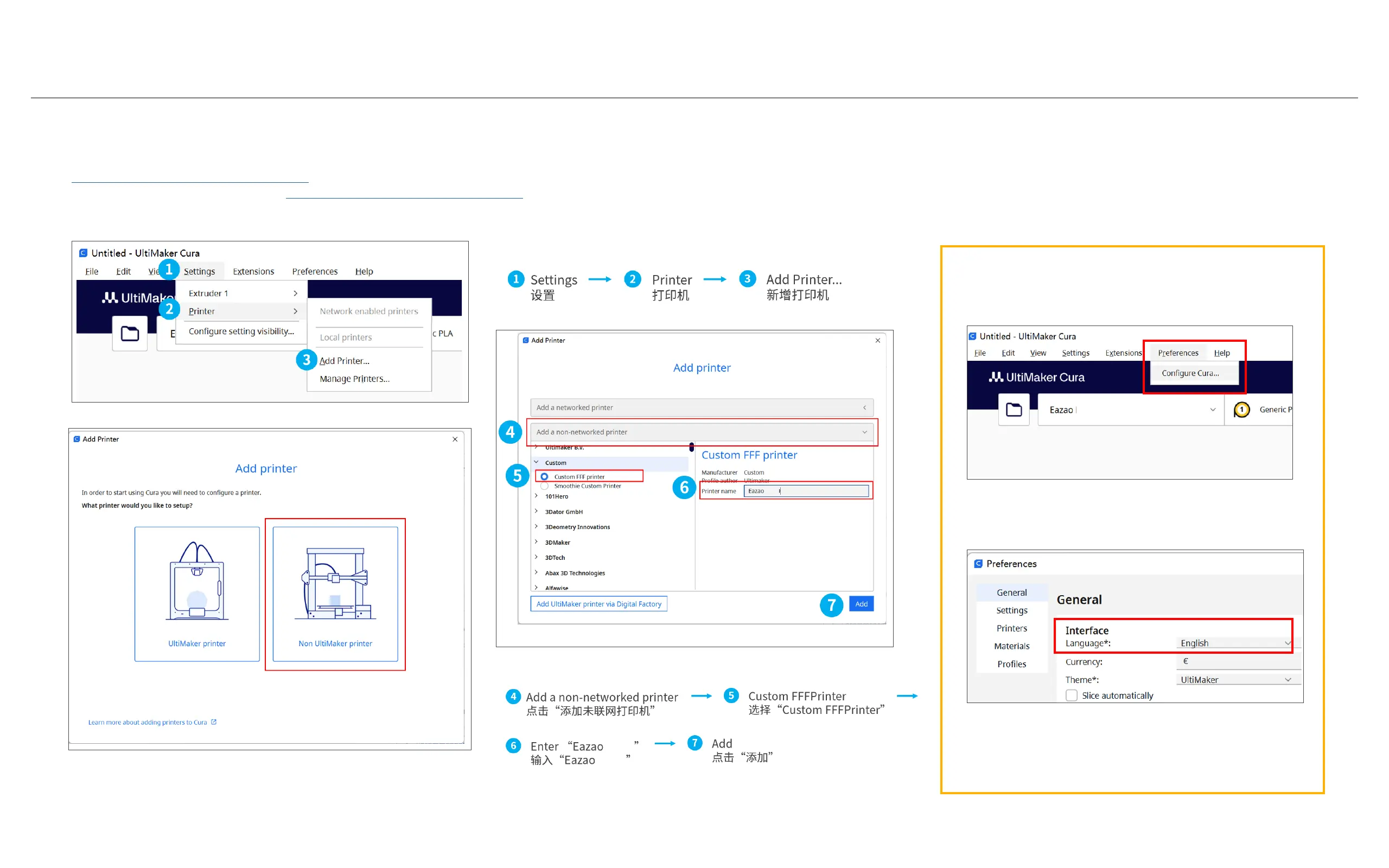
2.Add a printer/ 添加打印机
How to change the language of slicing software.
如何更换切片软件的语言。
Preferences > Congure Cura ...
偏好设置 配置Cura
After selecting the language you need, you
need to restart the Cura software.
选择您需要的语言后,需要重启Cura软件。
Select "Non UltiMaker printer"
选择"Non UltiMaker printer"



 To Next Page