15
第七步:打印前准备
Step 7 - Prepare for Printing
Equipment assembly:
1. Install the electric push rod and fill it
with clay.
2. Install the electric push rod on the side
of the printer and insert it into the feeding
tube.
Clay pre-extrusion:
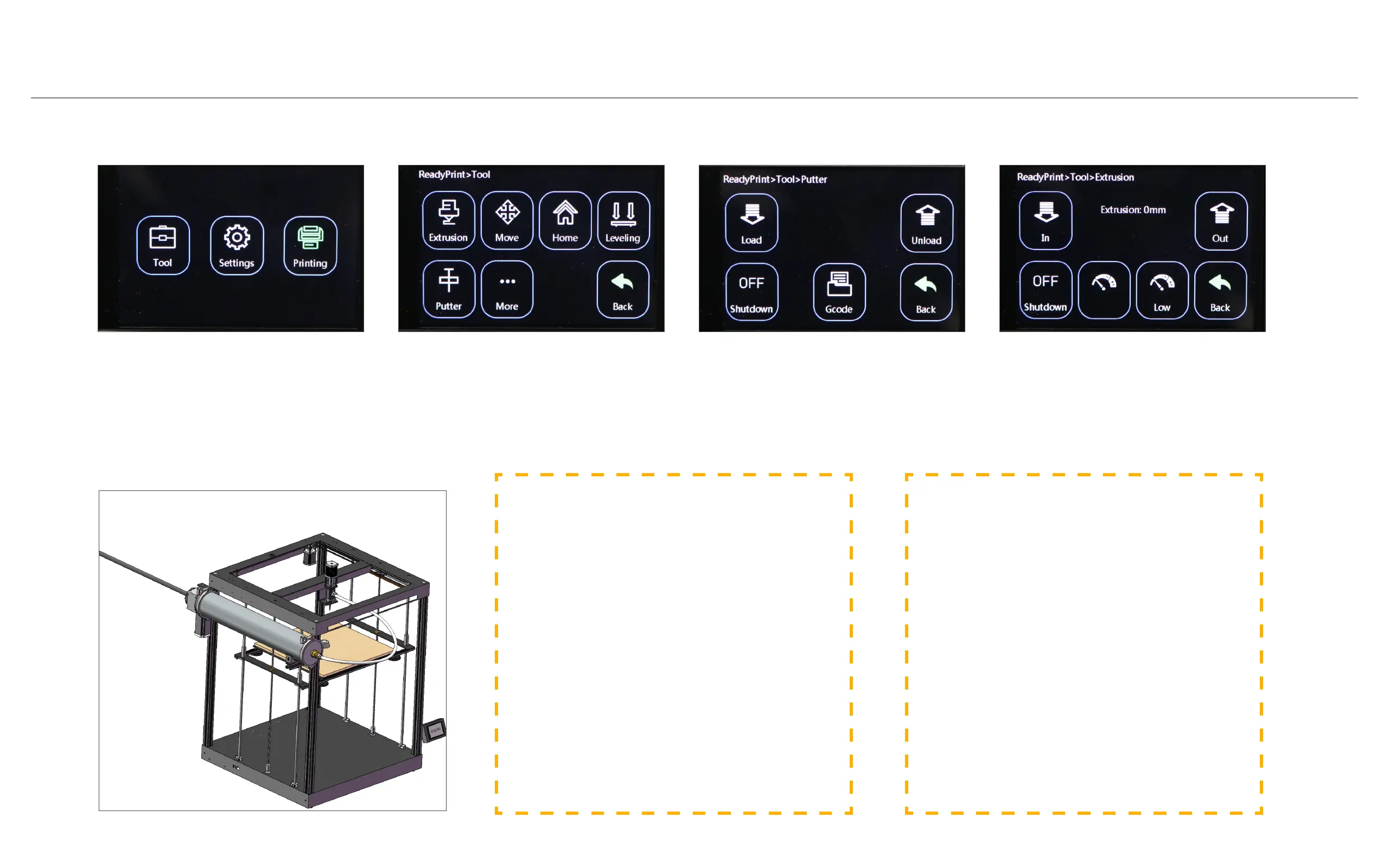
1. Click "Tool" -> "Putter" -> "Load", the
clay enters the extruder from the feeding
pipe.
2. After the clay enters the extruder, click
"Shutdown" to stop feeding, and click
"Back".
3. Click "Extrusion" -> "In", the extruder
starts to extrude clay.
4. After the clay is smoothly extruded from
the nozzle, click "Shutdown" to stop extru-
sion, and click "Back".
设备组装:
1.安装电动推杆,并装填陶泥。
2.将电动推杆安装在打印机侧边,并插入送料
管。
陶泥预挤出:
1.点击“Tool”->“Putter”->“Load”,陶
泥从送料管进入挤出机。
2.陶泥进入挤出机后,点击“Shutdown”停止
送料,点击“Back”。
3.点击“Extrusion”->“In”,挤出机开始挤出
陶泥。
4.陶泥从喷嘴顺畅挤出后,点击“Shutdown”
停止挤出,点击“Back”。
Clay pre-extrusion settings, select
"Tool".
陶泥预挤出设置,选择“Tool”。
Click "Putter" and "Extrusion" re-
spectively to pre-extrude the clay.
分别点击“Putter”和“Extrusion”,
进行陶泥预挤出。
"In", the extruder feeds material,
"Out", the extruder returns material.
"shutdown", the extruder stops.
“In”,挤出机送料,“Out”,挤出机
退料。“shutdown”,挤出机停止。
"Load", the putter moves forward,
"Unload", the putter moves back-
ward. "Shutdown", the putter stops.
“Load”,推杆前进,“Unload”,推
杆后退。“shutdown”,推杆停止。



 To Next Page