3
BATTERY INSTALLATION
This product requires the following batteries:
• 1 x 3.7V rechargeable Li-Poly battery - Helicopter (included)
• 6 x AA batteries - Controller (not included)
INSTALLING BATTERIES IN THE CONTROLLER
1. Using a Phillips-head screwdriver, remove the screw from the battery
compartment cover.
2. Insert six (6) AA batteries, making sure to follow the battery polarity
(+ and -) as shown in the drawing on the product.
3. Replace the battery compartment cover and secure with the screw.
CHARGING
1. Make sure the controller is turned ON.
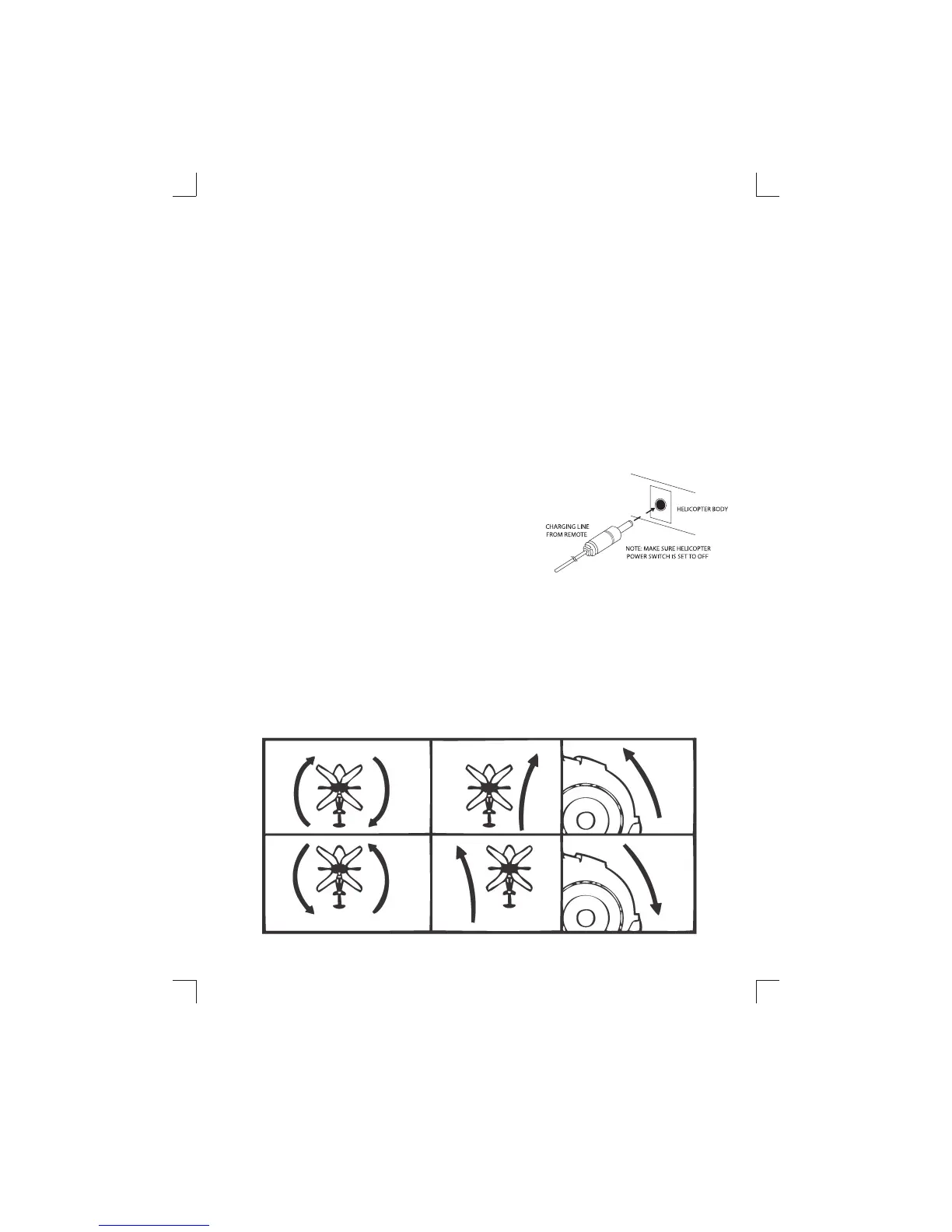
2. Turn the ON/OFF switch on the helicopter to
OFF, and insert the charging line. The green
charging indicator on the controller will turn
on when charging and o once charged.
Charging takes about 45 minutes for 6 minutes
of ight time. Do not overcharge.
3. Install new batteries in the controller when
you notice ight times begin to decrease.
DIRECTION CONTROL - TRIM
Located on the top of the Controller is the Trim Control. When the helicopter
does not drive or y straight, use the Trim Control to adjust the alignment.
US9969IS01EXC.indd 3US9969IS01EXC.indd 3 7/29/11 11:32 AM7/29/11 11:32 AM


 To Next Page