4
FLYING YOUR HELICOPTER
GETTING STARTED
• Select the frequency band on the controller. The frequency on the helicopter will
automatically sync.
• Switch the helicopter’s ON/OFF switch to the ON position. The power light will turn on.
• Place the helicopter on the ground with the tail pointed toward you and the nose fac-
ing away from you.
• Make sure your surroundings are clear of obstacles before ying.
• Do not y if the helicopter has become damaged in any way.
• NEVER y the helicopter around another person or animal.
BASIC FUNCTIONS
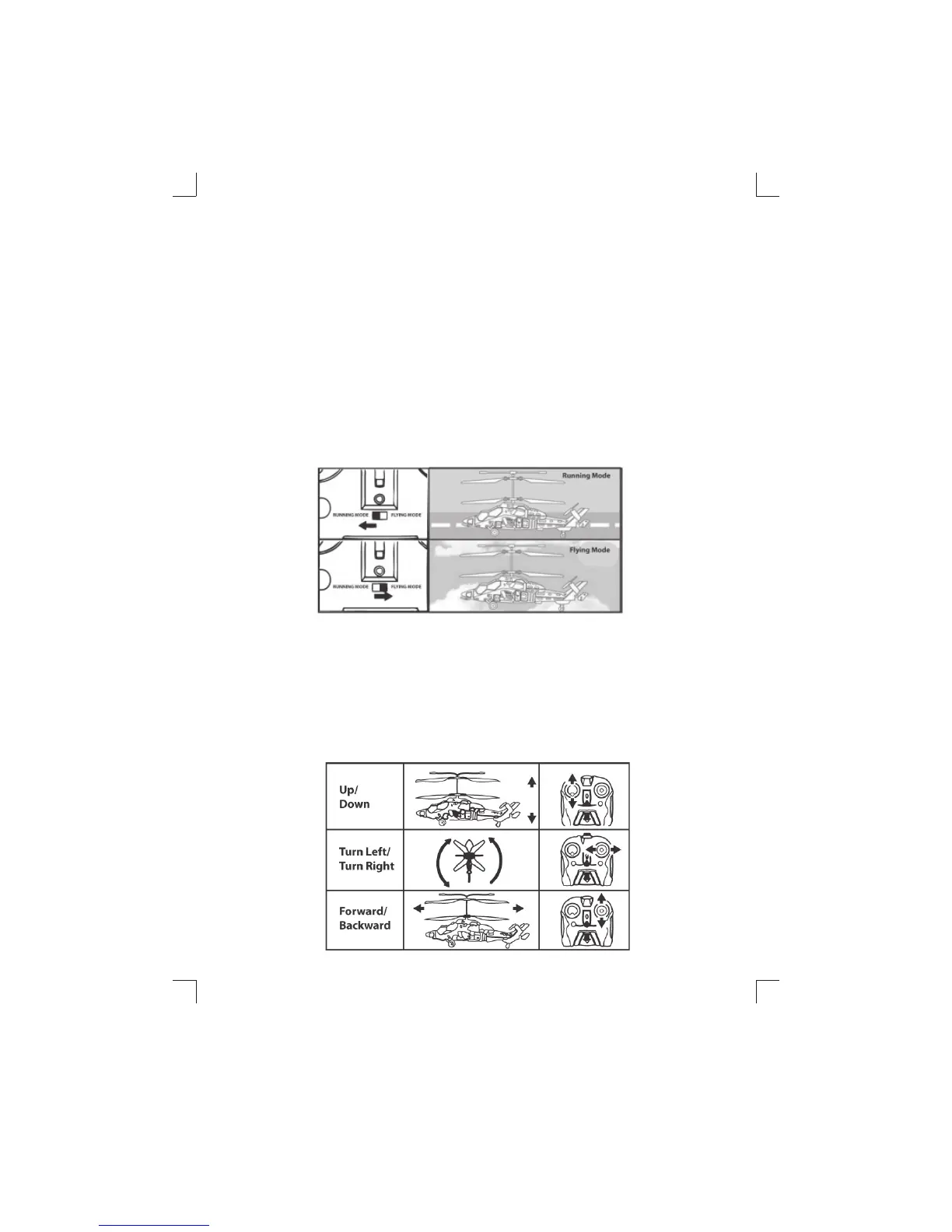
This remote control helicopter has 2 primary functional modes: Running Mode and
Flying Mode. Slide the switch LEFT to select running mode, and RIGHT to select ying
mode, which will cause the helicopter to lift into the air.
OPERATING YOUR HELICOPTER
Flying your helicopter
LEFT joystick - Slowly press UP on the Left joystick to increase the speed of the rotor
blades and cause the helicopter to ascend into the air. Slowly press down on the Left
joystick to cause the helicopter to descend.
RIGHT joystick - Move the Right joystick to the left or right to turn the helicopter
left or right. Move the Right joystick up or down to move the helicopter forward or
backward.
US9969IS01EXC.indd 4US9969IS01EXC.indd 4 7/29/11 11:32 AM7/29/11 11:32 AM


 To Next Page