- 23 -
•
Operation
•
Programming of multiple cut dimension
•
p
Press © X appears on the display.
•
0 1
...
9
9
Enter program number 01 ...
99.
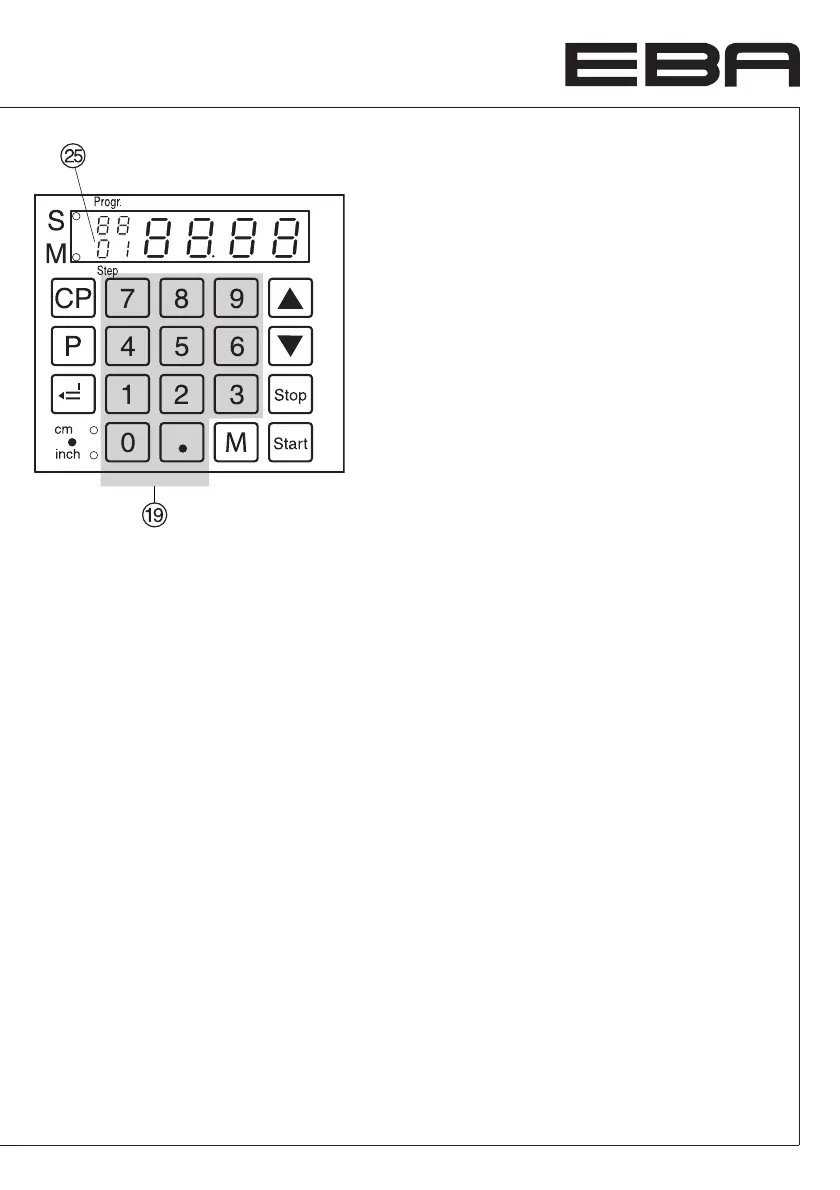
Top number on display = program number.
Lower number = program step.
•
Enter the cut size on the display
S
.
• g
Store the dimension.
• Enter multiple cut size.
Press
T
button E
Y
and multiple cut size
appears on the display.
Press
T
button again F ..... N
•
g
Store the dimension.
•
p
+
s
Escape the program mode.
Maximum nine multiple cuts can be entered.
Cancel a program
•
p
press © X appears on the display.
•
0 1
...
9
9
Enter program
number 01 ... 99.
• Press button
c
twice.
Each program has to be cancelled
separately.
Deleting a dimension when programming
Press
s
and overwrite the dimension.
Choose a program step appears.
Press
p
, hold, and press
T
©
ß Y
lights.
Enter the desired number of steps (e.g.
0 5
).
Change a step
b
© next step
j
© previous step
Insert a step
Press
p
, hold, and press
b
©
A new
program step is inserted before the displayed
program step is shown.
Delete a step
Press
p
, hold, and press
j
©
Program
step is deleted.
The following number of steps are updated.


 To Next Page