38
RIO PL
www.eberg.eu
Step 7
Adjust the louver at the air outlet, and then switch on the unit.
NOTE!
In the case of a traditional tilt window, use the special exible EBERG ClimaLock window seal (not
included).
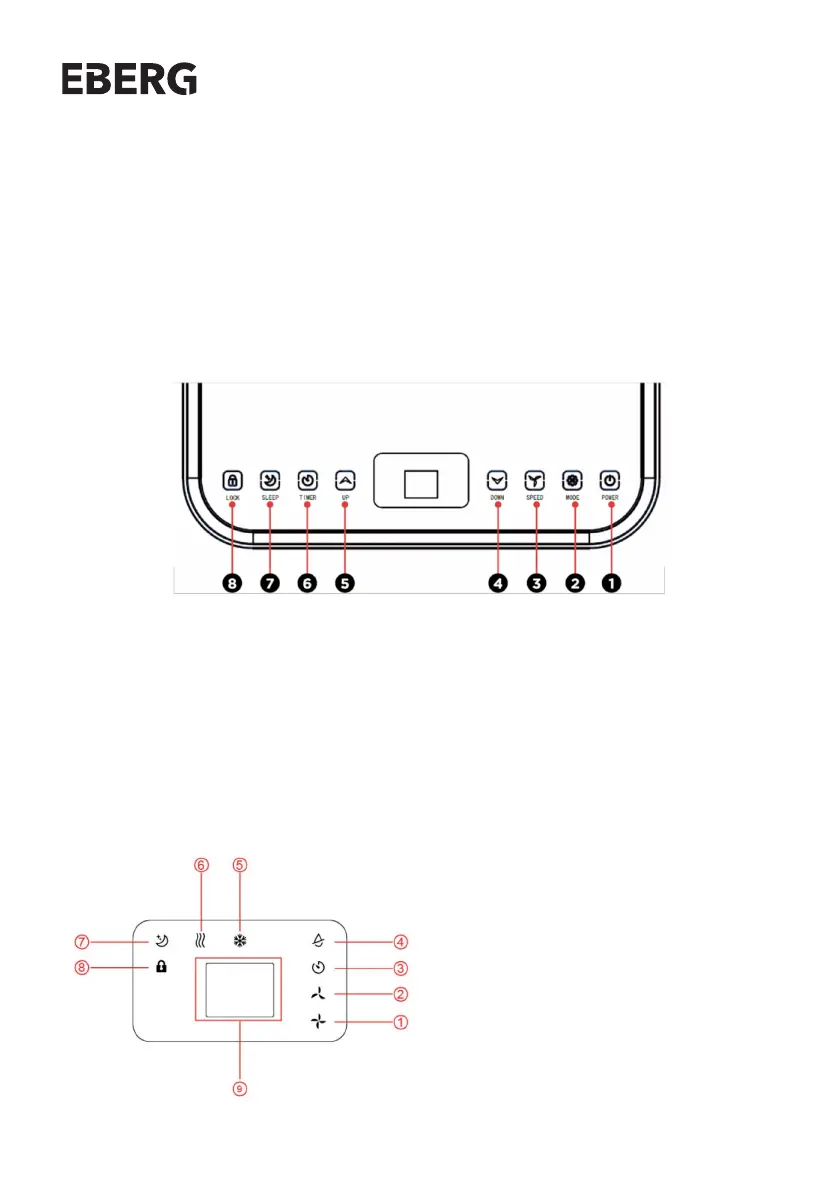
1. POWER - Press to switch the machine on or o.
2. MODE - Press to switch the operation mode between fan, cooling and dehumidier.
3. SPEED - Press to switch the fan speed between HIGH and LOW
4. DOWN - Decreasing the desired temperature or timer setting.
5. UP - Increasing the desired temperature(16°C 32 °C) or timer setting.
6. TIMER - Sets a time for the unit to automatically start or stop.
7. SLEEP - Press to turn on sleep mode or o.
8. LOCK - Press to turn on or turn o the child lock function
1. High Fan Speed
2. Low Fan Speed
3. Timer
4. Dehumidier Mode
5. Cooling Mode
6. Fan Mode
7. Sleep
8. Lock
9. Display Window
5. OPERATION
5.1 CONTROL PANEL AND DISPLAY
WYŚWIETLACZ LED


 To Next Page