ebm-papst A&NZ Pty Ltd 10 Oxford Road · Laverton North VIC 3026 · Phone +61 (03) 9360 6400 · Fax +61 (03) 9360 6464
ABN 33 115 927 556 NSW Phone +61 (02) 9827 6400 · NSW Fax +61 (02) 9827 6464 · NZ Phone +64 (09) 525 0245 · NZ Fax +64 (09) 525 0246
sales@ebmpapst.com.au · www.ebmpapst.com.au
6.5 Installing fans to be recognized by the EC-FAN GATEWAY
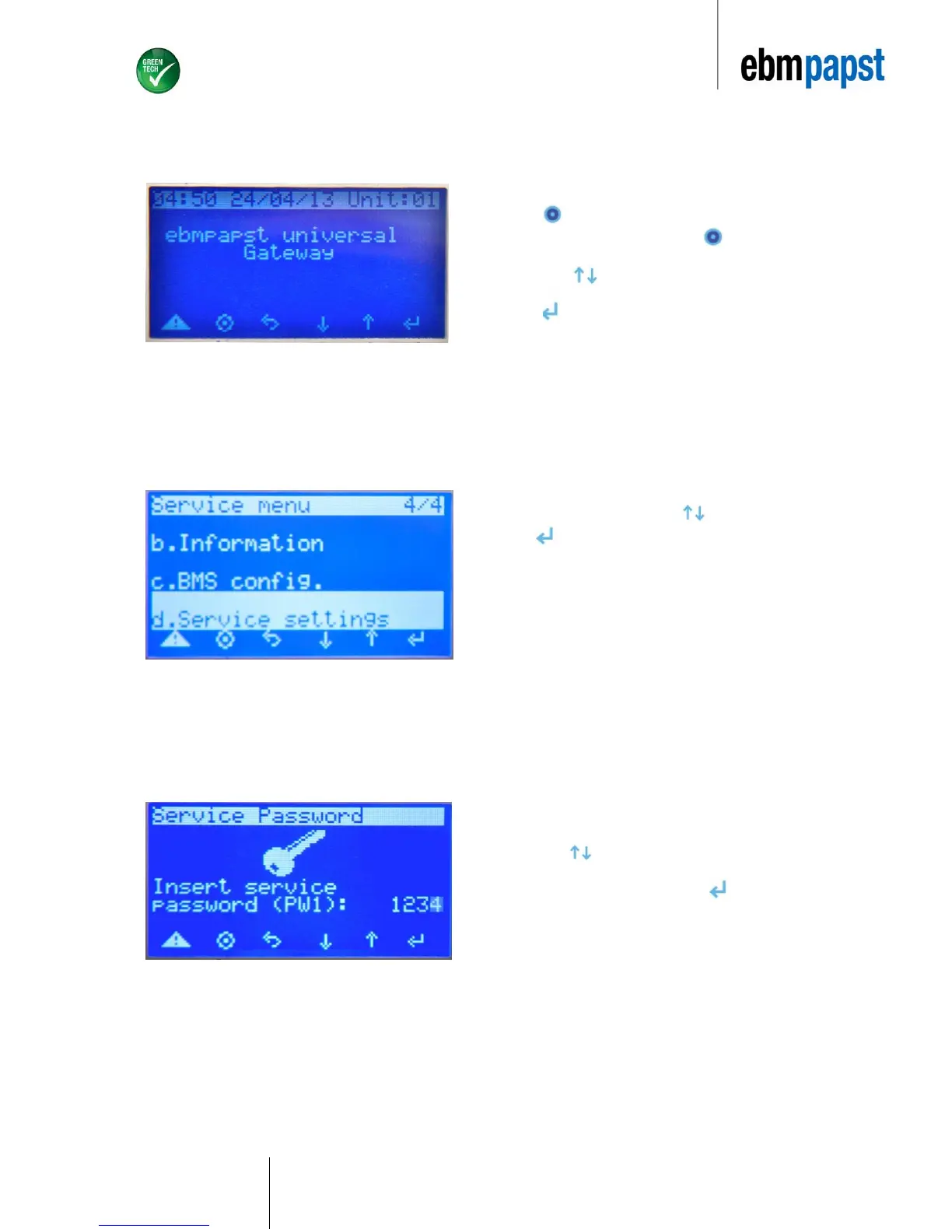
Once the EC-FAN GATEWAY device has locaded the following screen will appear:
6.5.1 Assigning the number of active devices
Select “d. Service Settings” by using arrows.
Press
The default password is “1234”.
Use arrows to scroll in order to obtain desired values for
Password entry.
Once desired values are obtained, press
Press once to access Main Menu
(At any point during the setup, pressing will return to user to
the main menu.)
Use arrows to locate “Service” command.
Press


 To Next Page