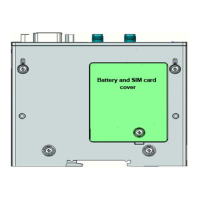
The ECA Electronic Engineering GSM Access Control system, available in models GSM-18V4.1 (access control only) and GSM-18V4YT (access control with Yearly Timer), is a sophisticated solution for managing gate access. This system allows authorized users to open a gate by calling the unit's SIM card, with the call being hung up and the gate triggered at no cost to the caller.
Function Description:
The core function of the GSM Access Control is to manage access to a property. It stores a database of authorized phone numbers and, upon receiving a call from one of these numbers, activates an internal relay to open a gate or trigger another connected device. The system does not answer calls, instead relying on Caller ID to identify authorized users.
The GSM-18V4YT model extends this functionality by incorporating a Yearly and Weekly Timer. This allows for scheduled activation or deactivation of the relay based on specific days of the week, time intervals, and even yearly events like public holidays. When the timer is active and controlling the relay (e.g., keeping it ON), the unit will not respond to incoming calls from users, instead sending an SMS notification that the timer is active. Conversely, when the timer is set to OFF (not active), the unit will respond to incoming calls and trigger the relay as per its normal access control settings.
Important Technical Specifications:
- User Capacity: The unit can store up to 2000 users in total. This includes up to 1600 "Normal Users" and up to 400 "Special Users."
- Power Supply: The unit operates with a voltage between 12V to 18V AC or DC. When using DC power, the BLACK wire is Negative and the RED wire is Positive.
- Relay Output: The internal relay provides Normally Open (N.O.) and Common (Com.) connections (White and Blue wires). A jumper allows selection of Normally Close (N.C.) contact instead of N.O.
- Inputs:
- Input 1 (Status): A negative input (Gray wire) used to check the status of the gate (Open or Closed) by connecting a magnetic read-switch to this input and ground.
- Input 2 (Alert): A negative input (Green wire) designed to trigger an SMS alert each time the gate opens or when a push button (like a doorbell) is connected.
- Antenna: Requires connection of an antenna, which should not be attached to any metal surface.
- SIM Card: Requires a SIM card for operation.
Usage Features:
The system is primarily programmed and managed via SMS commands. Key usage features include:
- Adding and Deleting Phone Numbers:
- Normal users (up to 1600) can be added or deleted via SMS.
- "Special Users" (up to 400) can be programmed with limited access based on specific days of the week and time intervals. These users can also have a limited number of entries.
- All phone numbers can be deleted with a "format" command followed by a "YES" confirmation.
- Automatic Learning: The unit can be set to automatically learn up to 1600 Normal Users by registering the Caller ID of incoming calls.
- Relay Functionality:
- Pulse (Momentary): The default setting, activating the relay for a set duration (default 1 second). The pulse time can be adjusted from 0 to 99 seconds (00 for 0.5 seconds).
- Latch (ON/OFF): Allows the relay to be toggled ON or OFF via SMS commands.
- System Lock/Unlock: The unit can be locked to prevent any user from activating the relay.
- Hold Command: This feature allows overriding the system to keep the relay active (ON) until a cancellation command is received. While in HOLD mode, the unit will not respond to other commands and will notify users attempting to call.
- Open to All Command: Temporarily allows any incoming call to open the gate, bypassing user authorization checks.
- Internal Clock Management: Users can check the unit's current internal clock (time, date, weekday) via SMS. The system automatically adjusts for daylight savings.
- Customizable SMS Messages: The SMS messages sent by the unit for Input 1 (status) and Input 2 (alert) can be customized.
- Weekly Timer (GSM-18V4YT only):
- Allows scheduling the relay to turn ON and OFF at specific times on chosen days of the week.
- Provides a report of current weekly timer settings.
- Settings can be cleared via SMS.
- Yearly Timer (GSM-18V4YT only):
- Enables programming the relay to turn ON or OFF for specific date ranges and time intervals, useful for public holidays or special events.
- Can store up to 50 yearly timer events.
- Provides a report of current yearly timer events.
- Events are automatically deleted from memory after execution.
- Settings can be cleared via SMS.
Maintenance Features:
- Factory Default Settings: The unit can be reset to its original factory settings, deleting all phone numbers and resetting all functions. This requires a confirmation SMS.
- Password Change: The default password (9999) can be changed via SMS.
- Checking System Status:
- Number of Users: Check the count of normal and special users in the system.
- Relay Status: Check if the internal relay is currently ON or OFF.
- GSM Reception Level: Check the signal strength of the GSM network (0-5).
- Gate Status: If Input 1 is connected, check if the gate is Open or Closed.
- Solar Applications: For reduced current consumption, a jumper link can be removed to turn off the LEDs after installation.

 Need help?
 General

 To Next Page