EasyManua.ls Logo

ECA GSM18v4 - User Manual

ECA GSM18v4
4 pages
Print Icon
To Next Page IconTo Next Page
Loading...
1
ECA Electronic Engineering Pty LTD
GSM Access Control Model GSM18v3 / User Manual V3
GSM Access Control model GSM18v4
User manual Version June 2016
1. General Overview
The GSM18v4 Access Control is our basic GSM access control system for cellular gate\door access
control. The unit can store a list of authorized users and when someone calls the SIM of the unit, the
unit hangs-up the call and checks if the phone number of the caller is in the list of the unit, and only if
he is an authorized user, a pulse generated by internal relay to trigger the gate\door to open. There is
no cost of call to the user. The unit can hold up to 1600 authorized users and up to 400 restricted
(limited) users, totally 2000 users.
2. General Product Description
Weight: 120 grams.
Input voltage: 12V DC
Air humidity range: 5% - 85%
RoHS compliance: Fully compliant with the EU RoHS and WEEE Directives
Casing material: The case made from plastic PC IP54.
GSM frequencies: The unit supports quad band GSM frequencies
3. Installation
SIM card insertion
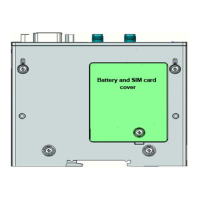
With a Philips screw driver open the SIM card drawer cover and insert the SIM card.
Make sure the SIM card is capable to receive incoming SMS messages and to identify a caller ID.
GSM antenna
The GSM antenna needs to be connected to the SMA connector in the front panel of the unit.
Power Supply
The power supply for the unit must be a single voltage source of regulated power supply between 10V-
14V Dc capable of providing a Min 2Amp peak during an active transmission. The unit is protected
from supply voltage reversal. An internal fuse ensures an electrical safety according to EN60950
standard. This fuse is not removable.
Question and Answer IconNeed help?

Do you have a question about the ECA GSM18v4 and is the answer not in the manual?

ECA GSM18v4 Specifications

General IconGeneral
BrandECA
ModelGSM18v4
CategoryIP Access Controllers
LanguageEnglish

Summary

General Overview

General Product Description

Installation

SIM Card Insertion

Procedure for inserting the SIM card into the unit.

GSM Antenna Connection

Instructions for connecting the GSM antenna to the SMA connector.

Power Supply Requirements

Details on the required input voltage and current for the unit.

System Operation

Programming the Unit

Programming Normal Users

Registering authorized user phone numbers via SMS commands.

Deleting Registered Numbers

Removing registered phone numbers using SMS commands.

Setting Internal Clock

Updating the unit's internal clock using SMS commands.

Special User Programming

Configuring special user access with time or entry limits.

Deleting Special Numbers

Removing special user phone numbers from the unit.

Changing Default Password

Modifying the default SMS programming password.

Gate Opening Trigger Delay

Adjusting the duration of the gate/door opening trigger.

Unit Information

Retrieving stored numbers and unit status via SMS.

Disable;Enable Unit

Activating or deactivating the unit's access control functions.

Open All Feature

Enabling gate opening for any incoming call.

Reset Unit

Restoring the unit to its default factory settings.

Related product manuals