English
English
12
This option takes you directly to the source settings menu. Here you can change names, enable or disable
selected resources.
Inserting battery in the remote control
The battery compartment cover can be secured against accidental opening. To unlock, insert a blunt, pointed
object (e.g. a paper clip) into the hole above the cover and push it in. At the same time, slide the cover in the
direction indicated by the arrow. Insert two 1.5 V AAA batteries. Make sure the (+) and (-) markings match
(make sure the polarity is correct). Do not mix old and new batteries. Replace only with the same or equivalent
type. Put the cover back on and secure it again with the screw.
A message will appear on the display if the batteries are almost dead and need to be replaced. Note that if the
battery level is low, the performance of the remote control may be impaired.
Batteries must not be exposed to excessive heat, such as sunlight, re, etc.
TV CONNECTION
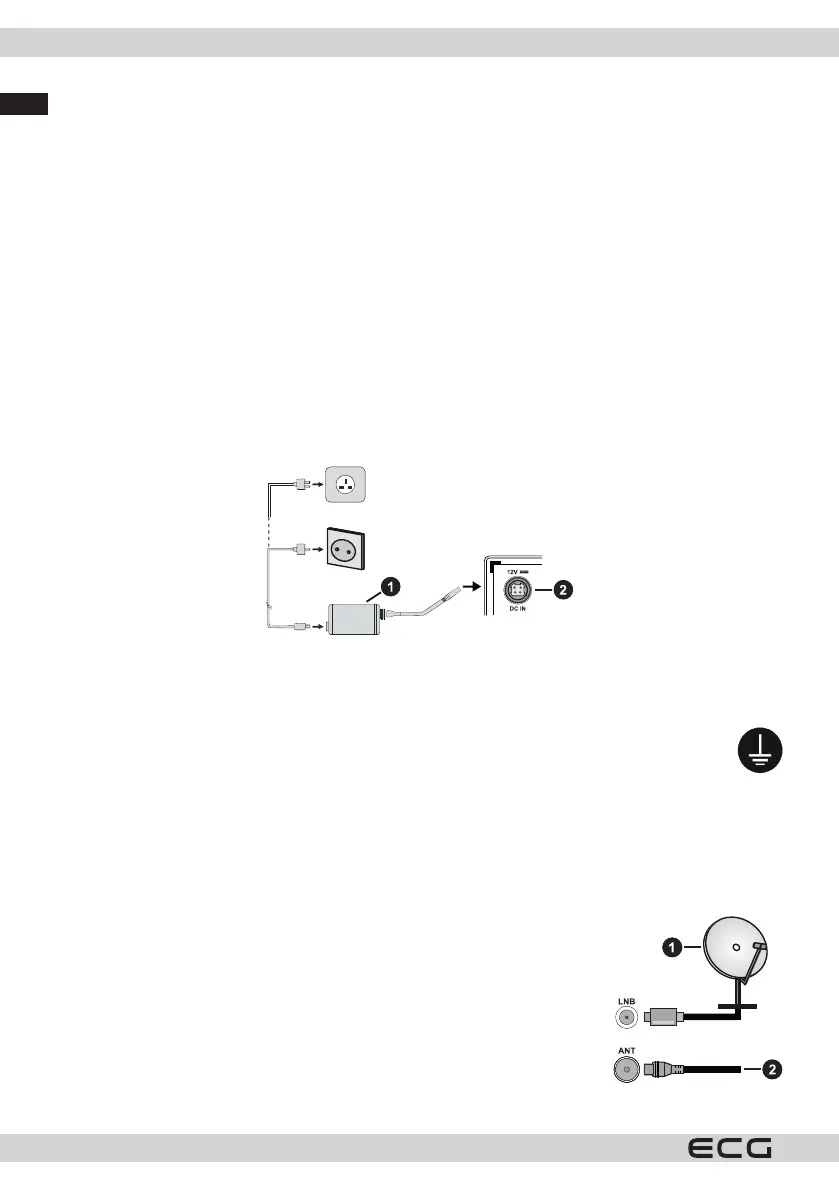
Plugging into outlet
IMPORTANT: The TV is designed to operate on 12 V DC. Therefore, an adapter is used that gives a voltage of 12
V. Connect this adapter to a mains supply that delivers 100-240V AC, 50/60Hz.
After unpacking, allow the TV to reach room temperature before plugging it in.
1. AC adapter
2. DC 12 V input terminal connection
Important safety information
Ensure correct earthing of the wiring
Using the included power cord, connect the ground terminal of the AC adapter to the ground terminal
of the power outlet. If the cable end cannot be inserted into the mains socket, consult an electrician
about replacing your old socket.
Don't forget to connect the ground.
Antenna connection
Connect the antenna or cable TV plug to the ANTENNA INPUT (ANT) jack or connect the satellite to the
SATELLITE INPUT (LNB) jack on the front side of the TV.
The back of the TV
1. Satellite
2. Antenna or cable
Warning: To connect a device to the TV, make sure the TV and the device are
switched o before making any connection. Once the connection has been made,
you can switch on the units to use them.



 To Next Page