English
English
31
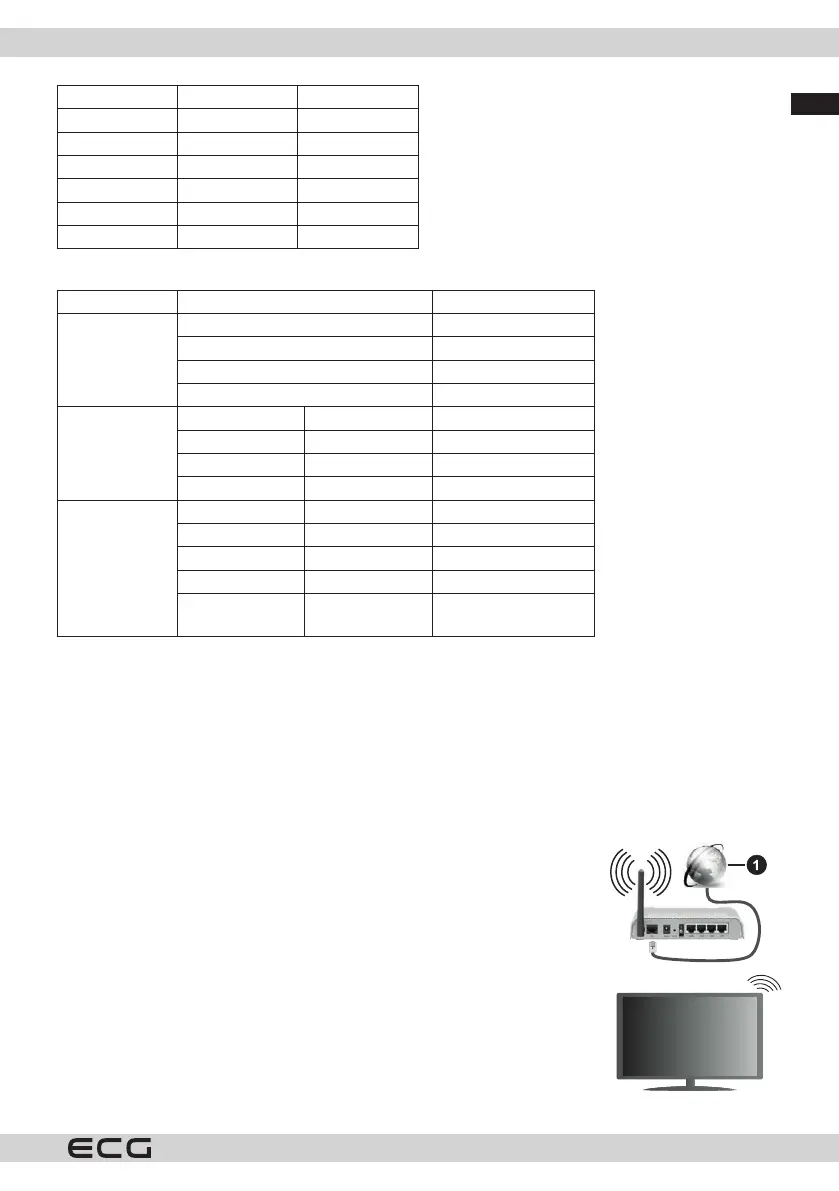
13 1280x960 60 Hz
14 1280x1024 60 Hz
15 1280x1024 75 Hz
16 1400x1050 60 Hz
17 1440x900 60 Hz
18 1440x900 75 Hz
19 1920x1080 60 Hz
AV and HDMI compatibility
Source Supported signals Availability
Rear AV
PAL O
SECAM O
NTSC4.43 O
NTSC3.58 O
YPbPr
480i, 480p 60 Hz O
576i, 576p 50 Hz O
720p 50Hz,60Hz O
1080i 50Hz,60Hz O
HDMI
480i, 480p 60 Hz O
576i, 576p 50 Hz O
720p 50Hz,60Hz O
1080i 50Hz,60Hz O
1080p
24Hz, 25Hz,
30Hz, 50Hz, 60Hz
O
(X: Not available, O: Available)
In some cases, the TV signal may not be displayed correctly. The problem may be incompatibility with
equipment (DVD, Set-top box, etc.). If you encounter this problem, contact your dealer as well as the equipment
manufacturer.
NETWORK CONNECTION
Wireless connection
Connecting to a wireless network
Your TV may have trouble connecting to some networks with hidden SSIDs. To
make your modem's SSID visible, change the modem's settings in its system.
Broadband to ISP (1)
Wireless-N router (IEEE 802.11a/b/g/n) with simultaneous use of 2.4 and 5 GHz
bandwidth is designed to increase bandwidth. It's optimised for smoother and
faster HD video streaming, le transfers and wireless gaming.
• Frequencies and channels vary depending on the area.
• The transmission speed varies depending on the distance and number
of obstacles between the transmission products, the conguration of the
products, the radio wave conditions, the trac and the products you are
using. Transmission may also be interrupted or disconnected depending on
radio wave conditions, DECT phones or any other WLAN 11b devices. The



 To Next Page