English
English
19
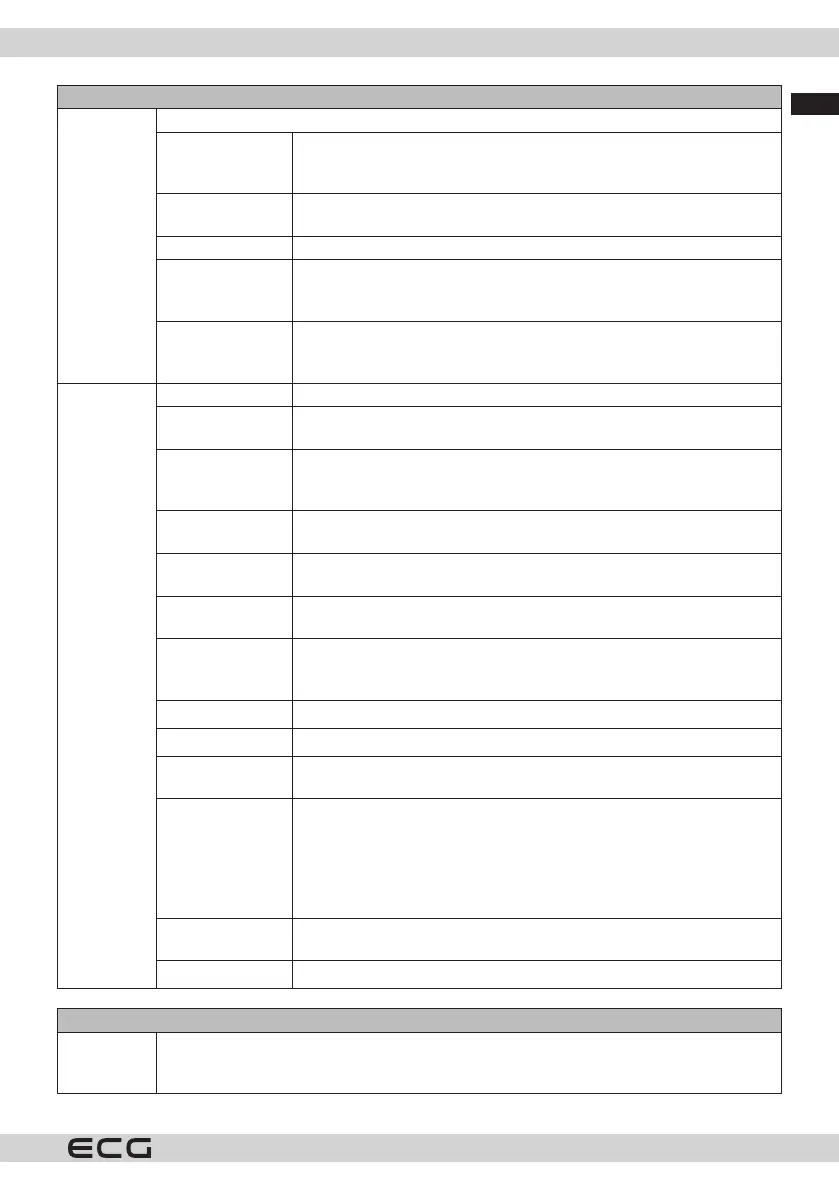
Picture menu
PC position Only appears when the input source is set to VGA/PC.
Automatic
position
If the image is not centered in VGA mode, use this option to
automatically adjust the image position. Press the OK button to start
the automatic settings.
Horizontal
positions
This feature places the image horizontally on the right or left side of the
screen.
Vertical positions This function shifts the image vertically up or down.
Point clock
frequency
The Spot Clock setting adjusts the interference that appears as vertical
bars in high-density presentations. For example, tables, paragraphs or
text in a small font.
Phase Depending on the input source (computer, etc.), you may see a blurred
or distorted image on the screen. You can use this feature and clean up
the image by trial and error.
Advanced
Settings
Dynamic contrast The dynamic contrast ratio can be set to the desired value.
Colour
temperature
Sets the desired color temperature value. Cold, Normal, Warm and
Custom options are available.
White point This setting will be available when the Color Temperature option is
set to Custom. Increase the "warmth" or "coolness" of the image by
pressing the left or right button.
Blue extension
White Enhancement function, which makes the white colour cooler for
a brighter image. Set to On to enable.
Micro Dimming
Low, Medium, High and O options are available. When Micro Dimming
is active, the contrast for each dened zone is increased locally.
Noise reduction
Low, Medium, High and O options are available. If the signal is weak
and the image is noisy, use the Noise Reduction setting.
Movie Mode
Films are recorded at varying frame rates from normal television
programmes. Turn this feature on when watching movies to better view
fast-moving scenes.
Skin tone
Skin tone can be set between -5 and 5.
Colour shift
Sets the desired colour tone.
Colour settings
Opens the Color Tuner settings. To set the Hue, Color, and Brightness
values manually, set the Color Tuner to Enabled.
Gamut Mapping
This option can be used to adjust the range of colours displayed on the
TV screen. If set to On, the colors are set according to the source signal.
When set to O, the maximum colour capacity of the TV is used in the
standard way (recommended option).
Note: This option may not be available depending on the TV model and
features.
Full HDMI
This feature is visible while viewing from an HDMI source. You can use
this function to enhance the blacks in the image.
Reset
Sets the picture to factory defaults (except in Game mode).
Audio menu
Dolby Audio Smart, Movie, Music, Messaging and O will be available. To turn it o, set it to O.
Note: Some items in the Sound menu will be greyed out and unavailable if it is set to an
option other than O.



 To Next Page