English
English
23
Oer System
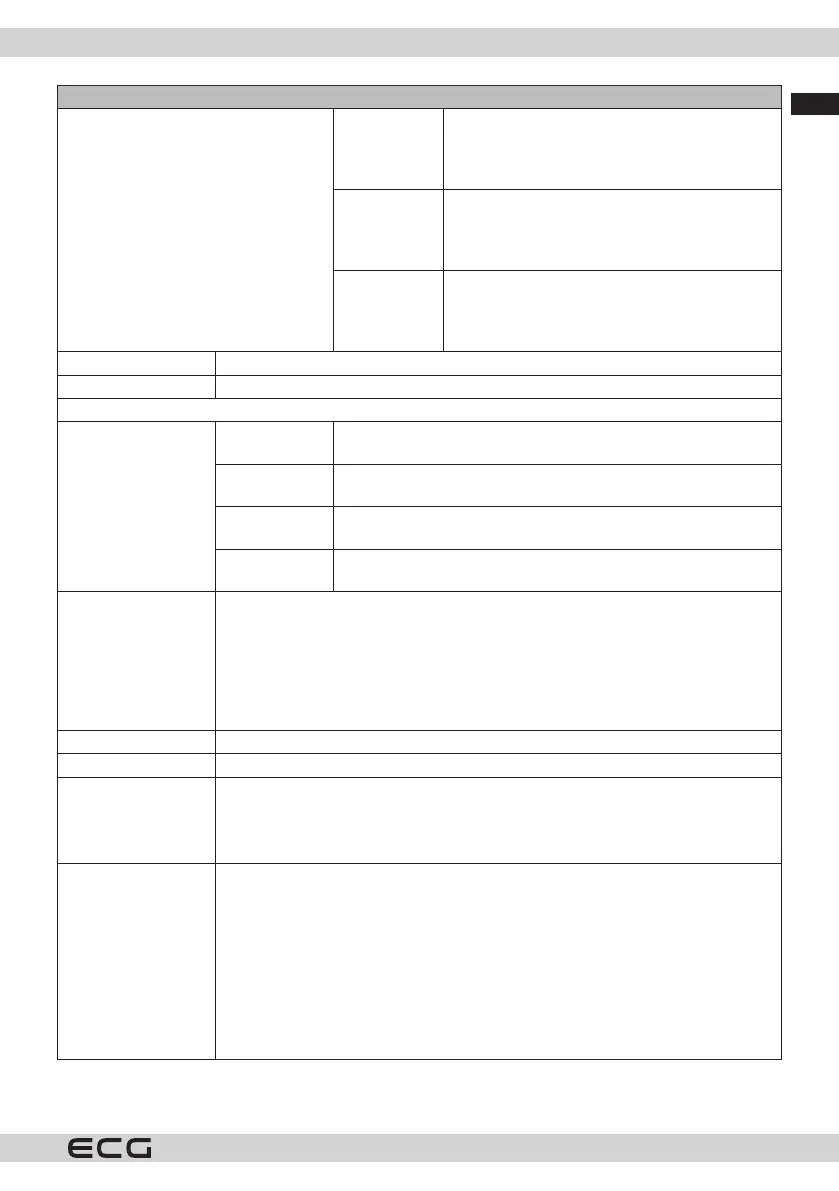
[S] Subtitles If this option is enabled and if any of the events
in the electronic program guide have the
"Subtitle" access service, these events will be
highlighted in a dierent color.
[SL] Sign
language
If this option is enabled and if any of the events
in the electronic program guide have the "Sign
Language" access service, these events will be
highlighted in a dierent color.
[AD] Sound
description
If this option is enabled and if any event of
the electronic program guide has the "Audio
Description" access service, these events will be
highlighted in a dierent colour.
Language You can set a dierent language depending on the broadcast and country.
Conditional Access Controls conditional access, if available.
Personal data protection
Privacy
settings
Manage your privacy permissions for Smart TV-related apps. Press
the OK button to enter the menu and adjust to your preferences.
View all
cookies.
Displays all saved cookies.
Delete all
cookies
Deletes all stored cookies.
Unfollow This option allows you to set your preferences regarding the
viewing behaviour of HbbTV services.
Parental control
settings
To change the parental settings, enter the correct password. In this menu, you can
easily set Menu Lock, Age Lock, Child Lock or Instructions. You can also use these
options to set a new PIN or change the Default CICAM PIN.
Note: Some options may not be available depending on the country selection
during Initial Installation. The default PIN could be set to 0000 or 1234. If you have
dened a PIN (required depending on country selection) during the First Installation,
use the PIN you have dened.
Date/Time Sets the date and time.
Sources Here you can change names, enable or disable selected resources.
Netix If your TV supports this feature, you can view the ESN* number and deactivate
Netix.
* The ESN number is a unique Netix identication number created specically to
identify your TV.
Samba ACR Samba Interactive TV supports recommendations and other applications by
collecting data about your on-screen consumption of specic content and
enhancing your viewing experience. Use this option to access the Samba
Interactive TV settings menu, review the Samba TV Terms of Service, Privacy Policy
and manage your advertising preferences, etc. An internet connection will be
required to access the HTML-based settings. You can enable or disable interactive
TV at any time in Settings > System > Privacy > Privacy settings by ticking or
unticking the checkbox next to the related items. This option may not be available
depending on the country selected during the initial installation process, the TV
model and its features.



 To Next Page