44
GB
4. Set the hour by turning the control knob in the 0-23 range.
5. Press “CLOCK PRE-SET,” the display ashes the minutes.
6. Set the minutes by turning the control knob
in the 0-59 range.
7. Press “START/+30SEC./CONFIRM” to nish setting. When the programmed time comes, two audio signals sound and the cooking
starts automatically.
Note: This function requires setting the clock. Otherwise, the timer function will not work.
Automatic menu
1. In the standby mode turn the to the right to select one of the automatic programs A-1 to A-8.
2. Con rm your selection by pressing “START/+30SEC./CONFIRM.”
3. Turn the
to set the weight of the food.
4. Press “START/+30SEC./CONFIRM” to start the food preparation.
5. After the cooking is nished, you will hear ve audio signals.
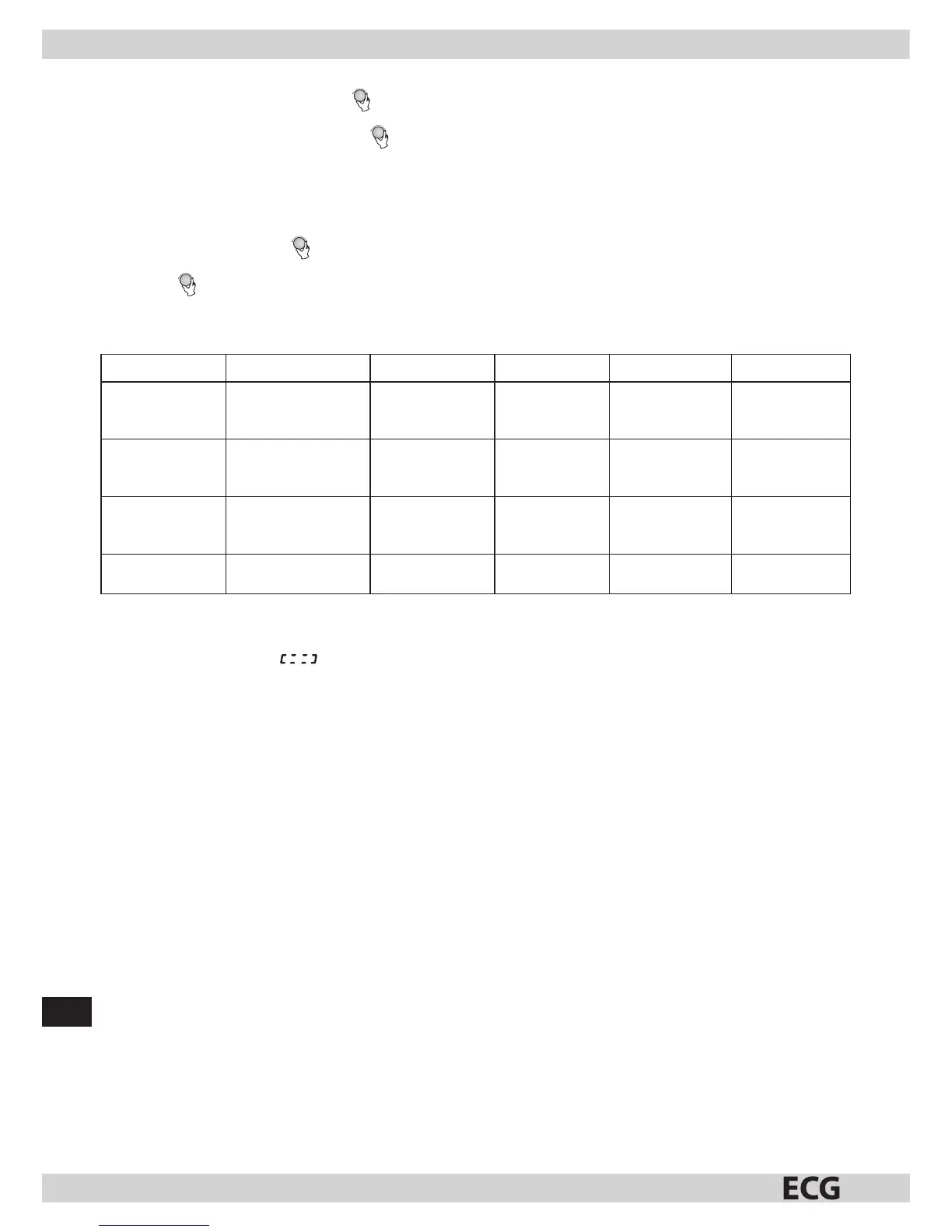
Automatic menu programs
Menu Weight (g) Display Menu Weight (g) Display
A-1 (warming) 200
400
600
200
400
600
A-2 (vegetable) 200
300
400
200
300
400
A-3 ( sh) 250
350
450
250
350
450
A-4 (meat) 250
350
450
250
350
450
A-5 (pasta) 50 (+450 ml of water)
100 (+800 ml of water)
50
100
A-6 (potatoes) 200
400
600
200
400
600
A-7 (pizza) 200
400
200
400
A-8 (soup) 200
400
200
400
Child lock
Lock: In the standby mode press “STOP/CLEAR” for 3 seconds. You will hear along beep indicating that the controls are locked and
the display shows “
.”
Unlock: In the locked state press “STOP/CLEAR” for 3 seconds. Along beep indicates the release of controls.
Displaying current status
1. If you press the button “MICROWAVE,” during the microwave cooking, the current microwave power level will be displayed for
2–3seconds.
2. In the presets mode you can press the “CLOCK/PRE-SET” button to check the remaining time until the delayed start. The set time will
ash on the display for 2-3 seconds and then the display will show the clock.
3. You can nd the current time during cooking by pressing “CLOCK/PRE-SET” (it will be displayed for 2-3 seconds).
General operating instructions
1. When turning the control knob, abeep sounds.
2. If you open the oven door during cooking, you have to press the “START/+30SEC./CONFIRM” button to continue cooking.
3. If you set aprogram and do not press the “START/+30SEC./CONFIRM” button within 1 minute, the current time appears on the display
and the program is cancelled.
4. E ective pushing of abutton is indicated by abeep.
5. When the cooking is nished, you will hear the audio signal ve times.


 To Next Page