Page 8
PA2040 User's Manual
11 12
13 15
14
16
19
20
1817
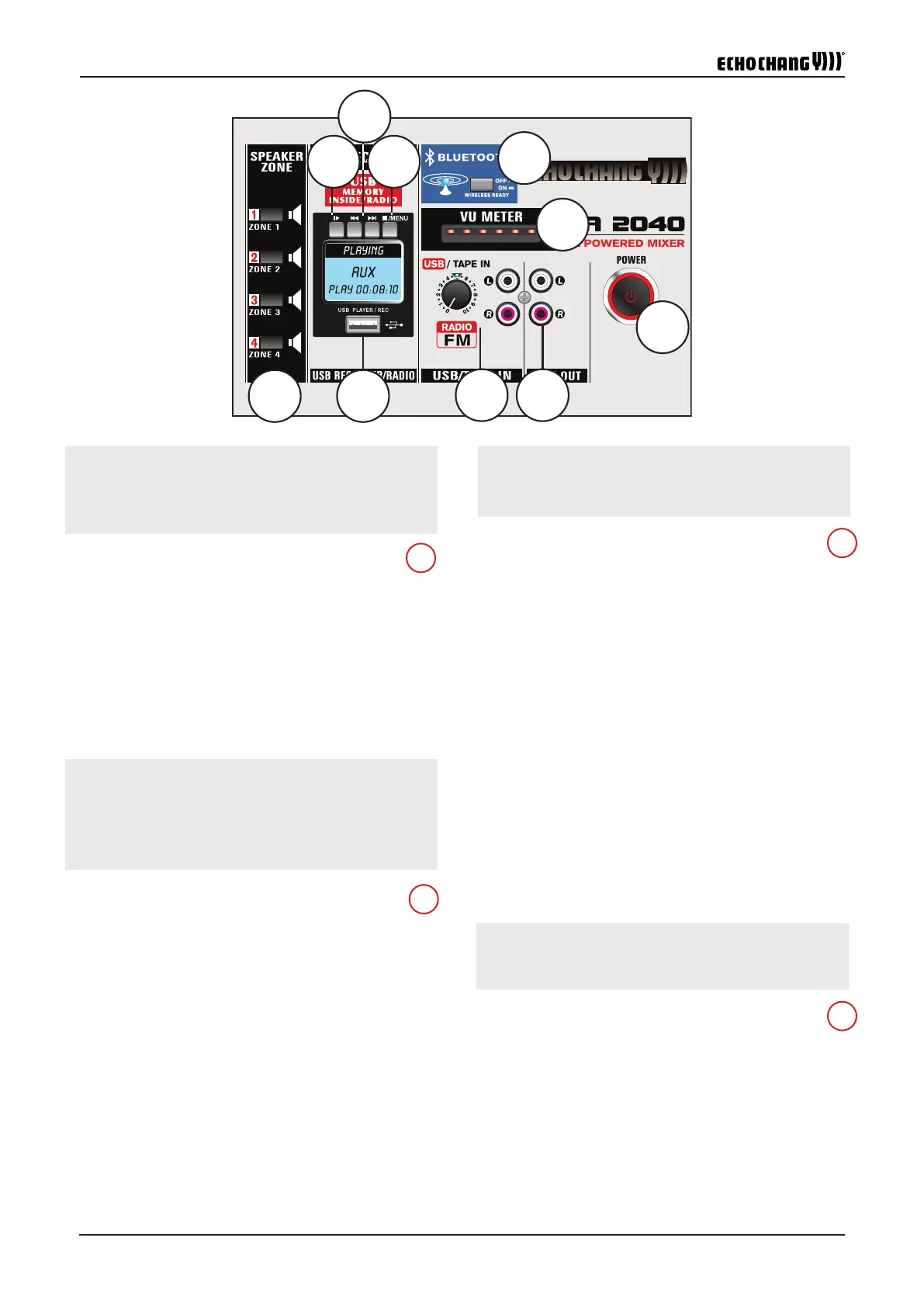
11. Speaker Zone Buttons
These buttons will allow users to assign the main signal to their re-
spective zones. These correspond to the zone outputs on the rear.
12. USB Port
Connect your USB ash drive to this port for either playback or
recording of digital audio les.
13. Play/Pause Button
This button will allow you to play and pause audio playing through
the USB recording. In addition to this, it will allow you to select
menu options when navigating the menu.
14. Back/Forward Buttons
These buttons allow users to skip forward and backwards between
digital audio tracks available. They also allow users to navigate
left/right and up/down within the internal software. When in the
recording menu, the 'back" button is also used to initiate recording
and the 'forward' button is used to save the recording.
14
13
12
11
ZONE 1, ZONE 2, ZONE 3, ZONE 4
)ZONE 3( 3)ZONE 2( 2 )ZONE 1( 1
)ZONE 4( 4
" ZONE 4 , ZONE 3, ZONE 2, ZONE 1
:
0004 3 2 1
USB PORT)USB(
USB
FAT-32
II
II
II


 To Next Page
 Loading...