23
Installation Guide
23
tel - 1-866-766-2267
email - gmsupport@echomaster.com
Illustrations are typical and may not match exact vehicle detail
FCTP-GM2003
Trailering Camera System
Step 1
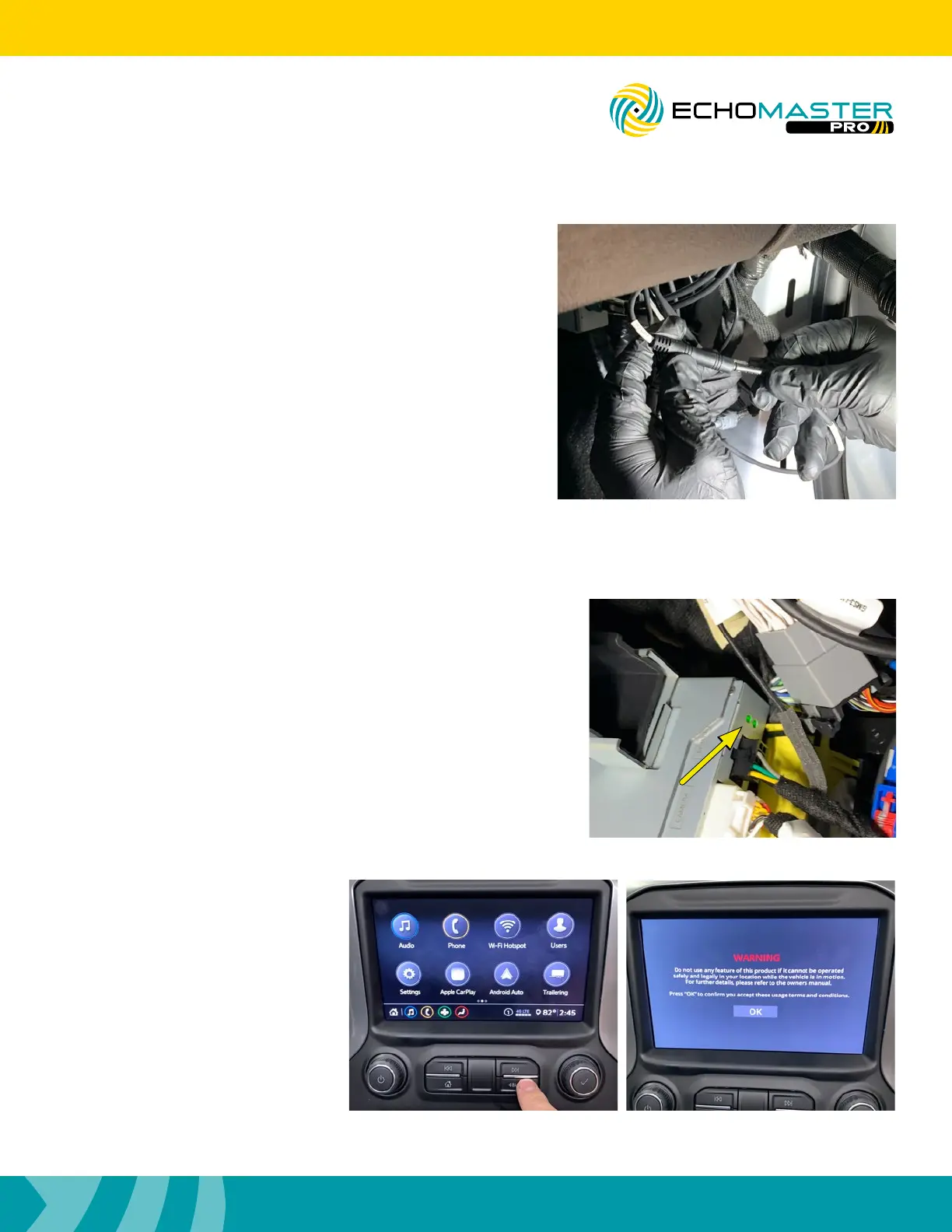
Before turning the ignition to the ON position for the first time
after the installation is finished, make certain that the LEDs
at the top of the module have stopped flashing. Failure to
do this will render the touch screen unresponsive. If you find
that this step was not completed and the touch screen is
unresponsive, turn the vehicle’s ignition to the OFF position
and wait until the LEDs have stopped flashing, then turn the
vehicle’s ignition to the ON position.
Step 2
Once the radio finishes the boot
up sequence press and hold the
BACK button for 3 seconds. The
WARNING screen will appear,
Press the OK button.
Testing
Step 8
Connect the GMS3-M2F extension and TRAILER cables to the
GMS3-CEH-HAR harness. Line up the labels and connect in
the following orientation.
RIGHT ----------------- GMS3-M2F48
LEFT ------------------- GMS3-M2F108
FRONT ---------------- GMS3-M2F144 (Optional Front Camera)
TRAILER -------------- TRAILER
OTHER --------------- TRAILER (Optional 2nd Trailer Camera)



 To Next Page