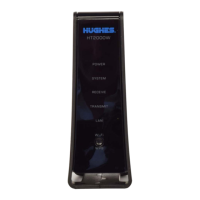
Wait for the modem to become operational
When you plug in the power supply, the new modem begins an automatic
installation process. Some of the white indicator lights on the modem’s front
panel blink on and off.
• Wait approximately 60 minutes for installation to complete.
• During this time you will not be able to use the Internet.
Do not unplug the modem power cord during installation.
Check modem operation
Using a device connected directly to the new modem (such as a laptop or
desktop computer), you should make sure it is operating properly. Make sure
you have waited approximately 60 minutes since you plugged in the power
cord.
1. Use a browser such as Google Chrome to go to any Internet web site.
2. If you see a web site, the modem is ready to use and you can skip the
remaining steps in this section.
3. If you cannot access a web site, check to see if all the LEDs are lit on the
front of the modem. If they are not lit, check the power. If some are lit but
not others, wait a little longer as the installation process may still be in
progress


 To Next Page
 Loading...