− 6 −
ENGLISH
Notes on Use
■Volume Setting
Before switching ON minimise the volume.
Sudden, large output can damage the
speakers.
■Volume Etiquette
To avoid disturbance in your neighbourhood,
enjoy your unit at an appropriate volume.
Remember that at night, even low volume
carries into surrounding areas.
Help to maintain a pleasant living
environment.
■Speaker Cord Connection
Always connect speaker systems with
power OFF.
If a speaker cable is inadvertently shorted,
the protection circuit in the amplifier will
operate, and audio output will stop
temporarily.
In this event, disconnect the power cord
from the outlet, correct the shorted area and
reconnect the power cord to the outlet.
The output of this amplifier is in BTL format;
avoid connecting the negative side to the
negative side of another device by a speaker
selector or the like (the negative side is not
GND voltage).
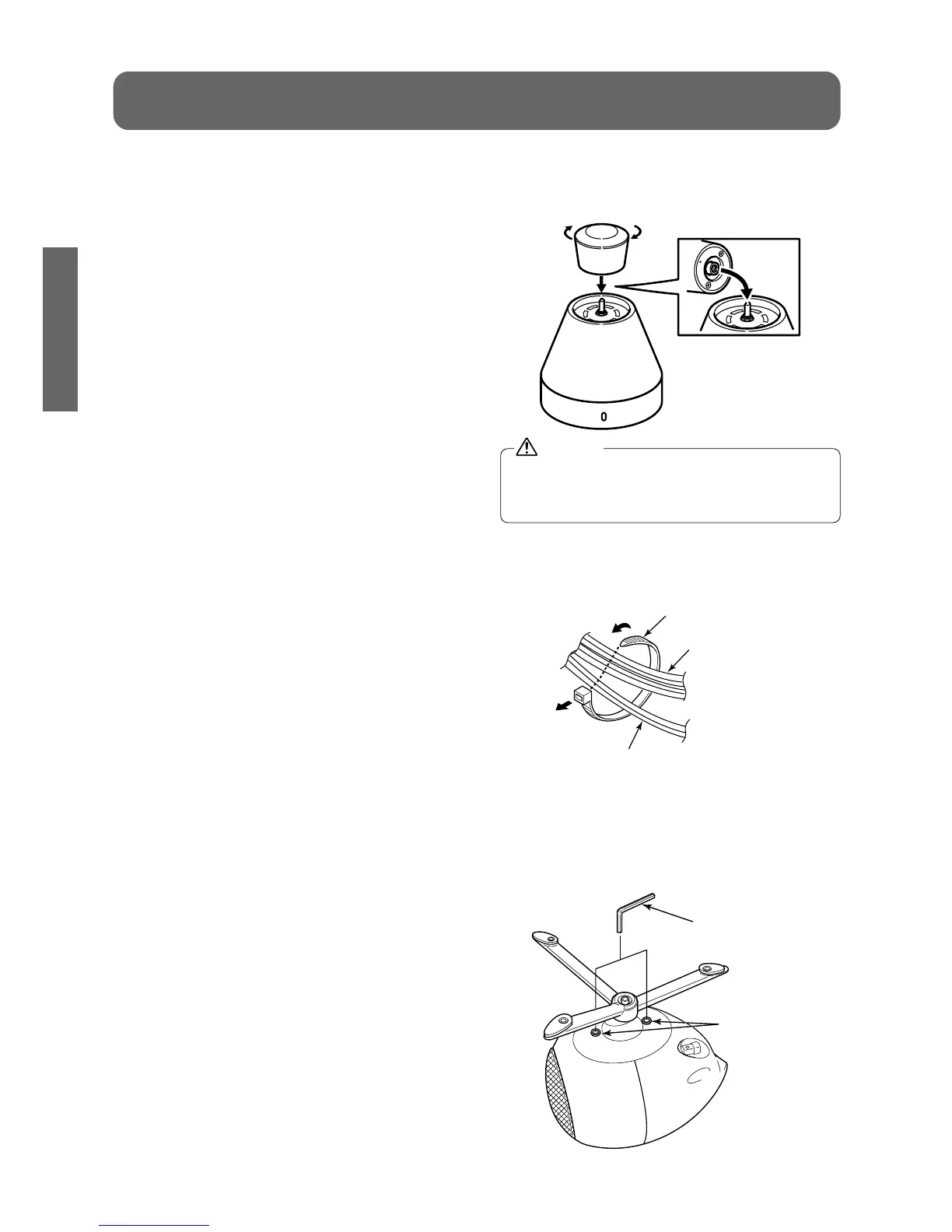
■Volume knob
Attach the volume knob to the amplifier as
shown in the following figure.
In order to protect internal parts, the volume
knob will separate from the amplifier if
excessive force is applied to the knob.
■Speaker Cable Routing
Bind the speaker cables using the accessory
cable ties.
■Hexagonal Head Screw
If the base of the speaker unit is loose after
you have adjusted the angle, use a
hexagonal wrench to tighten the hexagonal
head screw in the base of the speaker.


 To Next Page